Tone Commander 8810 User Guide 5
Display
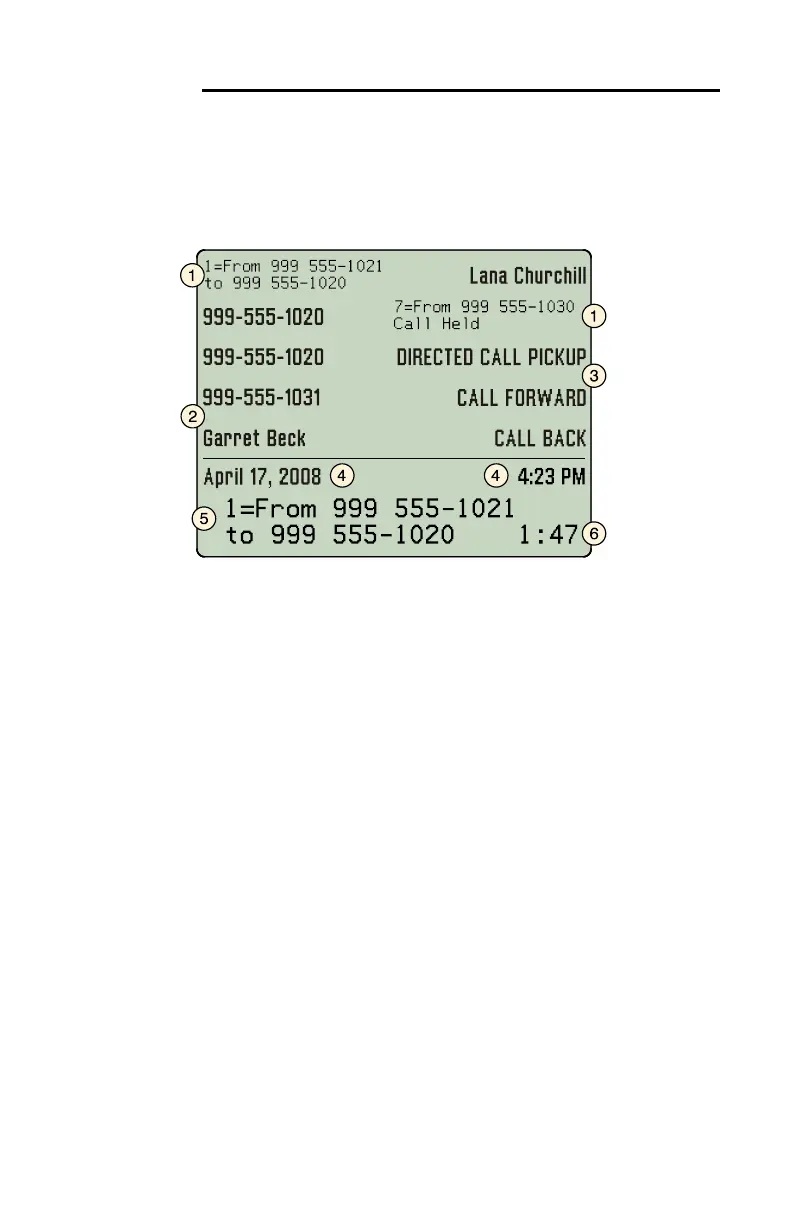
Call information, multifunction key labels, time and date, and other
information is shown on the 8810 display. The example below is a
typical display of call activity. Other information, shown throughout this
manual, is displayed when using the Call Directory, the Call Log, the
Info display, and when viewing or changing various setup options.
1) Call Information – the calling/called number and call state are
shown in small text next to each in-use call appearance key. For
the active call, this information is also shown in large text on the
bottom two lines of the display.
2) Multifunction Key Labels – keys assigned to call appearances
(page 27) are automatically labeled with the directory number after
an ISDN Parameter Download from the Telco central office. You
can also enter a more descriptive label, such as a user name.
3) Feature Activator Key Labels – Feature Activator keys (page 30)
are automatically labeled after a Parameter Download, or you can
manually enter a custom key label.
4) Current Date and Time – are always displayed on this line.
5) Active Call – the bottom two lines show information for the active
call (the call currently connected to the handset/headset/speaker).
Softkey options are displayed when the phone is idle.
This display area is also used to show menu options during setup;
current softkey functions are displayed in the bottom line.
6) Call Timer – the total connected time for the active call is shown in
the lower right corner of the display.



 To Next Page