The TOPCNC TC55V is a highly reliable, accurate, and user-friendly motion controller designed for automation technology applications. It serves as an upgraded version of the TC55, featuring a 3.5-inch color screen, RS 485 communication, Chinese/English language switching, and a USB connection for enhanced functionality and ease of use. This controller is primarily used to manage the movement of up to four axes (X, Y, Z, C) in various automated systems, offering both linear and circular interpolation capabilities.
Function Description
The core function of the TC55V is to execute programmed motion sequences for industrial machinery. It operates on a conversational programming method, which guides the user through the programming process by filling in blanks, eliminating the need for complex G-code understanding. This approach simplifies the creation of intricate motion paths and control logic.
The system's main operational modes include:
- Automatic (Auto) Mode: Allows the controller to run previously opened programs automatically. This mode supports both continuous operation (positive display) and step-by-step execution (negative display), where each command is executed individually. A "Stop" function is available to end the program and return to the first line of commands.
- Manual (Jog) Mode: Provides direct control over axis movement for setup, testing, or fine adjustments. In this mode, users can jog axes at either high or low speeds, with the jog increment and speed defined in the system parameters. A "Program Zero" function allows all axes to return to a predefined reference point at the highest speed. The "Machine Zero" function enables axes to return to their mechanical zero position, either by directly hitting a switch or by moving through a switch at high speed and then slowly stopping on it.
- Program (Prog) Editing: This mode is used to create, modify, and manage motion programs. The conversational programming interface allows users to define various commands such as incremental or absolute movements, pauses, output port control, repeats, and circular interpolations. The system supports up to 480 commands per program, facilitating complex automation tasks.
- Parameter (Par) Setting: This mode allows users to configure various control and speed parameters of the system. Access to these settings requires a specific user code (123456) to ensure security. Parameters include language selection (English/Chinese), external I/O and PLC extension settings, reference points for each axis, electronic gear ratios, and speed limits for different axes and operations.
The TC55V supports both linear interpolation for all four axes (X, Y, Z, C) and circular interpolation for the X and Y axes. It can control the stop and start of a spindle motor and features PLC extension capabilities, I/O extension, and isolated I/O ports, offering flexibility in integrating with other machine components. The system also allows for self-definition of I/O ports and custom boot picture settings, enabling personalization.
Usage Features
The TC55V is designed with user convenience in mind, offering several features that simplify operation and programming:
- Conversational Programming: This is a standout feature, making the controller accessible even to users without extensive G-code knowledge. The system prompts the user for necessary inputs, guiding them through the creation of motion programs. This method significantly reduces the learning curve and potential for programming errors.
- Multi-Axis Control: The ability to control up to four axes (X, Y, Z, C) with both linear and circular interpolation provides versatility for a wide range of applications, from simple point-to-point movements to complex contouring.
- Customizable Boot Picture: Users can personalize the controller by setting a custom boot picture, which can be a company logo or any other image, enhancing brand identity or providing specific instructions upon startup.
- Chinese/English Panel Display: The dual-language interface caters to a broader user base, allowing operators to work in their preferred language.
- USB Connection: The USB port facilitates easy program transfer and system upgrades, ensuring the controller can be kept up-to-date with the latest features and bug fixes.
- I/O Port Definition: The system allows users to define the function of various I/O ports, enabling flexible integration with external sensors, switches, and actuators. This includes settings for limit switches, emergency stops, speed control, and output port control.
- Electronic Gear Ratio Setting: This feature allows for precise calibration of motor movements by setting the numerator and denominator of the electronic gear ratio. This ensures that the physical movement of the machine accurately corresponds to the programmed commands, regardless of the motor type or mechanical transmission system (e.g., screw transmission, rack and pinion).
- Jogging and Zeroing Functions: Dedicated functions for jogging and returning to program or machine zero simplify machine setup and homing procedures, crucial for accurate and repeatable operations.
- Condition-Based Programming: The "Judge" and "Coordinating" commands allow programs to make decisions based on certain conditions (e.g., input port signals, coordinate values, PLC register values), enabling more intelligent and adaptive automation sequences.
- Subprogram Support: The ability to call and manage subprograms allows for modular programming, where frequently used sequences can be defined once and reused multiple times, simplifying complex programs and improving maintainability.
Maintenance Features
While the manual primarily focuses on operational aspects, several features contribute to the maintainability and longevity of the TC55V:
- System Parameter Configuration: The detailed parameter settings allow for fine-tuning the controller's performance to match specific machine characteristics and operational requirements. This includes setting speed limits, acceleration/deceleration times, and axis gaps, which can help optimize machine performance and reduce wear and tear.
- I/O Extension and PLC Integration: The support for I/O and PLC extensions means the controller can be adapted to evolving system needs without requiring a complete overhaul. This modularity simplifies troubleshooting and upgrades.
- Isolated I/O Ports: The use of isolated I/O ports helps protect the controller from electrical noise and surges from external components, enhancing system stability and reliability, and potentially reducing the need for repairs due to electrical interference.
- User Management and System Lock: The parameter setting mode requires a user code, and advanced functions like "Pro Edit," "ProShow," and "TimeLock" can be enabled with a "Sell Code." These security features prevent unauthorized access and modifications to programs and critical system settings, ensuring the integrity of the machine's operation and preventing accidental misconfigurations.
- Self-Check Functions: Although not explicitly detailed, the mention of "self-check" as a main system function implies built-in diagnostics that can help identify and troubleshoot potential issues, aiding in quicker maintenance and problem resolution.
- Firmware Upgrades via USB: The USB connection facilitates easy firmware updates, allowing the controller to benefit from performance improvements, bug fixes, and new features released by the manufacturer, extending its useful life and ensuring it remains compatible with modern automation practices.

 Need help?
 General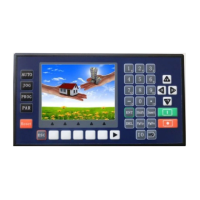

 To Next Page


