15. SETTING-OUT MEASUREMENT
88
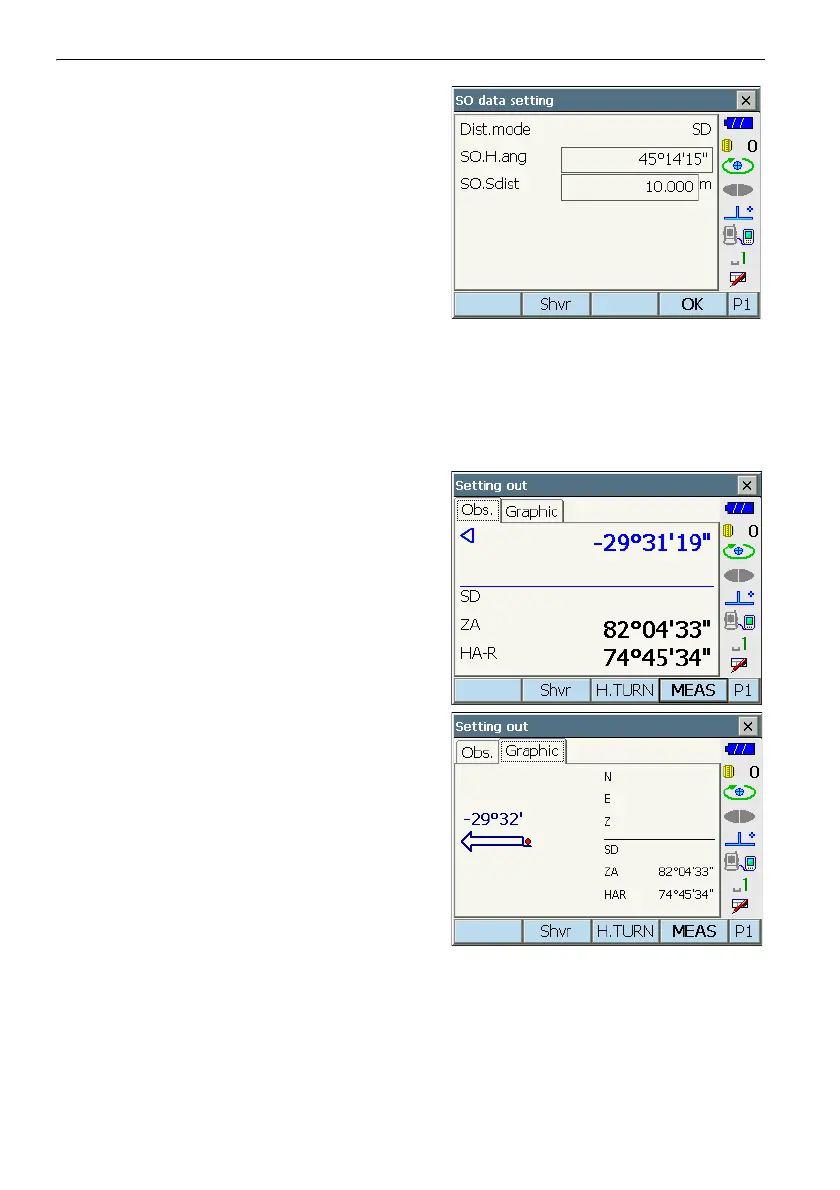
4. Select "SO data setting" In <Setting out> to
display <SO data setting>. In the distance mode
that conforms to your measurement
requirements, enter the included angle between
the reference point and the setting-out point in
"SO.H.ang", and the distance (slope distance,
horizontal distance or height difference) from the
instrument station to the position to be set out in
"SO.Sdist".
• Each time [Shvr] is pressed, the distance mode
changes from "SD" (slope distance), "HD"
(horizontal distance), "VD" (height difference),
and "Ht." (REM).
• Press [COORD] in the second page and input
coordinates in <Key in coord>. The angle and
distance from these coordinates to the position
to be set out will be calculated.
5. Enter values and press [OK] to display the screen
at right.
Press [H.TURN] to automatically rotate the
instrument until the difference in horizontal angle
to the setting out point reads 0°.



 To Next Page