OPERATION MANUAL
23
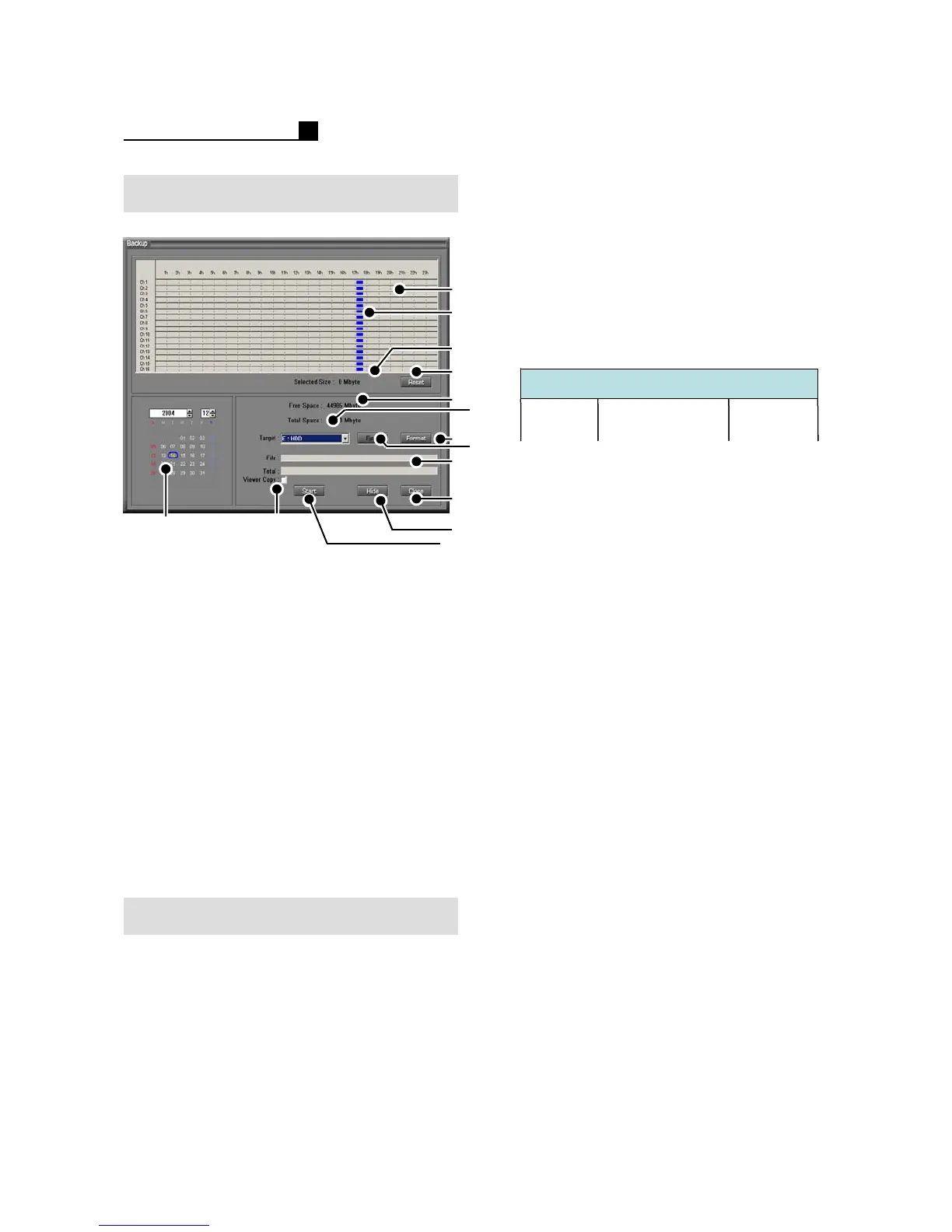
①Calendar
② Data Map
③ Recorded Data (Blue)
④ Selected Size
⑤Reset
⑥ Free Space of Media
⑦ Total space of Media
⑧Format
⑨Eject
⑩ Backup Status
⑪Close
⑫Hide
⑬Start/Stop
⑭ Backup Viewer Copy
NOTE:
Format must be done before BACKUP.
Backup (TOPS Series)
NOTE:
The backup time can be longer than the
selected time.
Ex) If user choose the backup time from
7:00 to 8:00, DVR will backup the data
6:45 to 8:45. It’s because DVR backup
the data on 64MB DB base.
How to Backup
① Select “Backup” Mode
②Insert Media
③ Select the date
④ Select the drive
⑤ Select data
⑥ Press “Start”
NOTE:
Tick “Viewer Copy” for backup viewer
save with backup data.
②
①
⑤
⑧
⑩
⑫
⑥
③
④
⑦
⑨
⑭
⑬
⑪
DB file of DVR
8:45
64MB
6:45 7:00 8:00
DB file of DVR
8:45
64MB
6:45 7:00 8:00
64MB
6:45 7:00 8:00



 To Next Page