OPERATION MANUAL
22
Calendar Search
Smart Search
① Select 1 CH Layout
② Select Smart Search
③Click “ADD”
④ Set Area on the screen
⑤ Adjust “Sensitivity”
⑥ Select “Key Image Set”
⑦ Select “Next Play”
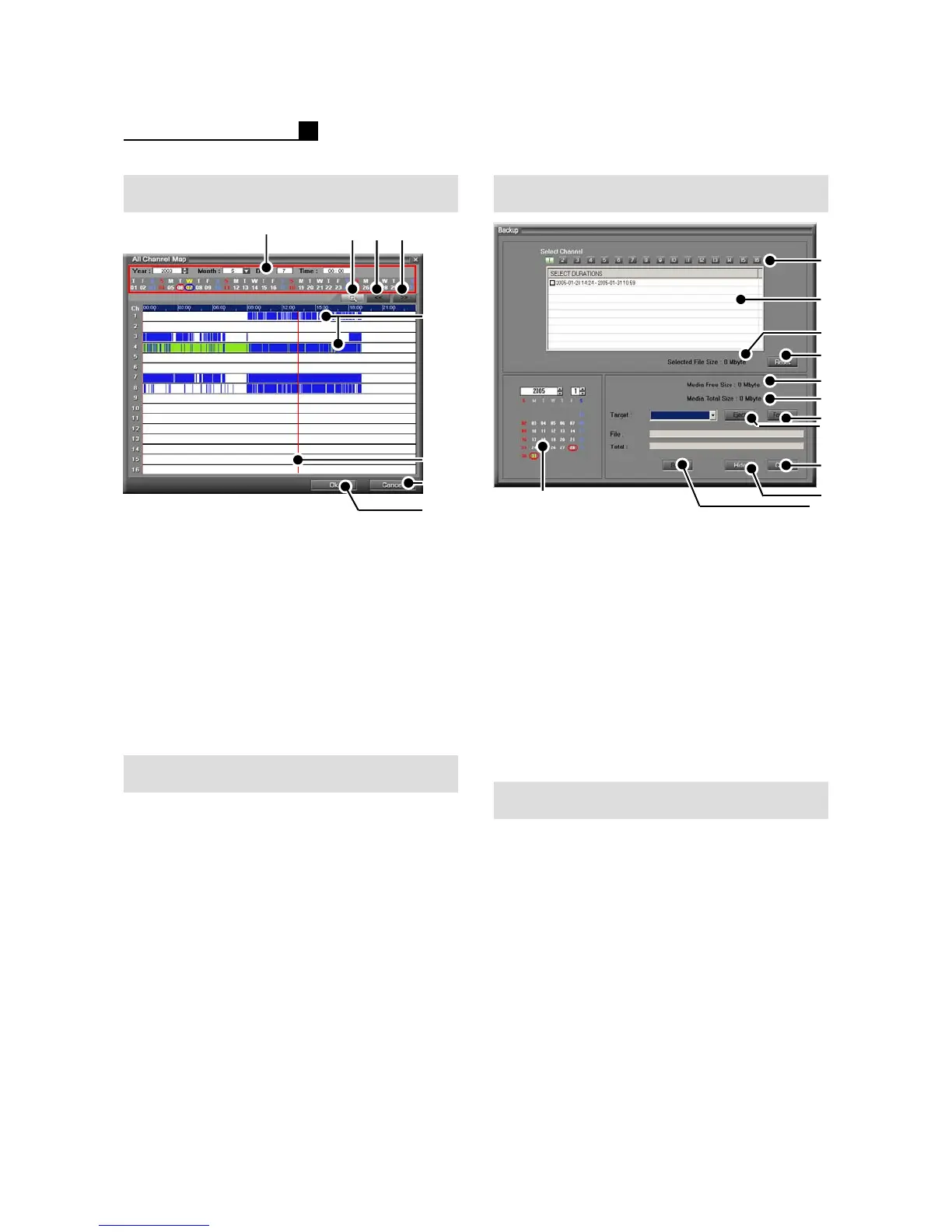
① Calendar (Year/Month/Date/Time)
②Detailed Map
③Previous Time
④Next Time
⑤ Record Status
NOR-Red, MOT-Blue, SEN-Green
⑥ Selection Line
⑦Close
⑧ Playback the selected time
⑨ Detailed view for record map
①Calendar
② Camera No.
③ List recorded data
④ Selected recorded data
⑤Reset
⑥ Free space of Media
⑦ Total space of Media
⑧Format
⑨Eject
⑩Close
⑪Hide
⑫ Start / Stop
How to Backup
① Select “Backup” Mode
②Insert Media
③ Select the date
④ Select the drive
⑤ Select Camera No.
⑥ Select data
⑦ Press “Start”
NOTE:
Format must be done before BACKUP.
2.4 BACKUP (MP SERIES)
② ③ ④
①
⑦
⑤
⑥
⑧
②
⑤
⑧
⑥
③
⑦
⑨
NOTE:
Tick “Viewer Copy” for backup viewer
save with backup data.
④
⑩
⑪
⑫
①



 To Next Page