OPERATION MANUAL
25
2.6 PASSWORD / ROTATION
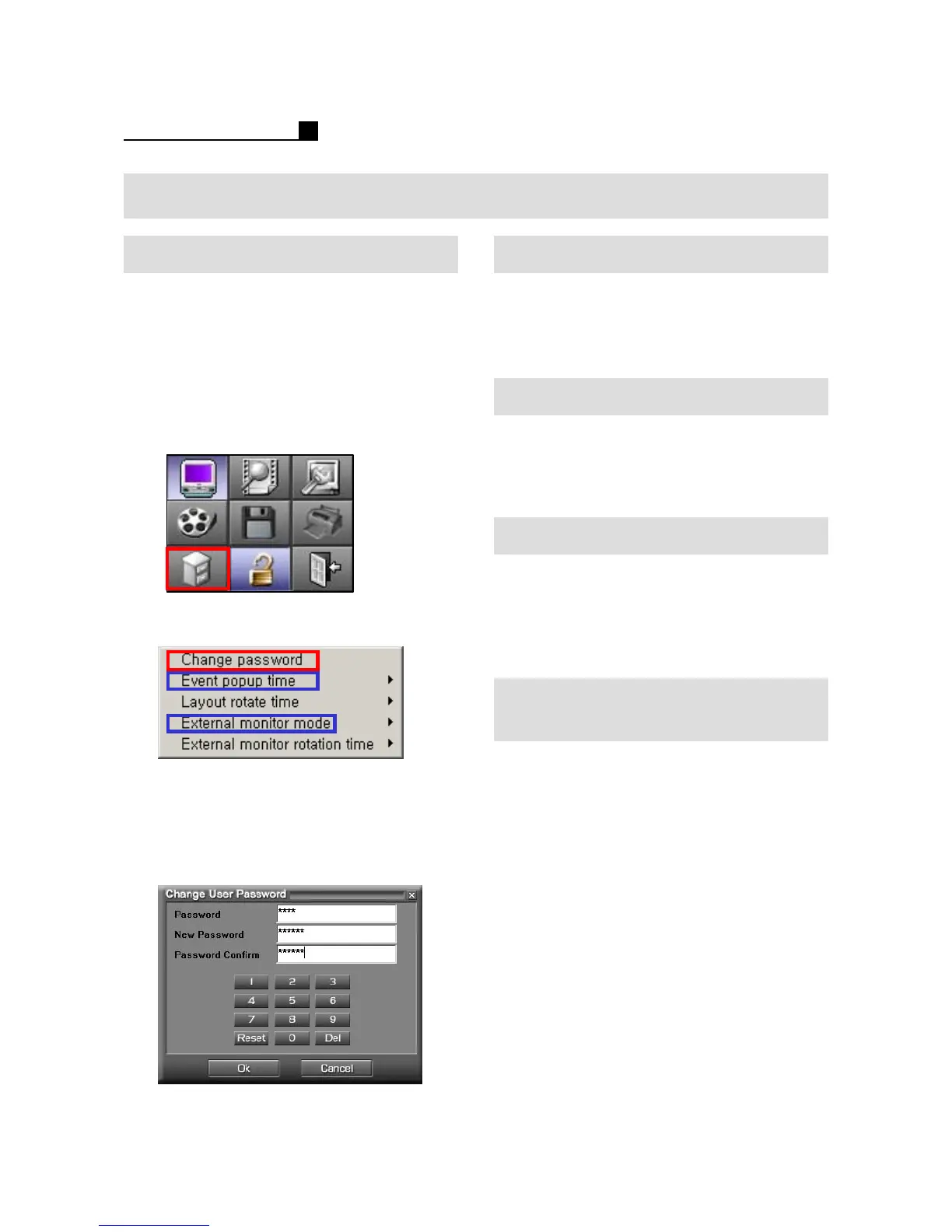
① Go to PASWORD / ROTATE Mode
② Select “Change Password”
③Type Password
Default P/W is “0”.
④ Press “OK”
2. Select “Change Password”.
1. Go to PASSWORD Mode.
Click the PASSWORD button in red.
① Go to PASSWORD / ROTATE Mode
② Select “Layout Rotate Time”
③ Select the duration time
How to change P/W How to set Rotation Time
3. Change the Password.
① Go to PASSWORD / ROTATE Mode
② Select “Event Popup Time”
③ Select the duration time
How to set Event Pop up Time
① Go to PASSWORD / ROTATE Mode
② Select “External Monitor”
③ Select “Fixed”, “Spot” and
“Event Spot” mode
How to set External Monitor
① Go to PASSWORD / ROTATE Mode
② Select “External Monitor Rotation
Time”
③ Select the time
How to set External Monitor
Rotation Time
Note:
Function in blue is not available with TOPS
Series.



 To Next Page