OPERATION MANUAL
55
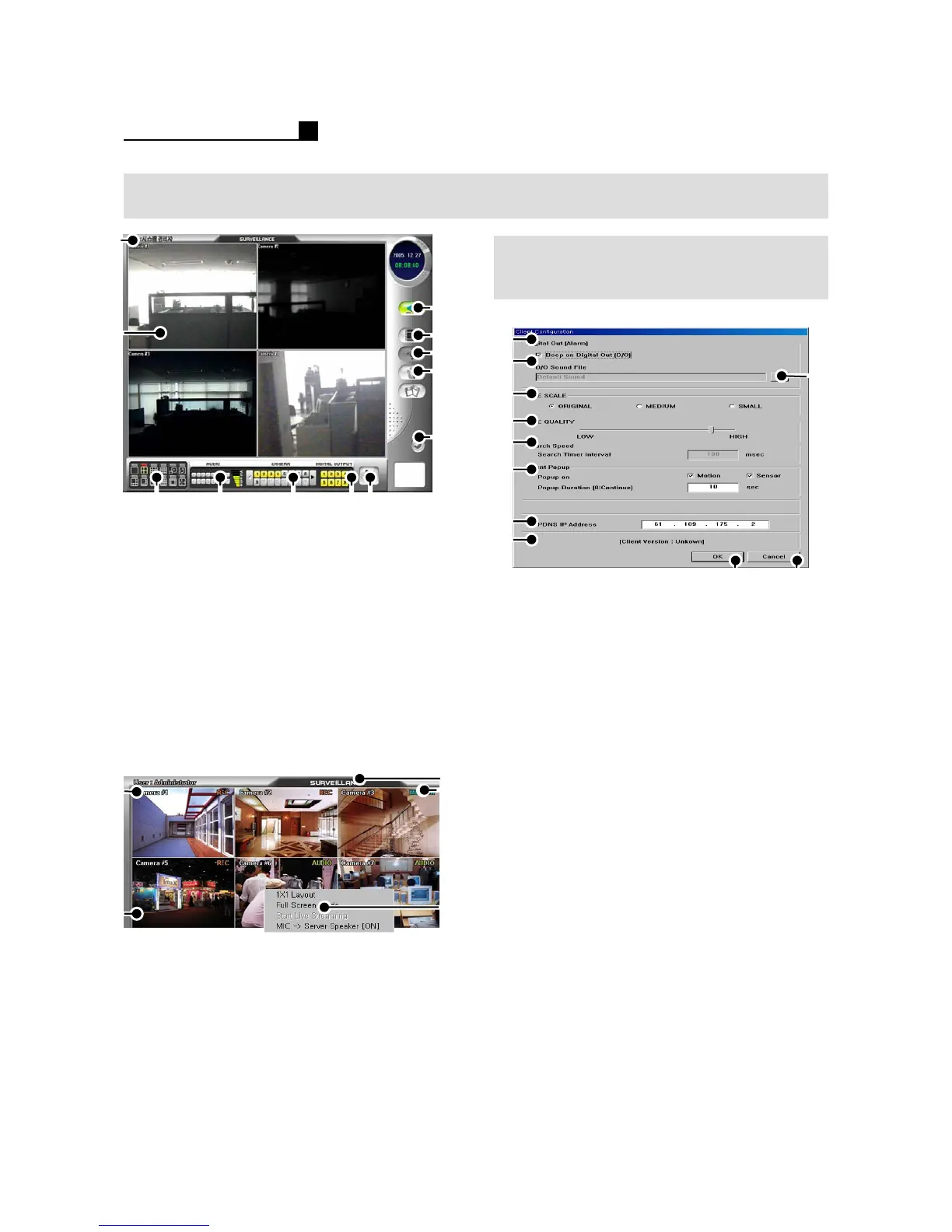
8.1 SURVEILLANCE
SPEED SETUP
(CLIENT CONFIGURATION)
① User level
② Network Live View
③ Screen Division
④ Audio Selection
⑤ Camera Selection
⑥ D/O (Alarm Out) Control
⑦ Network Speed Control
⑧ Connect / Disconnect
⑨ Search Mode (Client Configuration)
⑩Pan/Tilt
⑪ Setup Mode
⑫Exit
① Camera Name
②Audio Record
③ Show current mode
④ Show recording status
⑤Pop up Menu
- Choose one CH and right mouse click
③
①
②
④
⑤
⑥
⑦
⑨
⑧
⑩⑪
① Beep On/Off when Alarm
② Show the directory of sound file
③ Select the sound file
④ Select image size for transmission
⑤ Adjust image quality for transmission
⑥ Search Time interval to receive next
image from DVR
⑦ Event Pop up Selection
⑧PDNS IP Address
⑨Save & Exit
⑩Cancel
Audio
④
①
②
③
⑤
⑫
⑪
⑩
⑨
⑧
②
①
③④ ⑤⑥
⑦
Note:
Live Scale: Original, Medium, Small
Original: Recorded Resolution on DVR
Medium: 320*240
Small:160*120
Live Quality: Image Quality
If you want faster transmission from DVR
to Client. We recommend you to
set live scale “Small” and Image
quality “Low”.
It will be faster than before but the image
quality is not good.
Note:
Live Scale is not available on ME DVR.



 To Next Page