OPERATION MANUAL
32
4. SETUP (MPII SERIES)
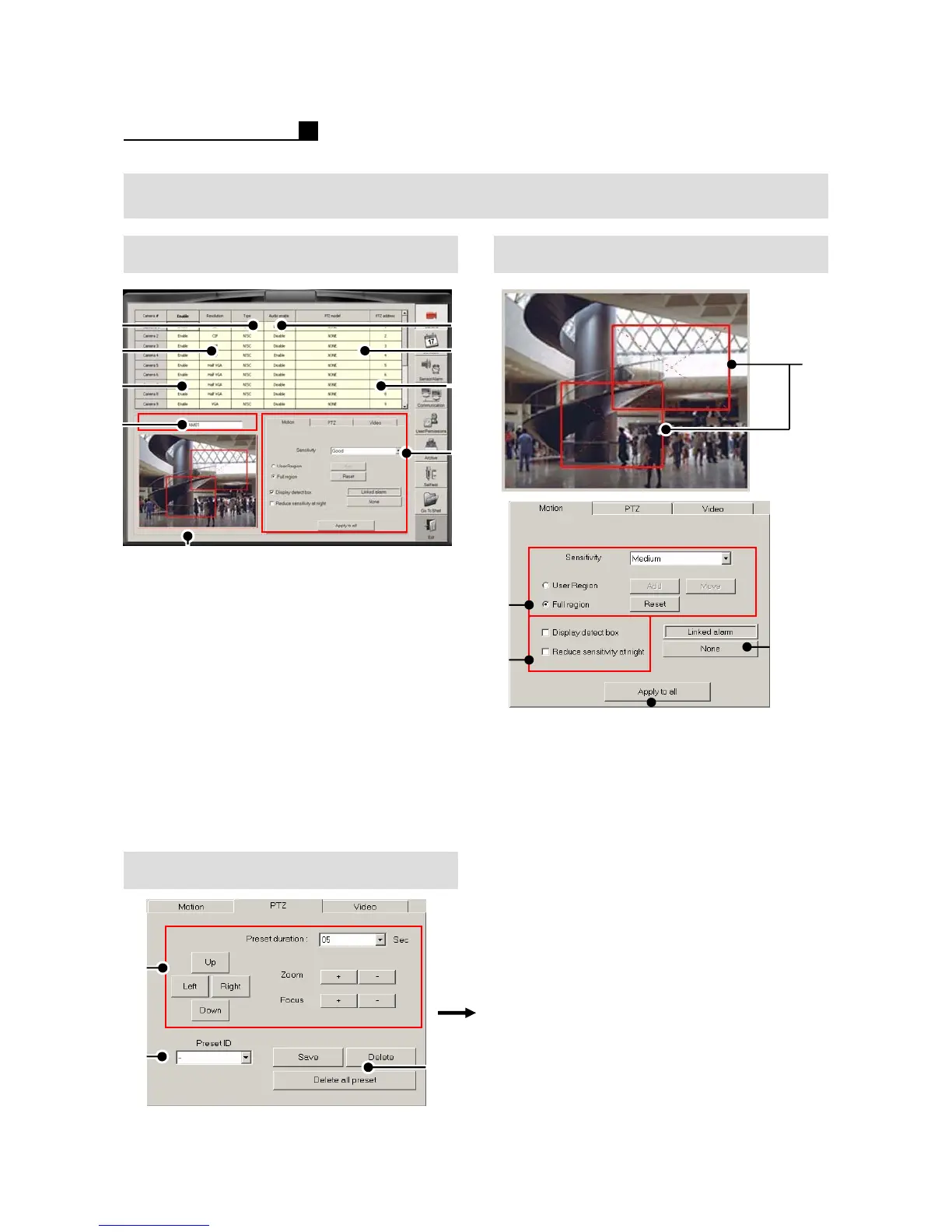
4.1 CAMERA /SENSOR Motion Area
①NTSC/PAL
②Resolution (CIF/HALF VGA/VGA)
③ Camera On/Off
④Audio On/Of
⑤ PTZ Protocol
⑥ PTZ Address
⑦ Camera Name
⑧ Motion Setting Area
⑨ Motion, PTZ, Video (Color)
① User Setting Area
② User Defined – Small Area
Full Region –Full Area
③ Display Detection Box
Reduce Sensitivity at night
④ Motion-Alarm Setting
⑤ Apply to all cameras
④
⑤
②
③
①
PTZ
③
①
②
①Direction, Zoom, Focus
Preset Duration
②Preset ID
③ Preset Save, Preset Delete.
Delete all Presets
⑧
⑤
⑨
⑥
④
②
③
①
⑦



 To Next Page