EasyManua.ls Logo

Tosibox Lock 150 - Renaming and Using Devices

Tosibox Lock 150
70 pages
Print Icon
To Next Page IconTo Next Page
To Previous Page IconTo Previous Page
Loading...
28
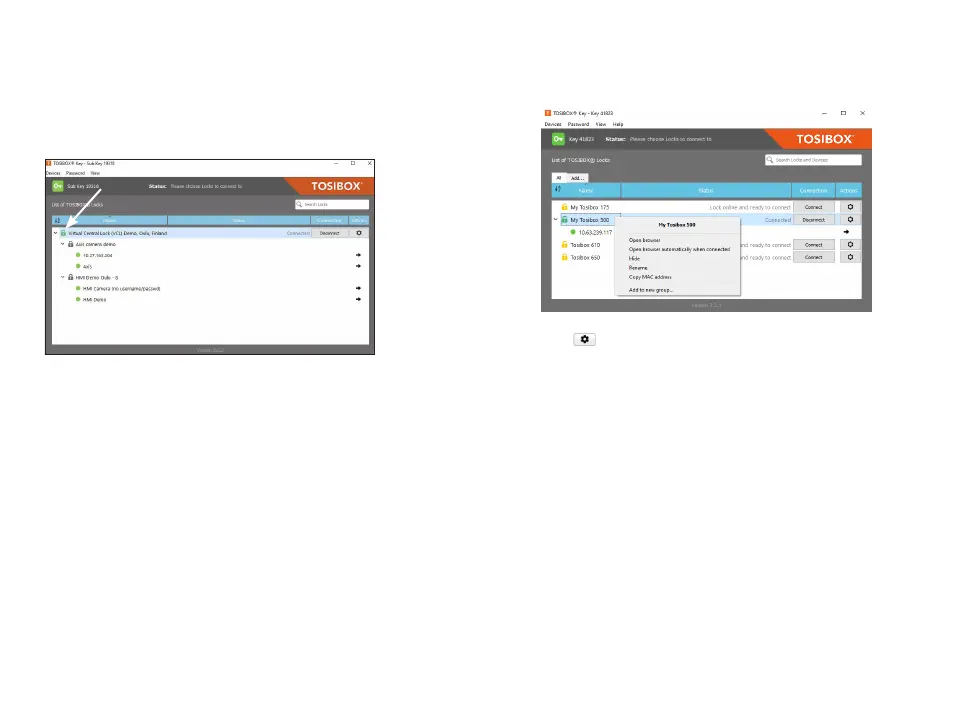
By clicking an extra menu opens.
1. 

2. 
have the Node user interface launch automatically when the
Key connects to the Node.
3. Click “hide” to hide this node from the view.
4. Click “Rename” to rename the selected Node. The Node
Node´s
Node
Keys can rename Nodes.
5. Click “copy MAC address” to copy the nodes address to

6. 
5.2 RENAMING AND USING DEVICES
This is the start window for the Key user interface. You
can open the Node
the Node icon on the left side of the window.

Other manuals for Tosibox Lock 150

Related product manuals