EasyManua.ls Logo

Toto SN970M - Page 22

Toto SN970M
32 pages
Print Icon
To Next Page IconTo Next Page
To Previous Page IconTo Previous Page
Loading...
42
43
Reference
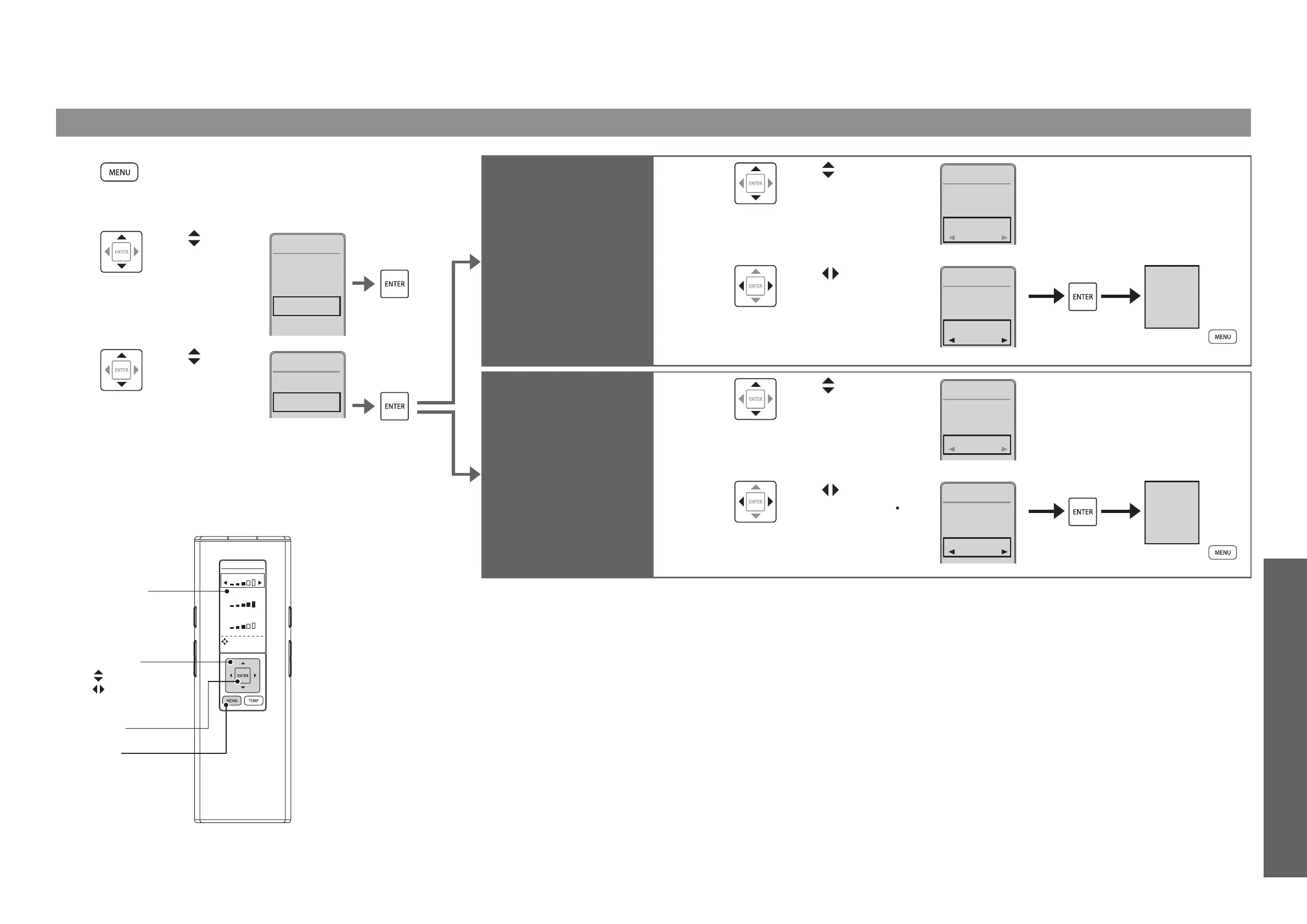
Changing Settings
AUTO OPEN/CLOSE
WATER
SEAT
DRYER
DIRECTIONAL
TEMPERAT URE
SETTING
[ENTER]
[MENU]
Select keys
: Select an item
: Select a setting
Remote control
display panel
1
Press [MENU].
2
Use to
select "AUTO
FUNCTIONS"
and then press
[ENTER].
1. CLEANING
2. ENERGY
SAVER
3. AUTO
FUNCTIONS
4. OTHER
SETTINGS
MENU3/4
3
Use to
select "AUTO
OPEN/
CLOSE" and
then press
[ENTER].
1. AUTO FLUSH
2. AUTO
OPEN/CLOSE
AUTO
FUNCTIONS
2/3
Change the time period till
automatic opening
(After closing manually.)
AUTO OPEN
WAITING
TIME
4
Use to select
"AUTO OPEN
WAITING TIME".
2. AUTO CLOSE
WAITING TIME
3. AUTO OPEN
WAITING TIME
AUTO
OPEN/CLOSE
3/4
15 SEC
90 SEC
5
Use to select
"15SEC", "30SEC"
or "90SEC"
and then press
[ENTER].
2. AUTO CLOSE
WAITING TIME
3. AUTO OPEN
WAITING TIME
AUTO
OPEN/CLOSE
3/4
30 SEC
90 SEC
AUTO OPEN
WAITING TIME
30 SEC
(To return
)
Automatically open and
close the toilet lid only/
Automatically open and
close the toilet seat and
toilet lid
SEAT/LID
4
Use to select
"SEAT/LID".
3. AUTO OPEN
WAITING TIME
4. SEAT/LID
AUTO
OPEN/CLOSE
4/4
LID
30 SEC
5
Use to select
"LID" or "SEAT
LID" and then press
[ENTER].
3. AUTO OPEN
WAITING TIME
4. SEAT/LID
AUTO
OPEN/CLOSE
4/4
SEATLID
30 SEC
AUTO
OPEN/CLOSE
SEATLID
(To return
)

Related product manuals