EasyManua.ls Logo

Toto SN970M - Detailed Cleaning and Other Settings Configuration

Toto SN970M
32 pages
Print Icon
To Next Page IconTo Next Page
To Previous Page IconTo Previous Page
Loading...
44
45
Reference
Changing Settings
CLEANING
1
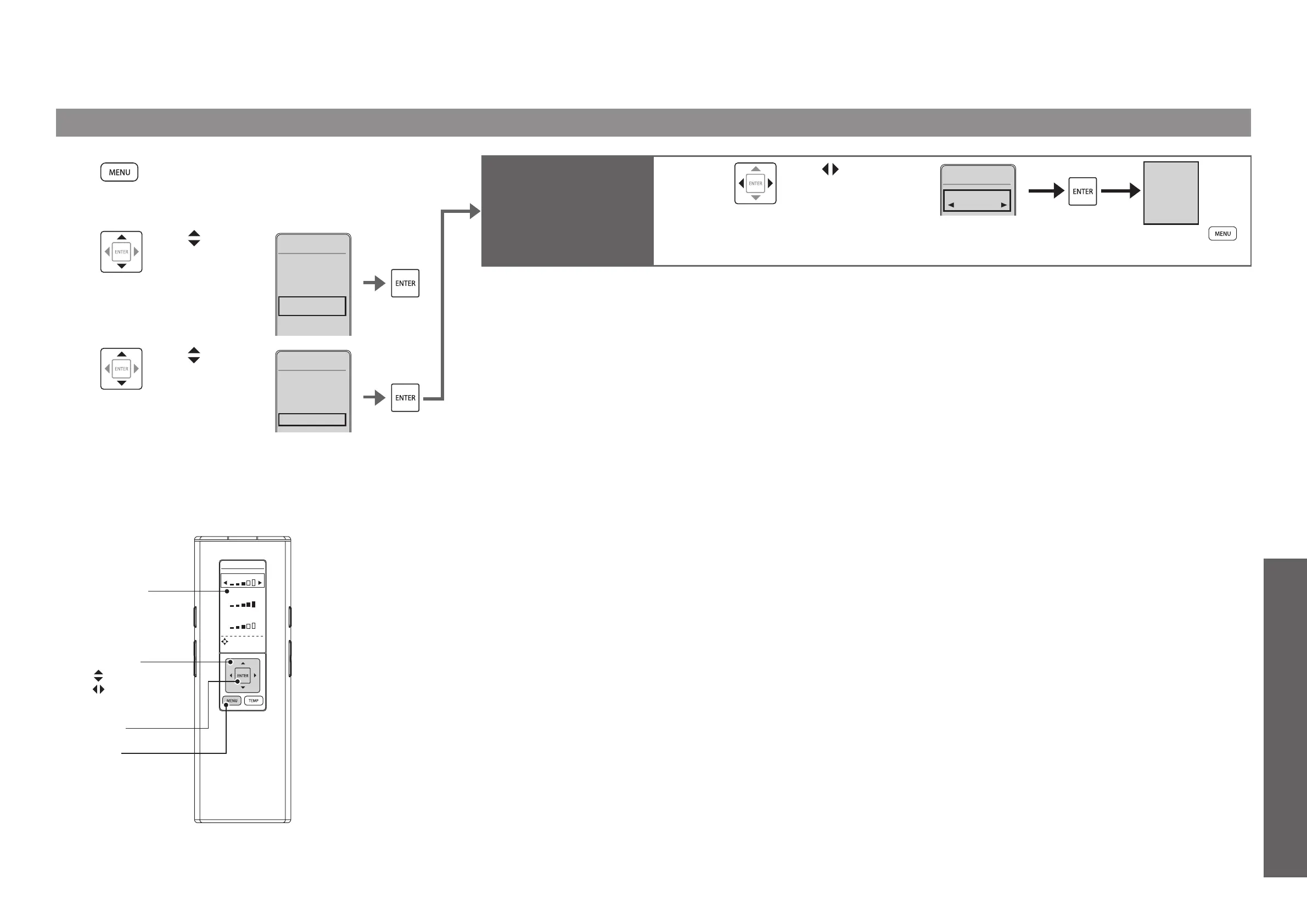
Press [MENU].
2
Use to
select "AUTO
FUNCTIONS"
and then press
[ENTER].
1. CLEANING
2. ENERGY
SAVER
3. AUTO
FUNCTIONS
4. OTHER
SETTINGS
MENU3/4
3
Use to select
"CLEANING"
and then press
[ENTER].
1. AUTO FLUSH
2. AUTO
OPEN/CLOSE
3. CLEANING
AUTO
FUNCTIONS
3/3
WATER
SEAT
DRYER
DIRECTIONAL
TEMPERAT URE
SETTING
[ENTER]
[MENU]
Select keys
: Select an item
: Select a setting
Remote control
display panel
Set whether or not to
deodorize automatically
after sitting on the toilet
seat
DEODORIZER
4
Use to select
"ON" or "OFF"
and then press
[ENTER].
1DEODORIZER
OFF
CLEANING1/1
DEODORIZER
ON
(To return
)

Related product manuals