www.touchstonehomeproducts.com 800.215.1990
rev. 20190312
Operating the Lift – cont.
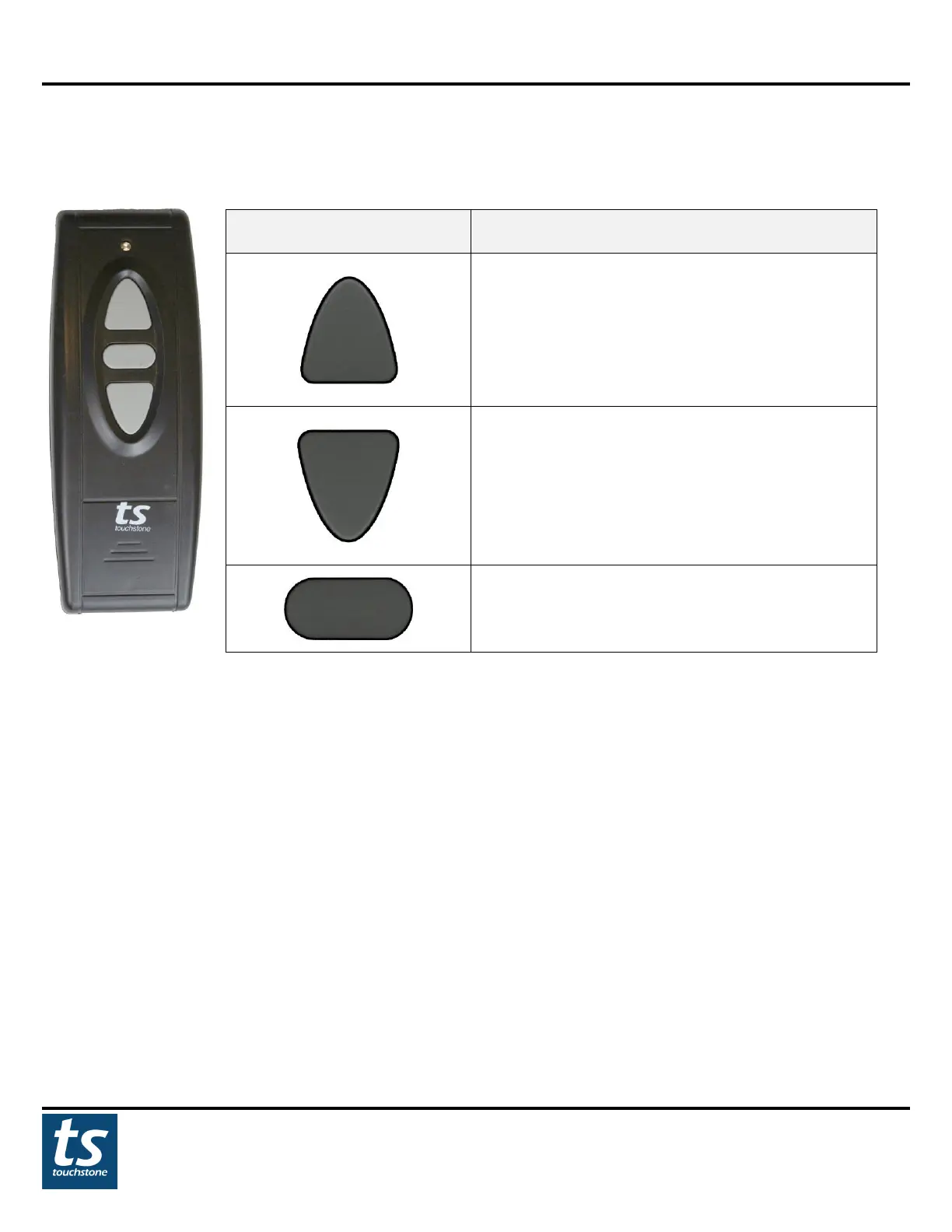
Wireless RF Control
Wireless RF
Remote Button
UP Button: PRESS the button once to raise the lift.
The lift will raise all the way up unless the stop
button is pressed.
DOWN: PRESS the button once to lower the lift.
The lift will lower all the way down unless the stop
button is pressed.
MEMORY: PRESS and HOLD the button for 3
seconds to raise the lift to the programmed
NOTE: For applications where fixtures are mounted above the lift and in the path of the lift travel, please use
the WIRED HANDSET ONLY to avoid damages to the lift and other items!
Pairing RF Remote Control to Control Box
The wireless RF remote will be paired to the SRV PRO TV Lift out of the box. Should the wireless RF remote stop
functioning, please follow the instructions below for pairing the RF remote control to the lift:
1. Unplug the power cable from the lift control box.
2. Wait 5 seconds and plug the lift power cable back into the control box.
3. Within 5 seconds, press UP button on the wireless RF remote after plugging the power cable to control box.
4. The wireless RF remote is now ready for use.


 To Next Page