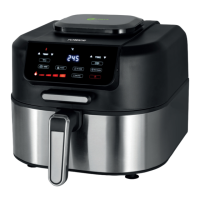
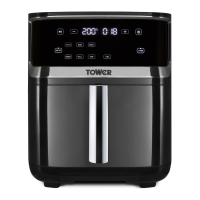
This document is a user manual for the Tower 7 Litre 7 in 1 Air Fryer with Steamer, model T17101. It is a versatile kitchen appliance designed for various cooking methods, combining air frying and steaming functionalities.
Function Description
The Tower T17101 is a multi-functional appliance offering 7-in-1 cooking modes, including:
- Air Fry: For creating low-fat fried snacks using a regular air fry cycle.
- Bake: Automatically sets ideal time and temperature for baking bread, cakes, or snacks.
- Roast: Automatically sets ideal time and temperature for roasting meat, fish, or vegetables.
- Grill: Automatically sets ideal time and temperature for grilling meat, fish, or vegetables.
- Reheat: Automatically sets ideal time and temperature for reheating ingredients.
- Steam: For creating a variety of simple steamed meals using a regular steam cycle.
- Combo Cook: This unique function combines air frying and steaming within a single cycle, ideal for creating succulent and nutritious full meals (meat, fish, or vegetables) in one go.
In addition to cooking modes, the appliance features:
- Steam Clean: An automatic cleaning function that runs after a cooking cycle to minimize manual maintenance.
- Pump Water: A function to pump remaining water out of the water tank after a cycle, reducing the need for manual emptying.
Important Technical Specifications
- Model: T17101
- Capacity: 7 Litre
- Rated Voltage: AC 220-240V~
- Frequency: 50/60Hz
- Power Consumption: 1700W
- Temperature Range: 80°C - 200°C
- Time Range: 1-60 minutes
- Dimensions (MM): H: 387 x W: 319 x D: 427mm
- Weight: 7.2Kg
Usage Features
The appliance is controlled via a digital control panel and LED display. Key controls include:
- Start/Pause Key (►II): To start, pause, or resume cooking cycles.
- Time/Temperature - Key: To decrease time or temperature settings.
- Time/Temperature + Key: To increase time or temperature settings.
- Power ON/OFF Key (ن): To turn the appliance on or off.
- Mode Selection Keys: Dedicated keys for Air Fry, Bake, Roast, Grill, Reheat, Steam, and Combo Cook.
- Function Indicators: Visual cues for selected functions.
- Temperature Selection Key (TEMP): To activate and adjust temperature.
- Time Selection Key (TIME): To activate and adjust cooking time.
Before First Use:
- Remove all packaging, stickers, and labels (except rating plate/warnings).
- Ensure no damage to the cord or body.
- Dispose of packaging responsibly.
- Place the appliance on a stable, horizontal, even, and heat-resistant surface, ensuring at least 10cm free space on the back, sides, and above.
- Thoroughly clean the drawer and grill plate with hot water, washing-up liquid, and a non-abrasive sponge. Wipe inside and outside with a moist cloth.
- DO NOT fill the drawer with oil or frying fat.
- Place the grill plate in the drawer.
- Ensure the drawer is fully closed for the air fryer drawer safety switch to allow operation.
Turning On:
- Plug into a mains socket; a sound prompt will occur, and the power key will flash.
- Touch the power key to turn on; all control panel keys and the LED display will illuminate.
Auto-Off Function:
- If no contact with the control panel for 1 minute when cooking is not in progress, the appliance enters Standby mode. The power key flashes, and other indicators/display turn off.
- Touch the power key to exit Standby mode.
Selecting a Cooking Mode and Program:
- Touch either the 'Air Fry' or 'Steam' key to select the desired cooking mode. The corresponding programs will light up.
- Once a mode is selected, touch a program key (e.g., Bake, Roast, Steam, Combo Cook) to select a specific program. The key will flash, and default time/temperature will appear on the LED display.
- For Steam mode: Ensure the water tank is filled. An 'E12' error code will display if the tank is not sufficiently filled.
Filling the Water Tank:
- Grip the water tank at the top of the unit and pull it up.
- Unscrew the water tank valve counter-clockwise.
- Pour water into the hole until full.
- Replace the valve by turning clockwise until secured.
- Place the water tank back onto its slot at the top of the unit.
Setting Temperature/Time:
- Temperature: Touch the 'Temp' key, then use '+' and '-' keys to adjust in 5-degree increments (80-200°C). Touch and hold for faster adjustment.
- Time: Touch the 'Time' key, then use '+' and '-' keys to adjust in 1-minute increments (1-60 minutes). Touch and hold for faster adjustment.
- Temperature and time can be adjusted during operation by touching the respective key and then adjusting.
Start/Pause:
- After setting mode, program, time, and temperature, touch the '►II' key to start. The selected program key will flash, and the LED display will show temperature and remaining time.
- Touch '►II' again to pause. All function keys illuminate, and the fan stops.
- Touch '►II' again to resume.
Safety Points:
- Surfaces are hot; DO NOT touch.
- Hot steam is released from air outlet openings; keep hands and face clear.
- DO NOT immerse cords, plugs, or any part of the appliance in water.
- Use oven gloves when handling hot accessories or food.
- DO NOT place combustible materials near the appliance.
- DO NOT cover air inlet/outlet.
- Unplug immediately if smoke is emitted.
- DO NOT leave unattended during operation.
Maintenance Features
General Cleaning and Care:
- Switch off, unplug, and allow to cool (keep drawer open for faster cooling).
- DO NOT use metal utensils or abrasive cleaning materials on the drawer to protect the non-stick coating.
- Clean the drawer with hot water, washing-up liquid, and a non-abrasive sponge/brush. For stuck food, soak in hot water and washing-up liquid for a few hours or overnight.
- Wipe the outside with a damp cloth.
- Wipe the inside with hot water and a non-abrasive sponge.
- Clean the heating element with a cleaning brush to remove food residues.
- Ensure all parts are thoroughly dry before use.
Self-Cleaning Function:
- This unit has a self-cleaning function to maintain optimal condition.
- To enable, touch the 'Steam Clean' key on the Steam Cooking control panel. Press '►II', and the unit will automatically perform a 30-minute cycle at 100°C (fixed settings, not adjustable).
Pump Water Function:
- This function helps dispose of excess water in the tank after a self-cleaning cycle.
- To enable, touch the 'Pump Water' key on the Steam Cooking control panel. Press '►II', and the unit will pump water into the drawer for five minutes.
- After the cycle, empty the drawer.
Emptying the Water Tank:
- Empty after every use or prolonged storage.
- Detach from the unit, unscrew the valve, and pour out excess water. Alternatively, use the Pump Water function.
Emptying the Excess Steam Collector Pot:
- This pot, located at the back, collects excess water during steam cooking. Empty after every use.
- Grip by protruding tabs, maneuver loose, tip upside down to dispose of water, then secure back into place.
Emptying the Water Drip Tray:
- This tray collects water when using the steam function. Empty after every use.
- Pull out from the bottom slot, tip forward to dispose of contents, then slide back into place.
Storage:
- Ensure the appliance is cool, clean, and dry before storing in a cool, dry place.
Troubleshooting:
The manual provides a comprehensive troubleshooting guide for common issues such as:
- Appliance not working (not plugged in, power key not touched, drawer open/paused).
- Drawer not sliding properly (too much food, incorrectly placed).
- Fried snacks not crispy (wrong snack type, food stuck, too much food, low temp, short time, wrong potatoes, unrinsed potato sticks, insufficient oil/water).
- Appliance smoking (high oil content, grease from previous use).
- Food burned (pre-heating incomplete, cooked too long, left in appliance).
- Water leaking from water tank (valve not tightened, damaged tank).
- Ingredients not cooked enough in Steam function (too much food, large pieces, short cooking cycle, dirty steam generator).
- 'E12' error code (not enough water in tank, too much water pumped into drawer).
- Unpleasant smell (not cleaned, steam drip tank not emptied, water tank not drained).
The manual emphasizes the importance of retaining it for future reference and passing it on if the appliance is given to someone else. It also includes information on Food Allergies and a Weights & Measures Table for convenience. Spare parts are available for purchase via the Tower website or customer support. The product comes with a 12-month guarantee, extendable to 3 years upon online registration within 28 days of purchase.

 Need help?
 General


 To Next Page