82
Chapter 13
VPN Server&Client
• Tunnel IP Address: 192.168.0.1 (This is the IP address of the WireGuard VPN
interface, it is recommended not to have the same LAN IP as the router.)
• Listen Port: Enter 51820 (The default port is 51820, which can be modified).
• Select your Client Access type. Select Home Network Only if you only want
the remote device to access your home network; select Internet and Home
Network if you also want the remote device to access internet through the
VPN Server.
• (Optional) Click Advanced Settings to display more settings. If DNS is turned
on, the router will become the DNS server of the VPN client that establishes
a connection with it. Change the Persistent Keepalive time (25 seconds by
default) to send out heartbeat regularly, you can also click RENEW KEY to
update the private key and public key.
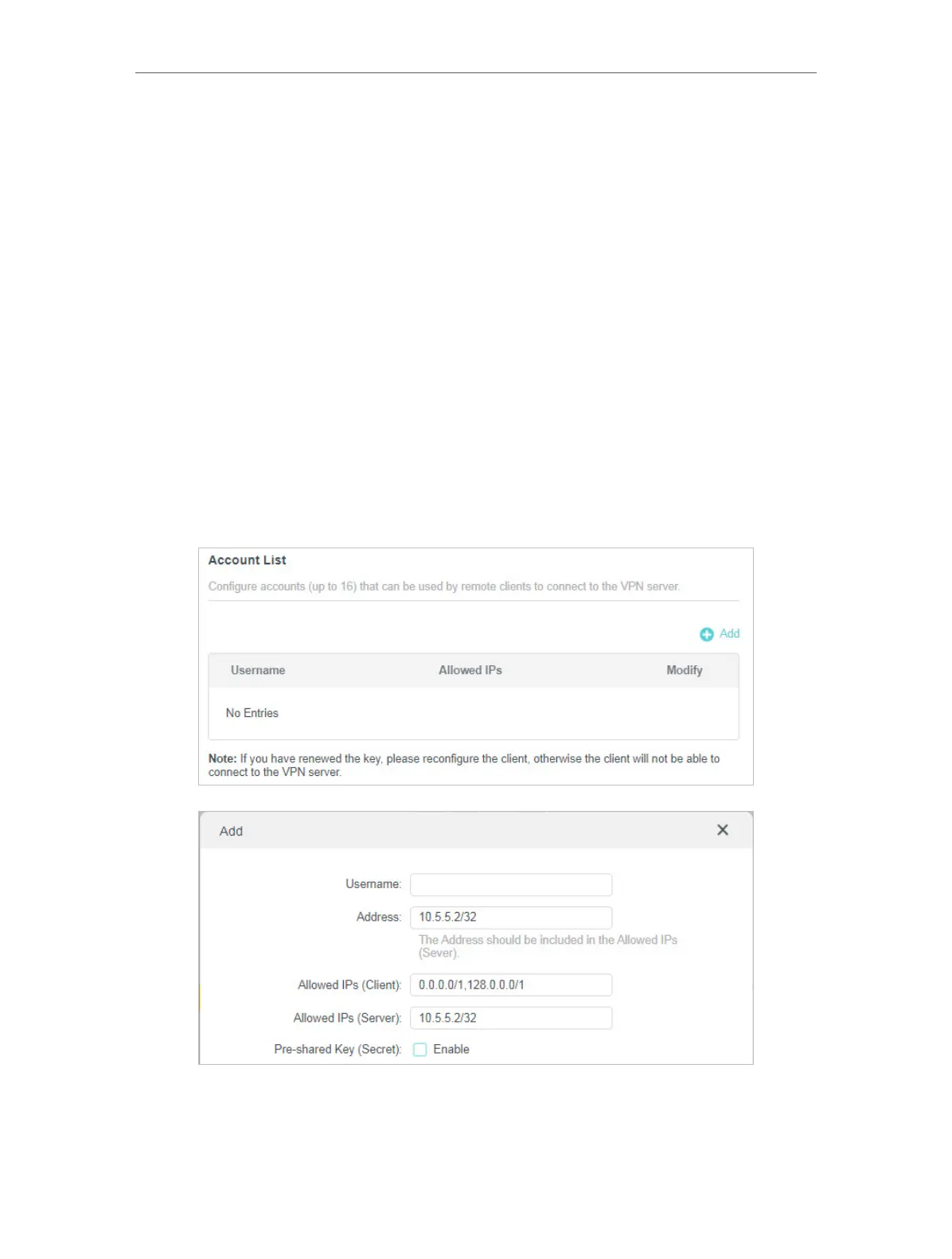
Step 2. Create accounts that can be used by remote clients to connect to the VPN
server.
1. Locate the Account List section. Click Add to create an account.
2. Give a Username to this account.
3. View the Address of the virtual interface assigned to this account. Do NOT change it
unless necessary.





 To Next Page