79
Chapter 13
Manage the Router
2. Set the current Date (In MM/DD/YYYY format).
3. Set the current Time (In HH/MM/SS format).
4. Click Save.
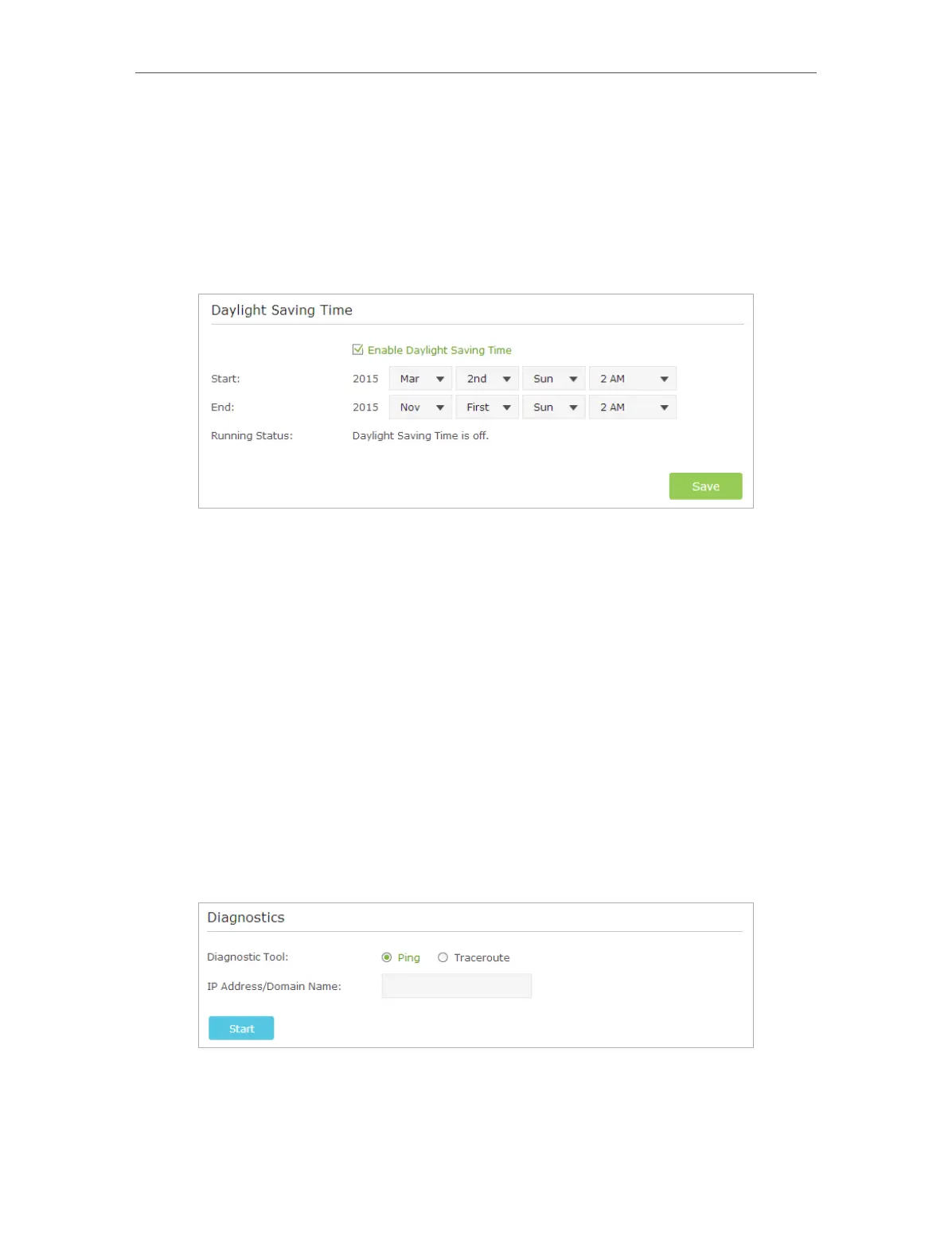
¾ To set up Daylight Saving Time:
1. Select Enable Daylight Saving Time.
2. Select the correct Start date and time when daylight saving time starts at your local
time zone.
3. Select the correct End date and time when daylight saving time ends at your local
time zone.
4. Click Save.
13. 2. Test the Network Connectivity
Diagnostics is used to test the connectivity between the router and the host or other
network devices.
1. Visit http://tplinkwifi.net, and log in with the username and password you set for the
router.
2. Go to Advanced > System Tools > Diagnostics.
3. Enter the information with the help of page tips:
1 ) Choose Ping or Traceroute as the diagnostic tool to test the connectivity;
• Ping is used to test the connectivity between the router and the tested host,
and measure the round-trip time.














 To Next Page