29
Chapter 6
USB Settings
Windows
computer
¾ Method 2:
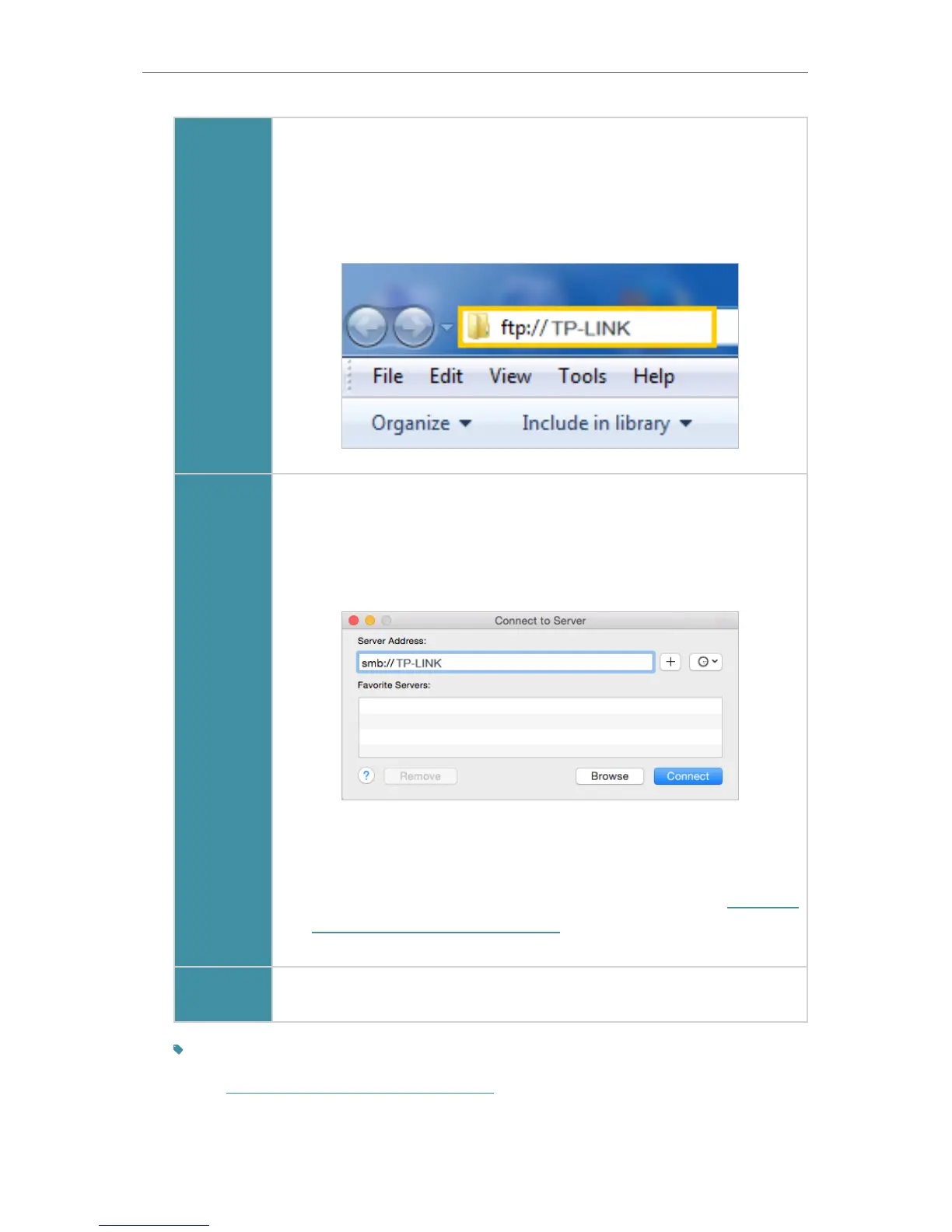
Open a web browser (or go to Computer) and type the server
address \\TP-LINK or ftp://TP-LINK in the address bar, then press
Enter.
Mac
1 ) Select Go > Connect to Server
2 ) Type the server address smb://TP-LINK
3 ) Click Connect
4 ) When prompted, select the Guest radio box. (If you have set up
a username and a password to deny anonymous access to the
USB disks, you should select the Registered User radio box. To
learn how to set up an account for the access, refer to To Set up
Authentication for Data Security.)
pad
Use a third-party app for network files management.
Tips:
You can also access your USB disk by using your Network/Media Server Name as the server address.
Refer to To Customize the Address of the USB Disk to learn more.


 To Next Page