Home
TP-Link
Wireless Router
Archer CR500
Page 73 (Remote Management)
TP-Link Archer CR500 - Remote Management
88 pages
Manual
Save Page as PDF
To Next Page
To Next Page
To Previous Page
To Previous Page
Loading...
69
Chapter 11
Administr
ate Y
our Net
work
2.
Go to
A
dvanced
>
System T
ools
>
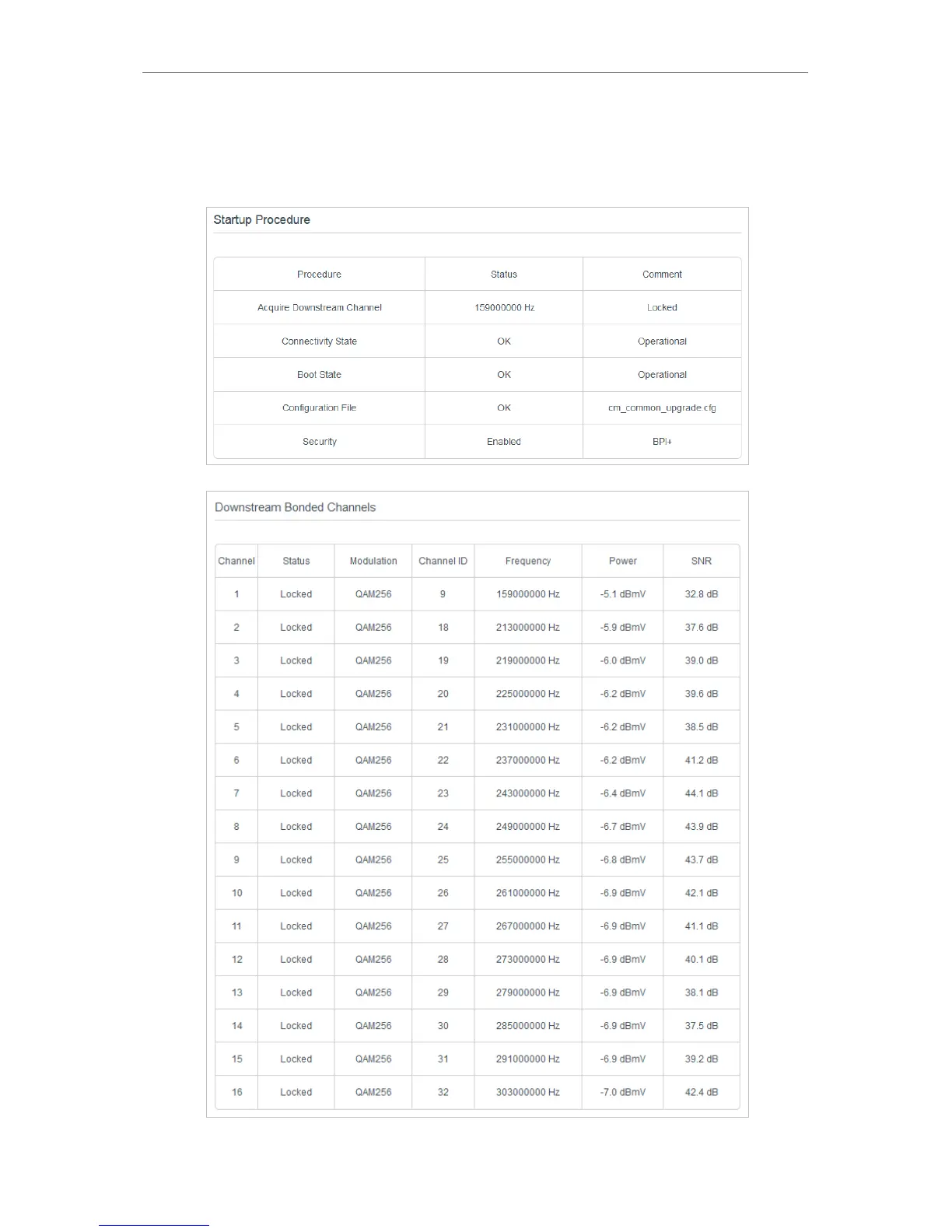
Connection Status
page
, then you can vie
w the
information of startup pr
ocedur
e, do
wnstream bonded channels, upstr
eam bonded
channels, and time information.
72
74
Table of Contents
Main Page
Default Chapter
1
User Guide
1
Table of Contents
2
About this Guide
5
Chapter 1 Get to Know Your Modem Router
6
Product Overview
7
Product Appearance
7
Front Panel
7
Back Panel
9
Chapter 2 Quick Start
10
Position Your Modem Router
11
Connect Your Modem Router
11
Activate Your Modem Router
13
Chapter 3 Log in to Your Modem Router
14
Chapter 4 Configure Internet Connections
16
Set up an Ipv6 Connection
17
Test Internet Connectivity
18
Operation Modes
20
Bridge Mode
20
Chapter 5 Network Security
21
Control Clients' Access
22
Wireless MAC Filtering
22
Deny Access by IP Address
23
Deny Access by MAC Address
24
Deny Access by Port Number
25
Allow Access by Passthrough Options
26
Use Firewall
28
Email Local Log
28
Record Log in a Remote Server
29
Chapter 6 USB Settings
31
Local Storage Sharing
32
Access the USB Disk
32
Customize Your Settings
34
Remote Access Via FTP Server
37
Access the USB Disk
37
Customize Your Settings
40
Media Sharing
41
Access the USB Disk
42
Customize Your Settings
43
Printer Sharing
44
Parental Control
49
Chapter 7 Parental Control
49
Guest Network
53
Chapter 8 Guest Network
53
Create a Network for Guests
54
Customize Guest Network Options
54
Chapter 9 NAT Forwarding
56
Share Local Resources in the Internet by Port Forwarding
57
Open Ports Dynamically by Port Triggers
58
Free Applications from Port Restriction by DMZ
60
Chapter 10 Specify Your Network Settings
61
Internet Settings
62
LAN Settings
62
Change the LAN IP Address
62
Use the Modem Router as a DHCP Server
63
Wireless Settings
64
Specify Basic Wireless Settings
64
Use WPS for Wireless Connection
66
View Wireless Information
68
Advanced Wireless Settings
68
Set up a Dynamic DNS Service Account
70
Chapter 11 Administrate Your Network
71
View Basic Information
72
View System Information
72
View Device Information
72
View Connection Status
72
Set System Time
74
Back up and Restore Configuration Settings
75
Change the Administrator Account
76
Remote Management
77
System Log
77
Appendix: Troubleshooting
79
Safety Information
88
Other manuals for TP-Link Archer CR500
Quick Installation Guide
2 pages
Installation Manual
9 pages
Related product manuals
TP-Link Archer CR700
106 pages
TP-Link Archer C5
144 pages
TP-Link Archer C7
146 pages
TP-Link ARCHER C60
106 pages
TP-Link Archer C80
99 pages
TP-Link Archer C59
111 pages
TP-Link Archer C64
95 pages
TP-Link Archer C54
103 pages
TP-Link Archer C4000
126 pages
TP-Link AC750 Archer C2
9 pages
TP-Link Archer C5 AC1200
147 pages
TP-Link Archer C7 Series
20 pages


 To Next Page