4
Chapter 1
Get to Know Your Modem Router
LED Status
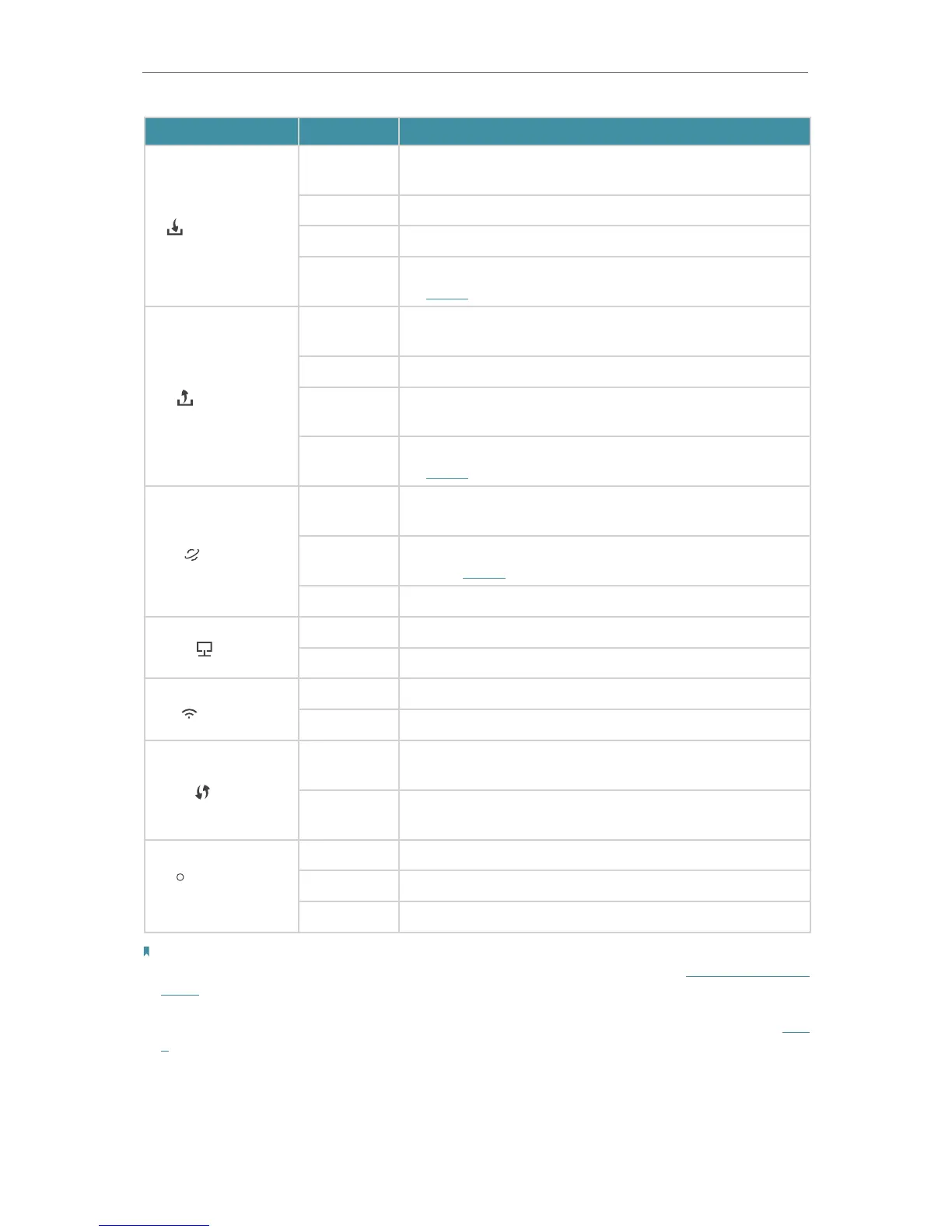
Indication
Downstream
Green
The modem router is synchronized with more than one
channel.
White The modem router is synchronized with one channel.
Flashing The modem router is scanning for downstream channels.
Off
The initialization is not started, or has failed. Please refer
to Note 1 for troubleshooting.
Upstream
Green
The modem router is synchronized with more than one
channel.
White The modem router is synchronized with one channel.
Flashing
The modem router is ranging or registering for upstream
channels.
Off
The initialization is not started, or has failed. Please refer
to Note 1 for troubleshooting.
Internet
On
The network is available with a successful Internet
connection.
Off
No successful Internet connection is available. Please
refer to Note 2 for troubleshooting.
Flashing The modem router is initializing.
LAN
On At least one LAN port is connected.
Off No LAN port is connected.
Wireless
On The wireless network is enabled.
Off The wireless network is disabled.
WPS
On/Off
The LED stays on for 5 minutes when a WPS connection
is established before it turns off.
Flashing
WPS connection is in progress. This may take up to 2
minutes.
USB on the
back panel
On A USB device is detected and ready to use.
Off No USB device is plugged in to the USB port.
Flashing A USB device is being detected.
Note:
1. If the Downstream LED or Upstream LED is off, check your Internet connection first. Refer to Connect Your Modem
Router for more information about how to make Internet connection correctly. If you have already made a right
connection, contact your ISP to make sure your Internet service is available now.
2. If the Internet LED is off, check your Downstream LED and Upstream LED first. If they are also off, please refer to Note
1. If the downstream LED and Upstream LED are ON, check your Internet configuration. You may need to check this
part of information with your ISP and make sure everything have been input correctly.














 To Next Page