83
T6. How to use the router as a regular wireless router to share my Internet ?
The router support two operation modes, 3G/4G Router Mode and Wireless Router
mode. If you already have a modem or your Internet comes via an Ethernet cable from
the wall, you can set up the router as a regular wireless router to share the Internet.
1. Connect your router’s LAN4/WAN port to the modem or the network port.
2. Visit http://tplinkmodem.net, and log in with password you set for the router.
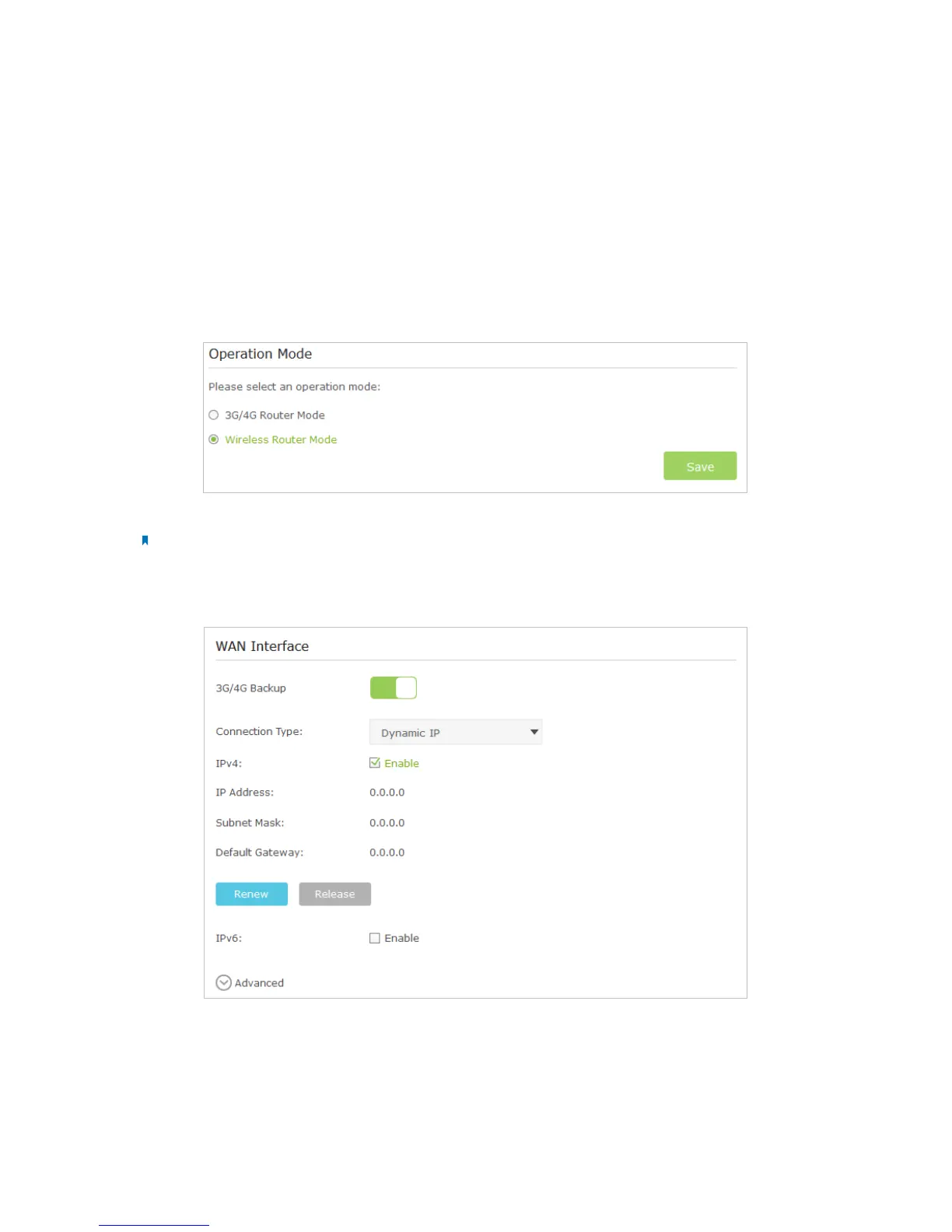
3. Go to Advanced > Operation Mode page.
4. Select the Wireless Router Mode option and click Save to make the settings effective.
Note:
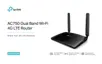
In wireless router mode, you can use 3G/4G network as a backup solution for Internet access. When 3G/4G Backup
is enabled, your router will be directly connected to the 3G/4G network when the original network service fails. To
enable or disable 3G/4G Backup, go to Advanced > Network > Internet.
T7. How to use the WDS Bridging function to extend my wireless
network?
My house covers a large area. The wireless network coverage of the router I’m using
(the root router) is limited. I want to use an extended router to extend the wireless
network of the primary router. Follow the steps to configure the router.














 To Next Page