27
Scheduler Association
This zone will display different contents based on your selection of association mode in
Settings
.
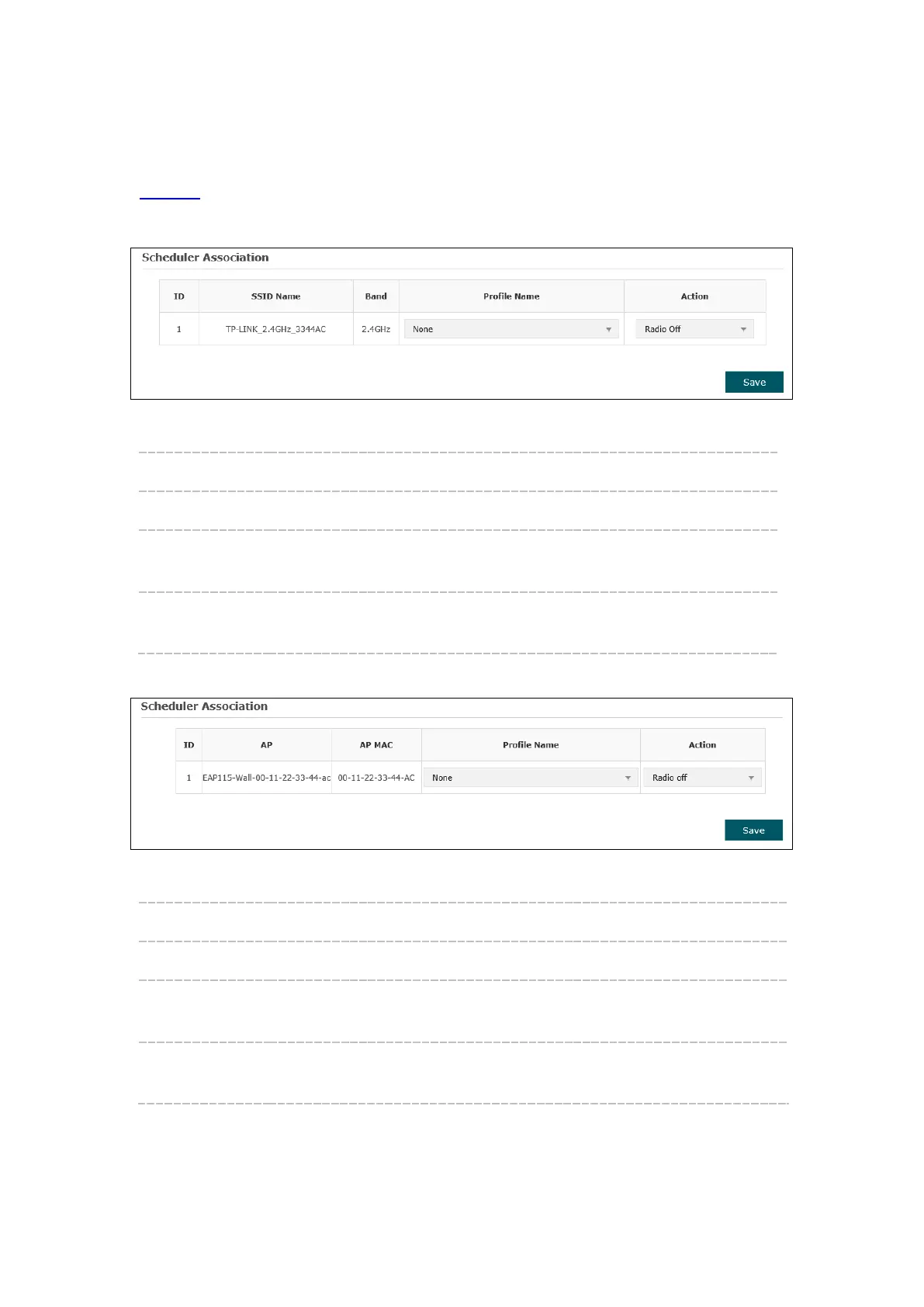
1. Associated with SSID
Figure 5-27 Scheduler Association_Associated with SSID
SSID Name: Displays the SSID of the standalone AP.
Band: Displays the frequency band which the wireless network operates at.
Profile Name: Select a profile name from the drop-
down list. Profile name is
configured in Scheduler Profile Configuration.
Action: Select Radio On/Off to turn on/off the wireless network during the time
interval set for the profile.
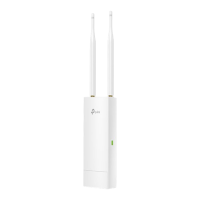
2. Associated with AP
Figure 5-28 Scheduler Association_Associated with AP
AP: Displays the name of the device.
AP MAC: Displays the MAC address of the device.
Profile Name: Select a profile name from the drop-down list. Profile name is configured
in Scheduler Profile Configuration.
Action: Select Radio On/Off to turn on/off the wireless network during the time
interval set for the profile.








 To Next Page