39
Rx/Tx Bytes: Displays the total amount of data (in bytes) received/sent on the LAN
port.
Packets:
Displays the total amount of dropped packets received/sent on the
LAN port.
Rx/Tx Errors: Displays the total amount of error packets received/sent on the LAN
port.
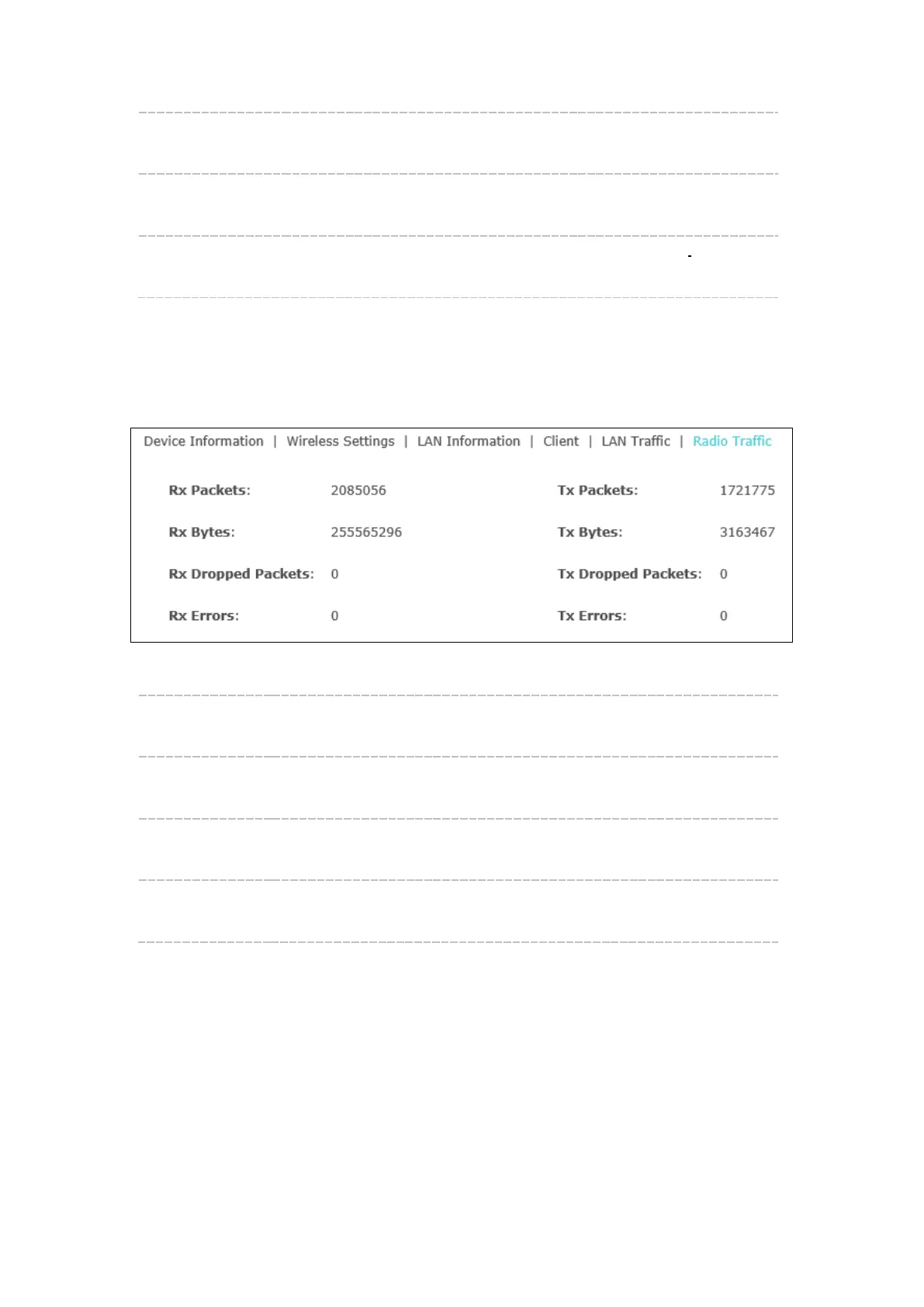
Radio Traffic
Click Radio Traffic and you can monitor the data transmission status of the wireless
network.
Figure 6-8 Radio Traffic
Rx/Tx Packets: Displays the total amount of packets received/sent by the wireless
network.
Rx/Tx Bytes: Displays the total amount of data (in bytes) received/sent by the
wireless network.
Rx/Tx Dropped
Packets:
Displays the total amount of dropped packets received/sent by the
wireless network.
Rx/Tx Errors: Displays the total amount of error packets received/sent by the
wireless network.








 To Next Page