Index: Displays the index of the binding p
olicy.
Policy Name:
AN ID bound to the policy.
Displays the binding direction.
Choose the
menu ACL→Policy Binding→Port Binding to load the following page.
Displays the name of the binding p
olicy.
Interface: Displays the port number or VL
Direction:
10.4.2 Port Binding
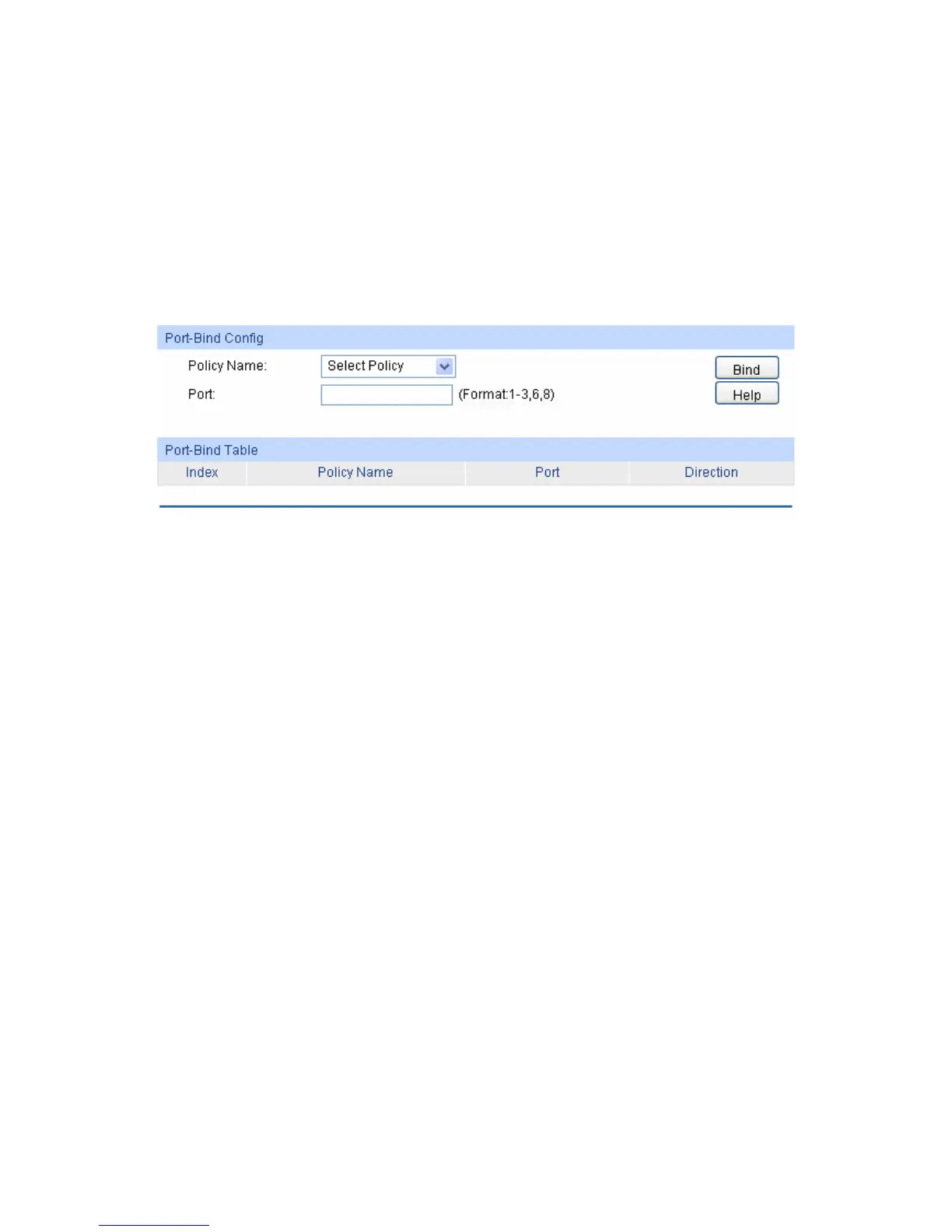
On this page you can bind a policy to a port.
Figure 10-13 Bind the policy to the port
are displayed on this screen:
g
Name:
Enter the number of the port you want to bind.
d Table
Name:
bound to the corresponding policy.
Displays the binding direction.
Choose the
menu ACL→Policy Binding→VLAN Binding to load the following page.
The following entries
Port-Bind Confi
Policy Select the name of the policy you want to bind.
Port:
Port-Bin
Index: Displays the index of the binding p
olicy.
Policy Displays the name of the binding policy.
Port: Displays the number of the port
Direction:
10.4.3 VLAN Binding
On this page you can bind a policy to a VLAN.
134





 To Next Page