TD-W8968 300Mbps Wireless N USB ADSL2+ Modem Router User Guide
29
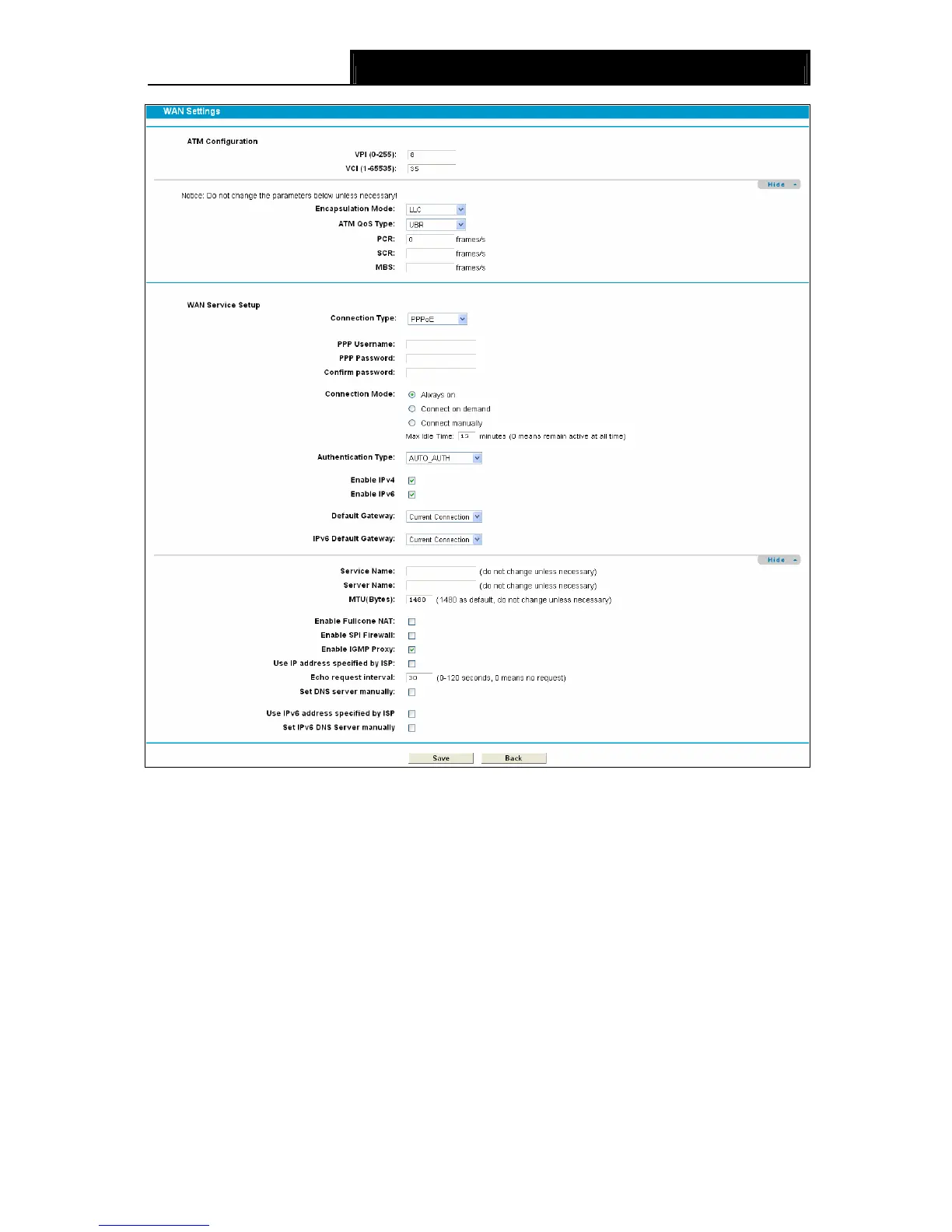
Figure 4-7
¾ PPP Username/Password/Confirm Password: Enter the User Name, Password and
Confirm Password provided by your ISP. These fields are case-sensitive.
¾ Connection Mode: For PPPoE connection, you can select Always on, Connect on demand
or Connect manually. Connect on demand is dependent on the traffic. If there is no traffic (or
Idle) for a pre-specified period of time), the connection will tear down automatically. And once
there is traffic send or receive, the connection will be automatically on.
¾ Authentication Method: Select the Authentication Method from the drop-down list, the
default method is AUTO_AUTH, and you can leave it as a default setting.
¾ Enable IPv4: Check this box to enable IPv4.
¾ Enable IPv6: Check this box to enable IPv6.
¾ Default Gateway: Select a WAN connection from the drop-down list as the IPv4 default
gateway.









 To Next Page