48
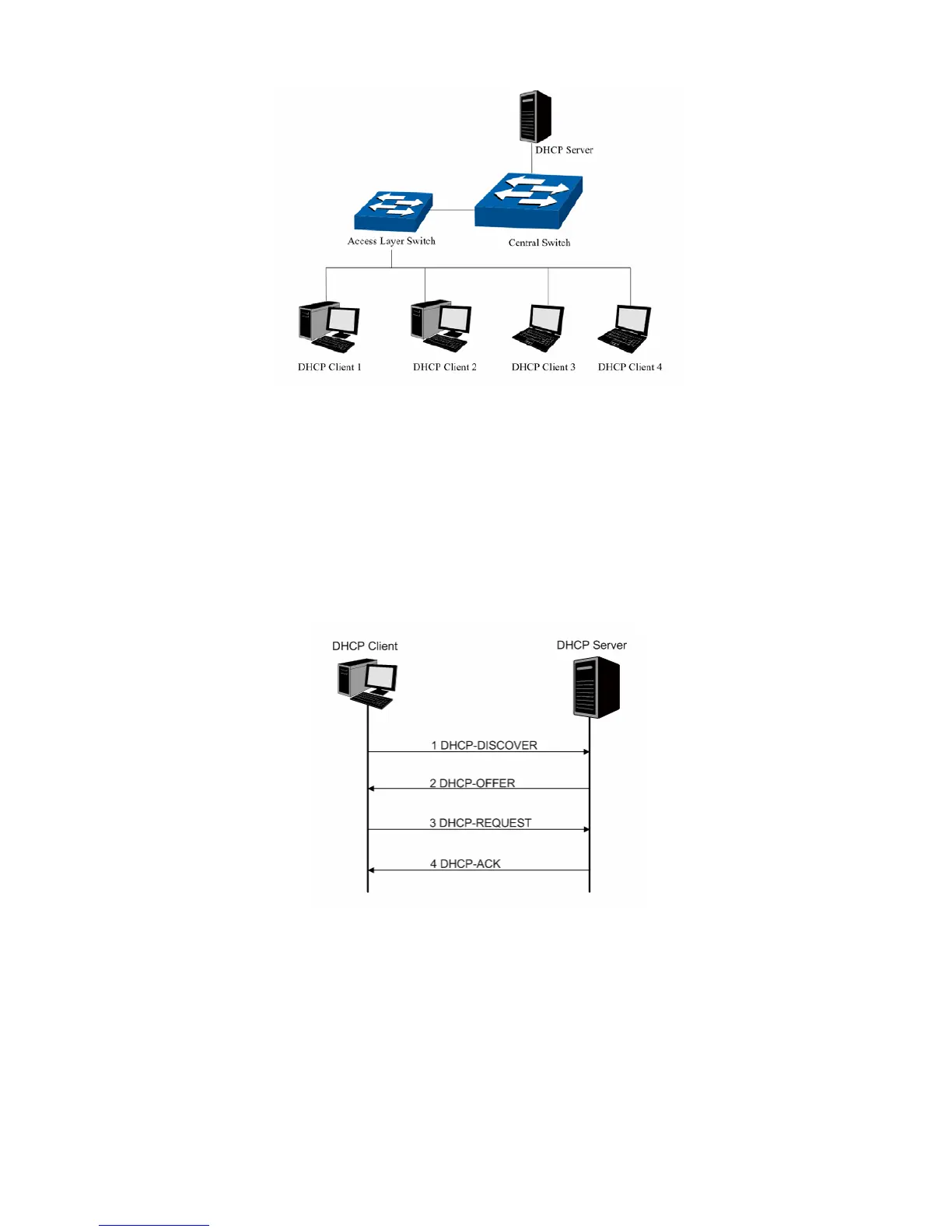
Figure 5-17 Network diagram of DHCP
For different DHCP clients, DHCP server provides three IP address assigning methods:
(1) Manually assign the IP address: Allows the administrator to bind the static IP address to a
specific client (e.g.: WWW Server) via the DHCP server.
(2) Automatically assign the IP address: DHCP server assigns the IP address without an
expiry time limitation to the clients.
(3) Dynamically assign the IP address: DHCP server assigns the IP address with an expiry
time. When the time for the IP address expired, the client should apply for a new one.
Most clients obtain IP addresses dynamically, which is illustrated in the following figure.
Figure 5-18 Interaction between a DHCP client and a DHCP server
(1) DHCP-DISCOVER Stage: The Client broadcasts the DHCP-DISCOVER packet to find
the DHCP server.
(2) DHCP-OFFER Stage: Upon receiving the DHCP-DISCOVER packet, the DHCP server
selects an IP address from the IP pool according to the assigning priority of the IP
addresses and replies to the client with DHCP-OFFER packet carrying the IP address and
other information.
(3) DHCP-REQUEST Stage: In the situation that there are several DHCP servers sending the
DHCP-OFFER packets, the client will only respond to the first received DHCP-OFFER











 To Next Page