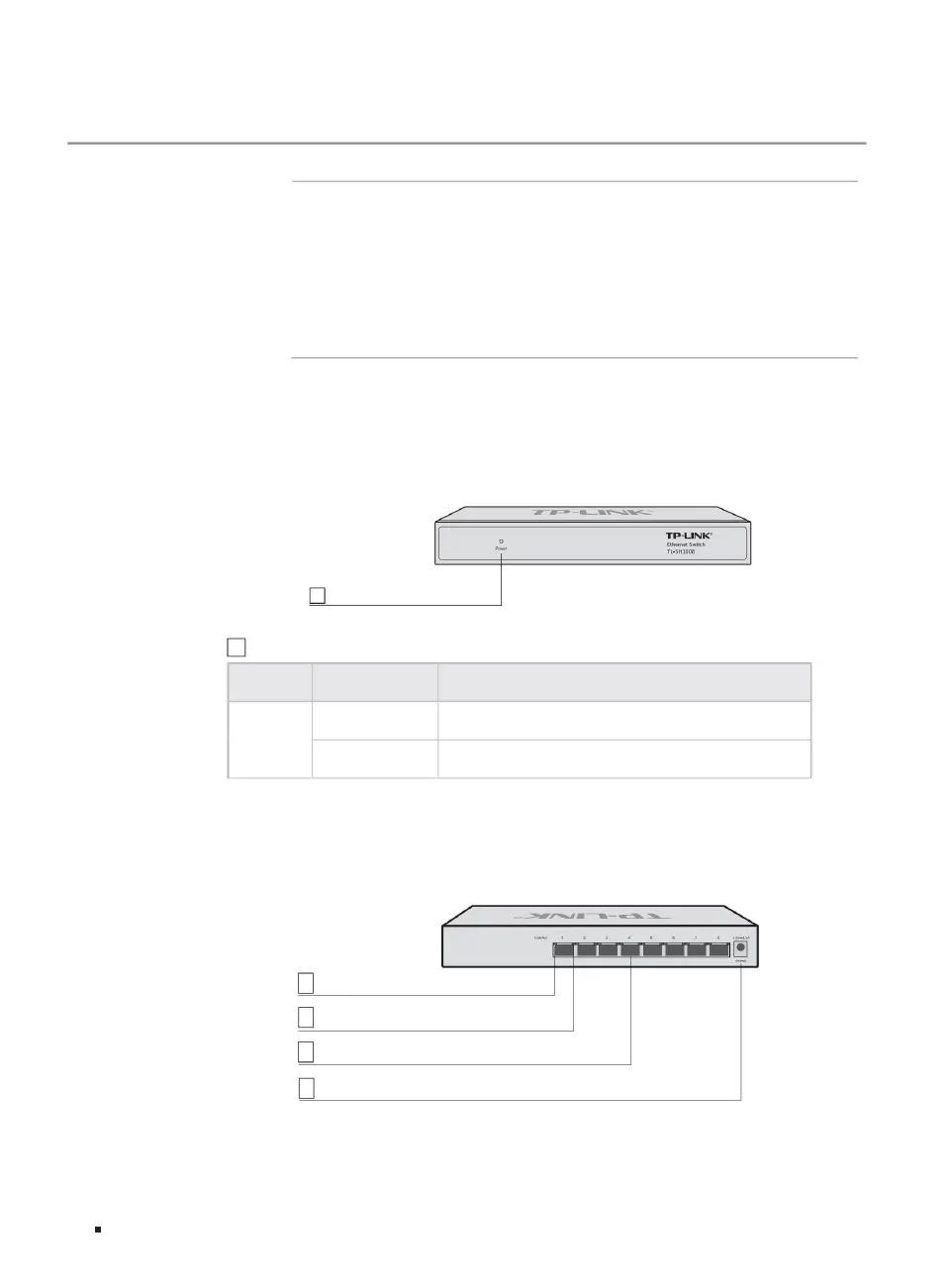
The front panel of TL-SH1008 is shown in Figure 1-1.
The rear panel of TL-SH1008 is shown in Figure 1-2.
TL-SH1008 is a 2.5Gbps Ethernet switch independently developed by Pulian Technology Co., Ltd., providing 8 2.5Gbps RJ45 ports.
2.5Gbps Ethernet Switch Installation Manual
ÿ Rear panel
ÿ Front panel
Indicator light working status working instructions
Does not light up and is not powered on or the system power supply is abnormal.
Always on: After the switch is connected to the power supply, this indicator light is always green.
Power
1.1 Product introduction
1.2 Product appearance
Link/Act indicator (2.5Gbps)
Link/Act indicator (10/100/1000Mbps)
Chapter 1 Product Introduction
Figure 1-1TL-SH1008 front panel diagram
4 power interface
Figure 1-2 Schematic diagram of the rear panel of TL-SH1008
1
1 power indicator light
2
3 2.5Gbps RJ45 ports
01Product introduction
1 power indicator light
Machine Translated by Google



 To Next Page