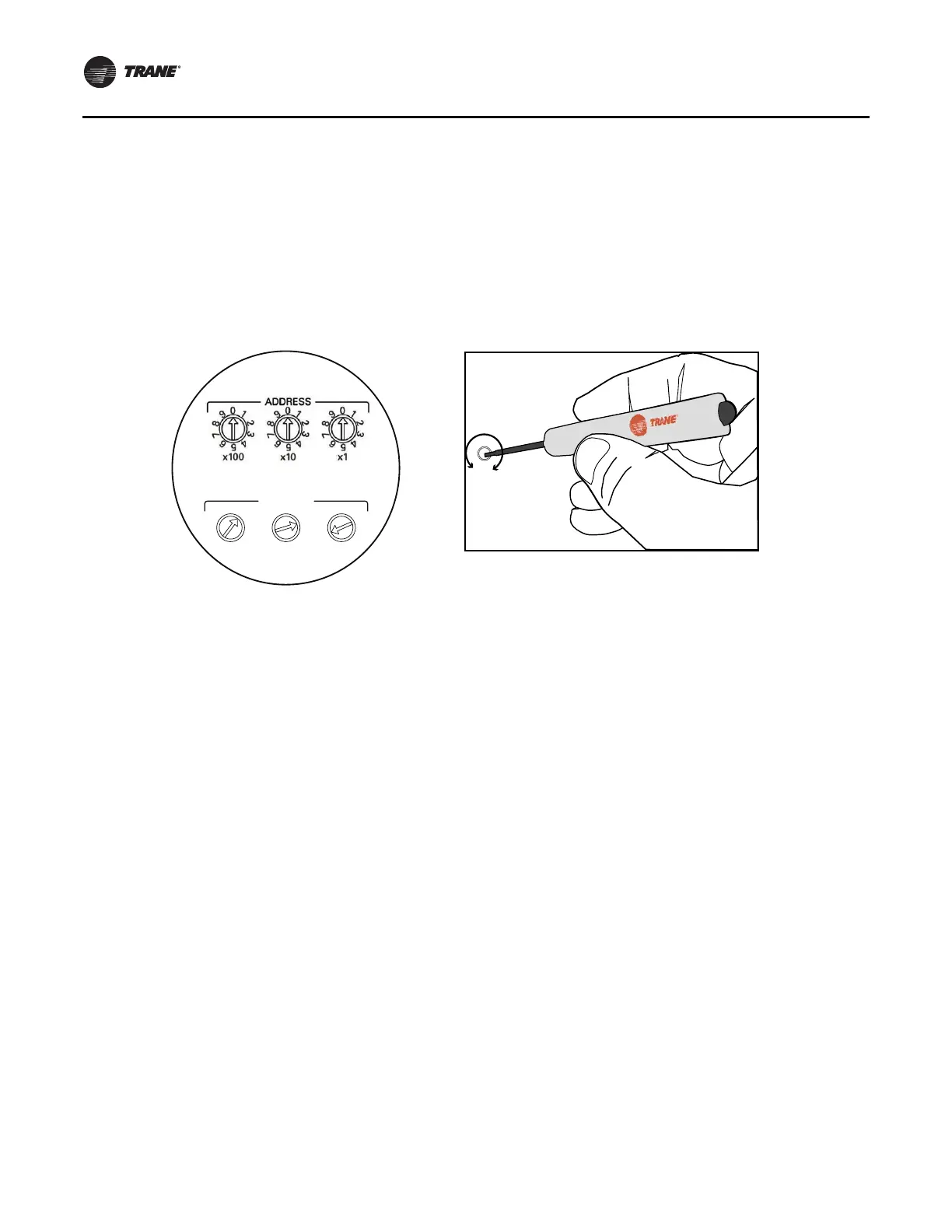
Setting Addresses Using Rotary Switches
12 RF-SVN03F-EN
Setting Addresses Using Rotary Switches
There are three rotary switches on the front of the BCI-R
controller that are used to define a three-digit address
when the BCI-R is installed on a BACnet communications
network. The three-digit address setting is used in both the
rotary switch value and the BACnet device ID. The
illustrations below show how to set rotary switch values.
For more information about rotary switches, see
“Understanding Rotary Switch Values and BACnet Device
IDs,” p. 17.
Note: All
devices are MSTP masters with valid rotary
switch addresses of
001 to 127 for BACne
Figure 8. Setting the rotary switch value
t.
0
5
1
3
6
2
9
4
8
7
ADDRESS
0
1
2
3
4
5
6
7
8
9
x1
0
1
2
3
4
5
6
7
8
9
x10
0
1
2
3
4
5
6
7
8
9
x100
Use a 1/8 inch (3 mm)
flathead service screwdriver
to set rotary switches.
Important: Each device on the BACnet MS/TP link must have a unique rotary switch value; otherwise,
communication problems will occur.
Before
After
Setting the rotary switch value to 127
(before and after).



 To Next Page