EasyManua.ls Logo

Transcend PF 810 - Page 26

Transcend PF 810
42 pages
Print Icon
To Next Page IconTo Next Page
To Previous Page IconTo Previous Page
Loading...
25
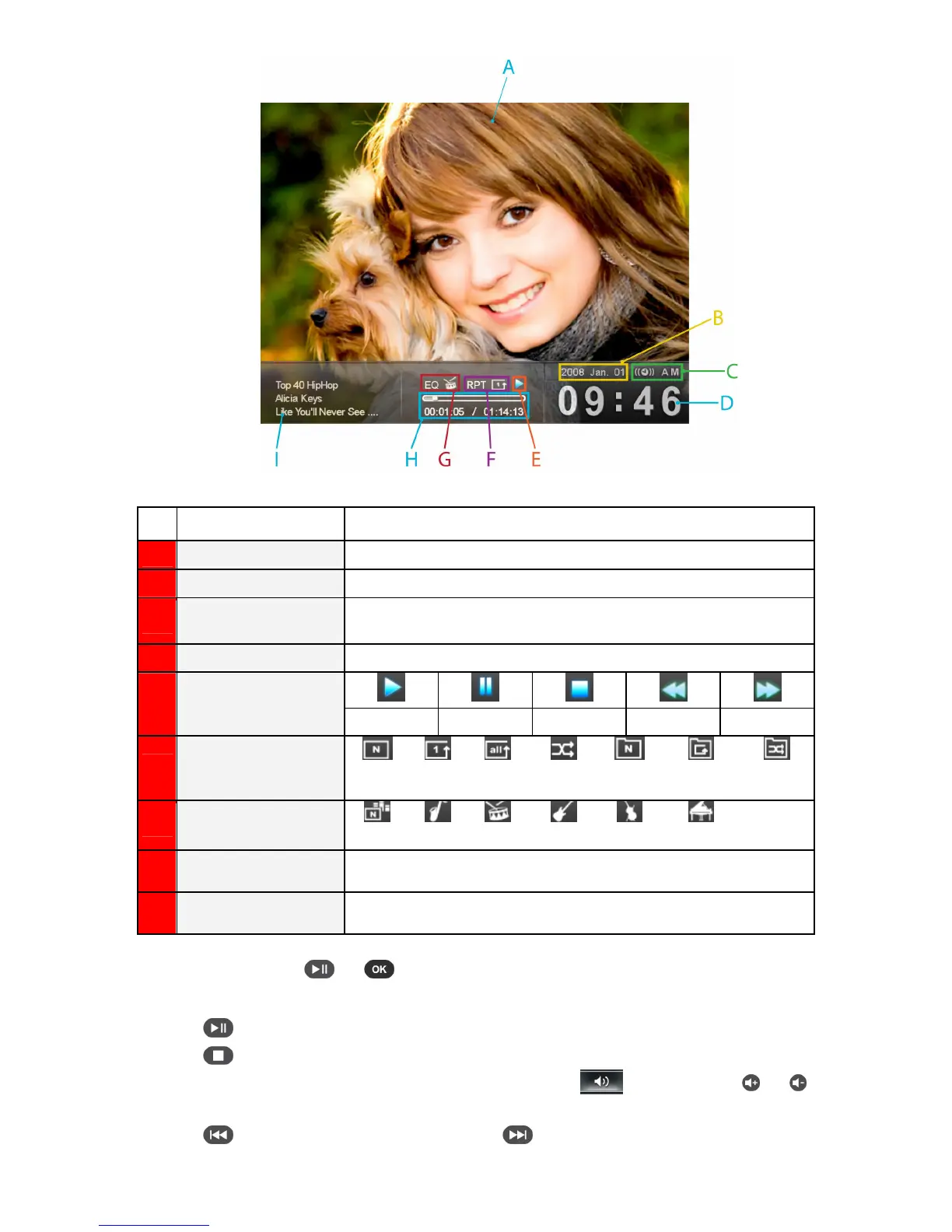
ICON INDICATION
A
Picture Display
Displays either a single background image or a photo slideshow
B
Date
Displays today’s date
C
AM / PM &
Alarm on / off
Displays AM or PM (when 12Hr time format is enabled). And display a
alarm icon while alarm on.
D
Time
Displays the current time
E
Play Status
Play Pause Stop Rewind Fast-Forward
F
Repeat Mode
Normal
Repeat
One
Repeat
All
Random
Normal in
Folder
Repeat in
Folder
Random in
Folder
G
Equalizer Mode
Normal
Jazz
Pop
Rock
Bass
Classical
H
Track Time &
Progress Bar
Indicates the track length and current position
I
Album / Artist / Song
Displays album title, artist name, and song title (respectively)
To start playing music, press or on a highlighted song in the Music Explorer.
The Music Player functions are familiar and easy - just like any other player:
1.
Press to play music and again to pause.
2.
Press to stop the music.
3.
Adjust the music volume by using the OSD volume control ( ) or by pressing
or on the
remote.
4.
Press to go back to the previous track and to play the next song available.


Related product manuals