18
•
SLEDGE
ADJUSTING THE ELECTRONIC SPEED CONTROL
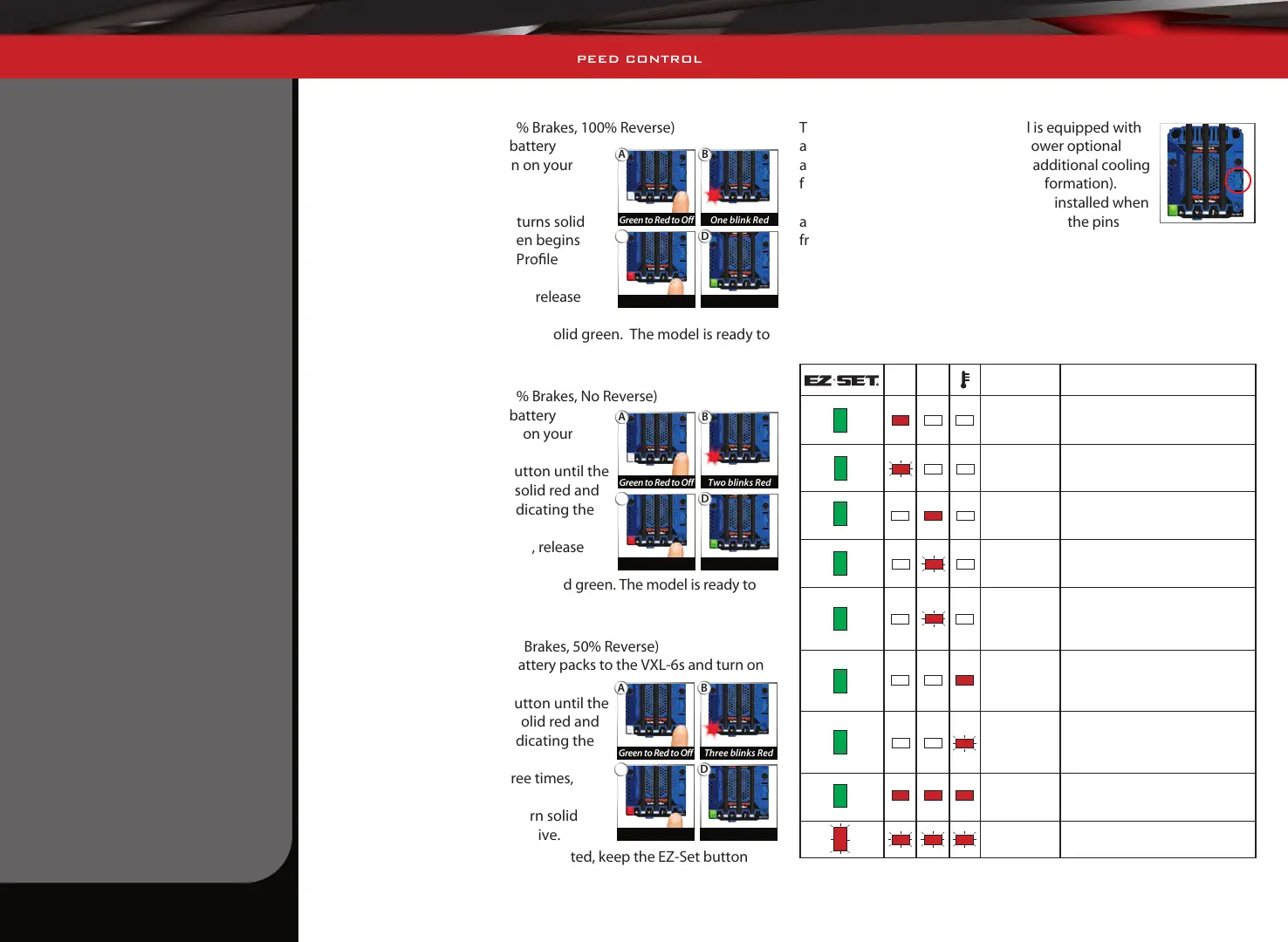
Selecting Sport Mode
(Profile #1: 100% Forward, 100% Brakes, 100% Reverse)
1. Connect two fully charged battery
packs to the VXL-6s and turn on your
transmitter.
2. Press and hold the
EZ-Set button until the LED turns solid
green, then solid red and then begins
blinking red (indicating the Profile
numbers).
3. When the LED blinks red once, release
the EZ-Set button.
4. The LED will blink and then turn solid green. The model is ready to
drive.
Selecting Race Mode
(Profile #2: 100% Forward, 100% Brakes, No Reverse)
1. Connect two fully charged battery
packs to the VXL-6s and turn on your
transmitter.
2. Press and hold the EZ-Set button until the
LED turns solid green, then solid red and
then begins blinking red (indicating the
Profile numbers).
3. When the LED blinks red twice, release
the EZ-Set button.
4. The LED will blink and then turn solid green. The model is ready to
drive.
Selecting Training Mode
(Profile #3: 50% Forward, 100% Brakes, 50% Reverse)
1. Connect two fully charged battery packs to the VXL-6s and turn on
your transmitter.
2. Press and hold the EZ-Set button until the
LED turns solid green, then solid red and
then begins blinking red (indicating the
Profile numbers).
3. When the LED blinks red three times,
release the EZ-Set button.
4. The LED will blink and then turn solid
green. The model is ready to drive.
Note: If you missed the mode you wanted, keep the EZ-Set button
pressed down and the blink cycle will repeat until the button is
released and a mode is selected.
Accessory Power Panel
The VXL-6s electronic speed control is equipped with
a power panel that can be used to power optional
accessories, such as LED light kits or additional cooling
fans (see Traxxas.com for additional information).
Always be sure to keep the panel cover installed when
accessories are not being used to protect the pins
from damage.
LED Codes and Protection Modes
The VXL-6s electronic speed control is equipped with sophisticated
circuitry designed to help protect the electronics from damage caused
by overloading and excessive temperatures. When a protection circuit is
activated, an LED on the VXL-6s ESC will light, indicating a fault.
Explanation Solution
Overcurrent
Protection,
Stage 1
Stop driving; inspect the vehicle for
overgearing or damage.
Overcurrent
Protection,
Stage 2
Stop driving; inspect the vehicle for
overgearing or damage.
Low Voltage
Protection,
Stage 1
Stop driving; inspect the batteries and
recharge.
Low Voltage
Protection,
Stage 2
Stop driving; inspect the batteries and
recharge.
Overvoltage
Stop driving and disconnect the
batteries. Inspect the batteries and
confirm the battery voltage.
Thermal
Shutdown
Protection,
Stage 1
Stop driving; inspect the cooling fan
on the ESC. Allow the power system to
cool before continuing.
Thermal
Shutdown
Protection,
Stage 2
Stop driving; inspect the cooling fan
on the ESC. Allow the power system to
cool before continuing.
Critical
functioning
error
Contact Traxxas Customer Service.
Programming
error
Contact Traxxas Customer Service.
B
Two blinks Red
A
Green to Red to Off
D
Solid
C
Release
B
Three blinks Red
A
Green to Red to Off
D
Solid
C
Release
B
One blink Red
A
Green to Red to Off
D
Solid
C
Release



 To Next Page