User manual TREMOL M23
25
ARTICLE SALE USING BARCODE SCANNER
Scan the article barcode. The article must have programmed barcode and price.
If the barcode matches with any article the sale is registered. Before scan is possible to set
quantity and price.
ECR supports only barcodes compliant to EAN13, EAN8, UPC-A and UPC-E
standards. If working with unique barcodes, they must be programmed (see 2.2).
Weight barcode can be used a variant of EAN13. This type of barcode contains
information about the number of the article in ECR and its quantity (up to 5 categories). It
is not necessary to program this type of barcodes as article parameters. Only the first two
digits need to be programmed, in the general parameters of ECR. (see 2.2).
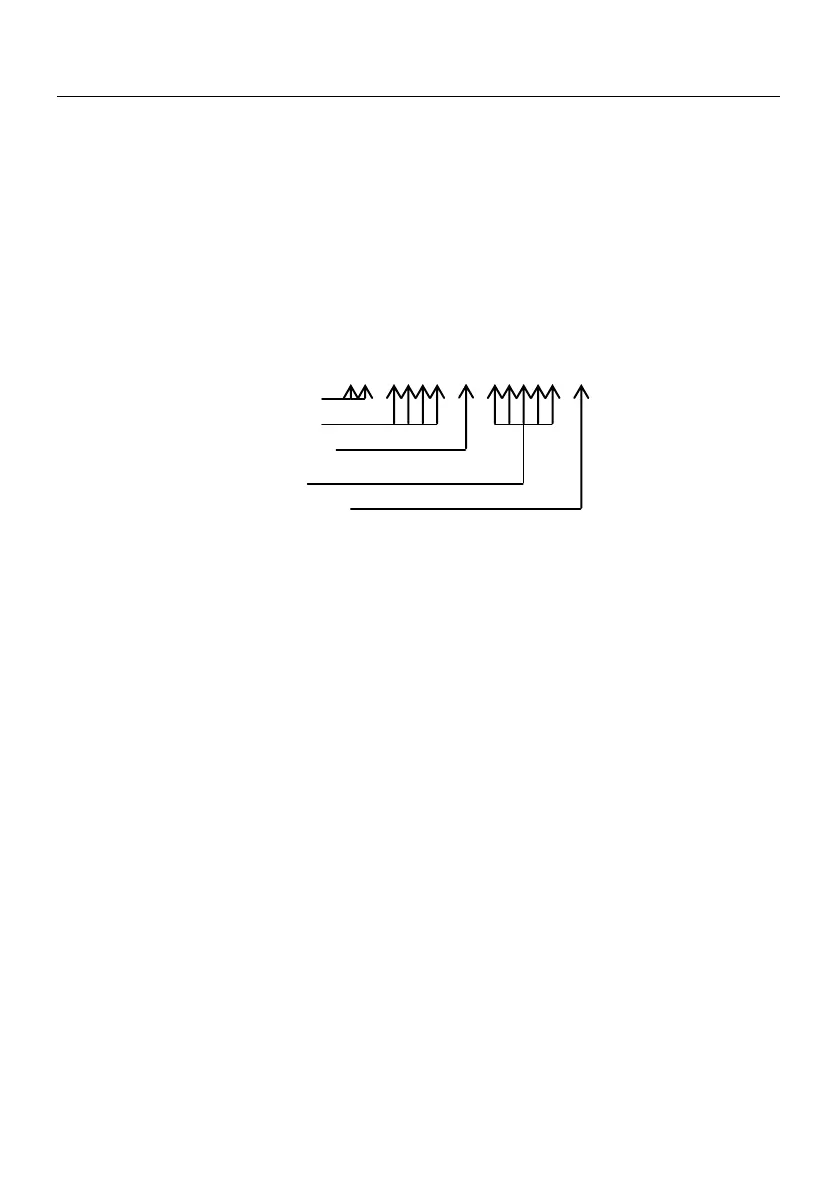
The ECR interprets the barcode digits as follows:
YY NNNN X QQQQQ X
weight barcode prefix
Article number
Quantity checksum
(Not checked by ECR)
Quantity max. 99,999 Kg.
Barcode checksum
(Checked by ECR, depending on P27)
SALES WITH QUANTITY USING ELECTRONIC SCALE
ECR is put in sales mode. Electronic scales is already switched on and in operation mode.
The goods are put on the scales. When the weight of the goods is displayed in XX,XXX Kg
format, the key |is pressed. If the communication between the ECR and the electronic
scales is proper, the weighted quantity is displayed on the ECR. A long beep indicates no
communication. Pressing |key again starts a new attempt to get quantity information
from the electronic scales. There follows a sale of a department (article) following the
above described steps.
CURRENCY OPERATION. SUM CALCULATION. PAYMENT. CHANGE TYPE
When Currency = YES, ECR changes its functionality in the following way: the
receipt is printed also the total amount calculated in currency using the programmed
exchange rate; calculation and displaying of subtotal in currency is possible; payment in
currency.
After calculating the subtotal by pressing again ?, the sum is displayed in
currency and when the button is pressed again the sum is displayed back in cash.
When currency amount is shown, press = to pay in currency.
If before pressing the key a sum was entered and its greater then amount due a
change is calculated in currency.
When working with some values for rate and sums is possible to have some
rounding mistakes.



 To Next Page