TT31 Transponder Installation Manual 1 February 2010
00455-00 Issue AJ
______________________
8.4 Push Buttons
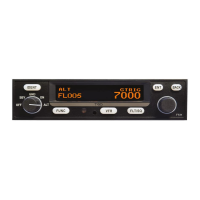
IDENT Press the IDENT button when ATC instructs you to “Ident” or
“Squawk Ident”. This activates the SPI pulse in the transponder
replies for 18 seconds. IDENT will appear in the display.
FUNC Pressing the FUNC button provides access to the flight timer,
stopwatch and altitude monitor function. When the aircraft is
ADS-B equipped, pressing FUNC also provides access to the
ADS-B position monitor.
VFR Pressing the VFR button sets the transponder to the pre-
programmed conspicuity code. Pressing the button again
restores the previous squawk code.
FLT/SQ Pressing FLT/SQ alternates the primary display between squawk
code and Flight ID.
ENT The ENT button enters a digit in the code selector.
BACK The BACK button goes back to the previous digit in the code
selector.
8.5 Code Selector Knob
The right hand knob is used to set squawk codes and the Flight ID. The FLT/SQ button selects which
will be updated. Turning the knob will highlight the first digit on the display, and the digit can be
changed as required. Press the ENT button to advance to the next digit. When ENT is pressed on the
last digit, the new squawk code or Flight ID will replace the previous value. If the code entry is not
completed within 7 seconds, the changes are ignored and the previous code restored.
1200 VFR code in the USA
7000 VFR code commonly used in Europe.
7500 Hijack code
7600 Loss of communications
7700 Emergency code
The Flight ID should correspond to the aircraft call sign entered on your flight plan. If no flight plan is
active, the aircraft registration should be used as your Flight ID. Use only letters and digits. If the
Flight ID is less than 8 characters long, entering a blank character will end it.
8.6 Flight Timer
The Flight Timer records the time for which the transponder has been powered on and operating in
flight mode – either ON or ALT. Press the FUNC button to display the Flight Timer.
8.7 Stopwatch
The stopwatch can be used as a convenient timer. Press the FUNC button to display the stopwatch.
Pressing ENT will reset and start the timer. Pressing ENT again will stop the timer.
8.8 ADS-B Position Monitor
The ADS-B position monitor is available on aircraft equipped for ADS-B position output. It provides a
convenient way of verifying that valid position information is being received by the transponder by
displaying the current calculated position. If a valid position is displayed, the transponder will be
transmitting that position to ADS-B participants. If no position is available the position will be
Page 24 Trig Avionics Limited


 To Next Page