PRELIMINARY: TR-FFT Fire Fighter’s Telephone Manual — LS10309-001TR-E:A 04/28/2021 15
TR-24Z-EXT Installation Installation
.
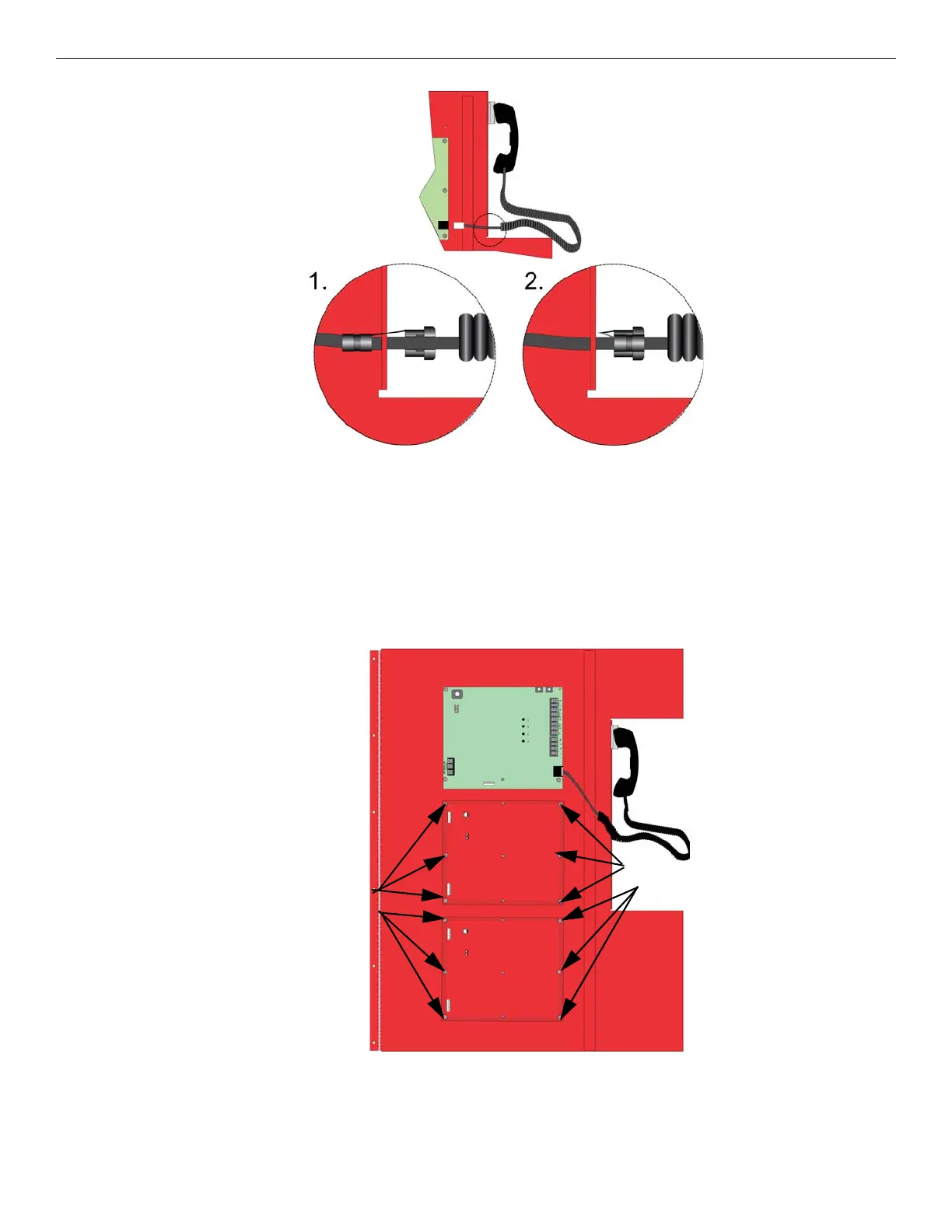
Figure 3.6 Strain Relief Clip Installation
3.3 TR-24Z-EXT Installation
The TR-24Z-EXT expander board offers the option to add additional zones to the TR-FFT.
To install the TR-24Z-EXT, do the following steps.
1. Open the cabinet door and the dead front panel.
2. Remove the power. See Appendix A: for a list of the compatible powering devices.
3. Remove the blank plate and discard.
4. Mount the TR-24Z-EXT on the six mounting studs located on the inside of the dead front panel.
5. To secure the board, use the nuts removed from the blank plate. See Figure 3.7.
Figure 3.7 Mounting Locations for the TR-24Z-EXT
6. Connect one end of the wiring harness (P/N 130398 supplied) to the TR-FFT and connect the other end of the wire harness
to the TR-24Z-EXT as shown in Figure 3.8.
mounting studs
mounting studs



 To Next Page