22 PRELIMINARY: TR-FFT Fire Fighter’s Telephone Manual — LS10309-001TR-E:A 04/28/2021
SLC Device Installation Addressing the TR-MINIMON SLC Devices
4.4 Addressing the TR-MINIMON SLC Devices
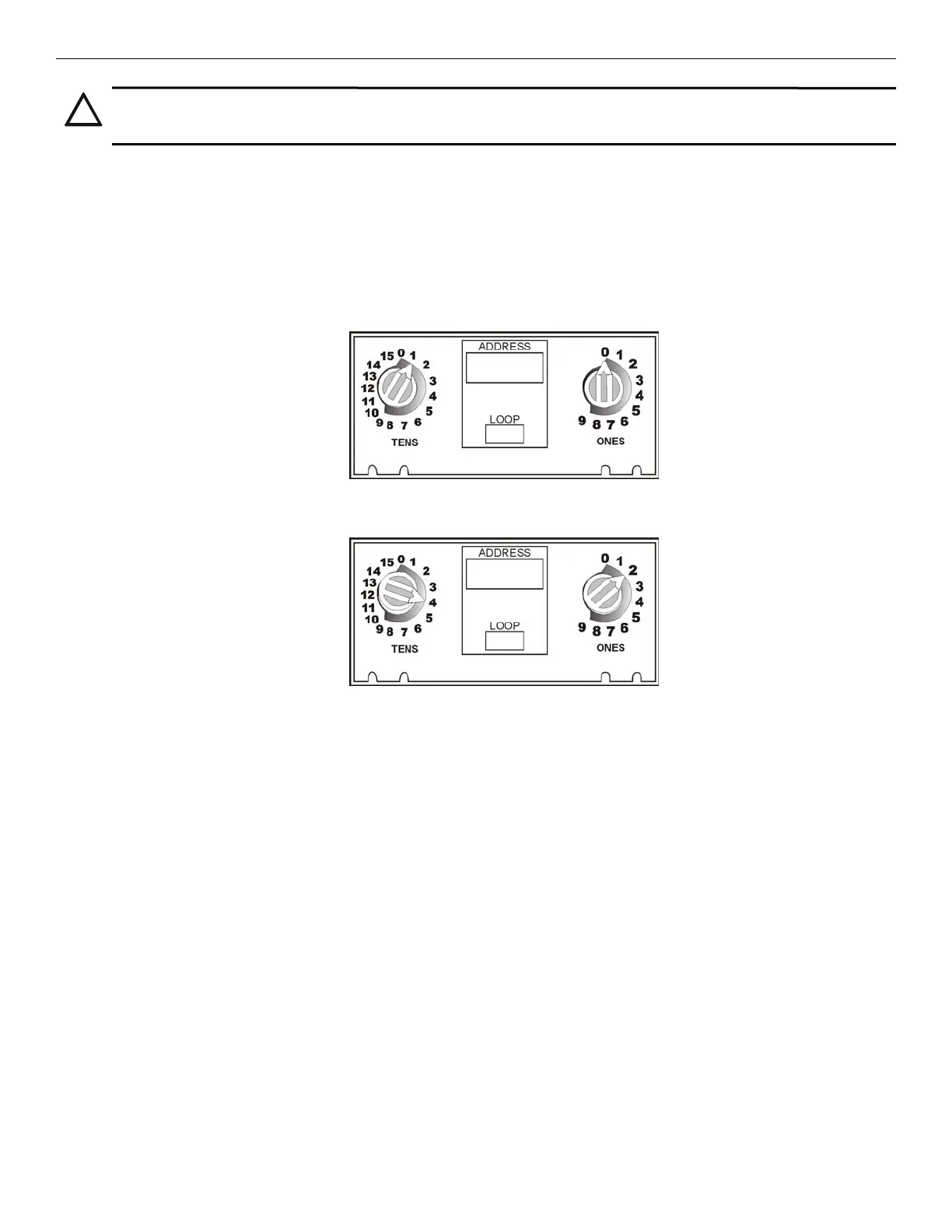
All TR-MINIMON devices are addressed using the two rotary dials that appear on the device board. Use the ONES rotary dial
to set the Ones place in a one- or two-digit number, and use the TENS rotary dial to set the Tens place in a two-digit number.
TR-MINIMON modules can be assigned any unique address from 1 to 48.
• Example 1: To select the device address 10, turn the ONES rotary dial to 0 and turn the TENS rotary dial to 1 as shown in
Figure 4.4.
• Example 2: To select the device address 42, turn the ONES rotary dial to 2 and turn the TENS rotary dial to 4 as show in
Figure 4.4.
Figure 4.4 TR-MINIMON SLC Device Addressing using the Rotary Dials
CAUTION: BREAK WIRE RUNS:
FOR PROPER SYSTEM SUPERVISION DO NOT USE LOOPED WIRE UNDER TERMINALS MARKED SLC + AND – OF
THE SLC DEVICE CONNECTORS. BREAK WIRE RUNS TO PROVIDE SUPERVISION OF CONNECTIONS.
Example 1: Device set to 10
Example 2: Device Set to 42



 To Next Page