EasyManua.ls Logo

Trinity TINYPRO6 - User Manual

Trinity TINYPRO6
20 pages
Print Icon
To Next Page IconTo Next Page
Loading...
TINYPRO6 – Operational Manual
TRINITY
[1]
USER’S MANUAL
TINYPRO6
POWER METER
This document contains the latest technical information about TINYPRO6 which is a
micro-controller based Power meter. The product TINYPRO6 is sophisticated
electronic equipment, and the user is advised to read this User’s Manual carefully
before attempting to install or operate the equipment.
Published on: (mention the date of publishing)
Document Version: 1.0
Question and Answer IconNeed help?

Do you have a question about the Trinity TINYPRO6 and is the answer not in the manual?

Summary

Warranty

Warranty statement

Details the warranty terms and conditions for the Trinity product.

What This Warranty Does Not Cover

Lists exclusions from the warranty coverage, including misuse and third-party parts.

Introduction

The Main Features Available in This Model

Highlights key features like multiparameter monitoring, LED displays, and RS485 communication.

Front View of the Unit

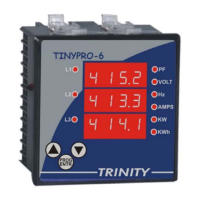
Shows and describes the physical layout and components of the TINYPRO6 unit.

Technical Specifications

Installation and Commissioning

Connection Scheme

Illustrates the wiring diagram for connecting the unit, including voltage and CT connections.

RS485 Connection

Explains how to establish communication using the RS485 interface, including converters.

Operational Details

Programming Mode

Guides users through setting programmable parameters like CT primary and unit address.

Run Mode Displays

Describes the different screens displayed in Run Mode and how they autoscroll.

Freezing and Unfreezing the Displays

Explains how to pause and resume the display scrolling for analysis.

Communication

Modbus RTU on RS485 Port

Details communication protocols, baud rates, and data reading for SCADA/EMS integration.

Appendix

Defining Multiplication Factor

Explains how multiplication factors are used for parameter resolution and data transmission.

Exception Code

Describes error codes returned by the meter for invalid queries or data requests.

Ordering Options

Overview

The TINYPRO6 is a micro-controller based power meter designed for monitoring electricity and managing electrical loads. It offers a range of basic to multifunctional measurement capabilities and supports integration with SCADA/EMS systems via an RS485 port. The device is described as rugged, cost-effective, and field-proven, with over 100,000 units in service.

Function Description

The TINYPRO6 power meter is designed to provide comprehensive electrical parameter monitoring. It can be configured for either 3P4W (3-phase, 4-wire) or 3P3W (3-phase, 3-wire) electrical installations, depending on the ordering option. The device measures and displays various electrical parameters, making it suitable for robust electrical load management systems. Its RS485 port with MODBUS-RTU protocol enables communication with SCADA/EMS software for downloading live data and integrating into control systems.

Important Technical Specifications

The TINYPRO6 offers a variety of technical specifications that highlight its capabilities:

Voltage Measurement:

  • Volts R-N, Y-N, B-N (Line-to-Neutral): Direct Voltage Input up to 300V L-N. Secondary Voltage Input: 63.5V*. Burden: 0.5VA.
  • Volts RY, YB, BR (Line-to-Line): Direct Voltage Input up to 500V L-L. Secondary Voltage Input: 110V*. Burden: 0.5VA.

Current Measurement:

  • Secondary Current Input: 5A or 1A (to be specified at the time of ordering).
  • CT Primary: Site Selectable, with a range of 0-4000A.
  • Burden: < 1.0VA.
  • Overload (Through CT): 5A CT = 6A RMS Continuous; 1A CT = 1.2A RMS Continuous. Whole Current: 120% of Imax continuous.

Frequency:

  • Range: 45 to 55 Hz.
  • Accuracy: 0.3% of Reading.

Energy (KWh):

  • Range of Reading: 0 to 99999999.9 kWh.
  • Accuracy: 1.0S as per IS13779.

Power Factor (System PF):

  • Accuracy: 1% of Reading (IPFI≥0.5).
  • Range of Reading: 0.05 to 1.00 Lag/Lead.

Active Power (System KW):

  • Accuracy: 1.0% of Reading (Between 0.5 Lag to 0.8 Lead).

Display:

  • 0.4" Red Seven Segment.

Communication:

  • RS485 for integration with EMS/SCADA.

Physical Dimensions:

  • Bezel: 96x96 mm (DIN enclosure).
  • Depth: 55 mm.

Usage Features

The TINYPRO6 is designed for ease of use with both programming and run modes.

Display and Indicators:

  • Multiparameter Monitoring: Features LED indicators for various parameters.
  • Seven Segment Display: Displays with 0.4" Red Seven Segment for clear readings.
  • Run Mode Displays: Automatically scrolls through different pages, displaying parameters like individual phase-to-phase voltages (R-Y-B), individual phase current values (R-Y-B), system PF, Hz, active power (KW), and total active energy (KWh). Each page stays for an interval of 7 to 8 seconds.
  • LED Indicators: Specific LEDs glow to indicate the parameter being displayed (e.g., VOLT for voltage, AMPS for current, KWh for total active energy).

Operational Modes:

  • Programming Mode: Allows users to set field-programmable parameters such as CT-primary and unit address for RS485 communication.
  • Run Mode: The default operating mode after power-up, displaying real-time electrical parameters.

Keypad Operation:

  • The unit is operated using a keypad with PROG/ENTR, Up, and Down keys.
  • Entering Programming Mode: Pressing the PROG/ENTR key for about five seconds continuously from Run Mode will enter Programming Mode, starting with CT PRIMARY setting.
  • Navigating Parameters: In Programming Mode, the PROG/ENTR key moves to the next programmable parameter (e.g., UNIT ADDRESS).
  • Setting Values: Up and Down keys are used to adjust values, and PROG/ENTR confirms the set value.
  • Freezing/Unfreezing Displays: In Run Mode, pressing PROG/ENTR freezes the display, indicated by a blinking LED. Up and Down keys can then be used to manually change and analyze pages. Pressing PROG/ENTR again unfreezes the display, resuming automatic scrolling.

Parameter Settings:

  • Setting CT-primary: Settable from 5 to 5000 to ensure actual current values are displayed.
  • Setting Unit Address for RS485 Port: Allows specifying a meter address from 1 to 255 for RS485 communication, with a fixed baud rate of 9600.

Maintenance Features

The manual emphasizes careful reading before installation or operation, suggesting that proper setup is key to device longevity.

Protection:

  • The installation instructions highlight the importance of connecting phases through control fuses of 1.0A rating. This protects the internal electronics from damage due to severe overvoltage or phase faults in the system.

Warranty:

  • A one-year limited warranty covers defects in workmanship and materials for products purchased new in India.
  • Users are advised to securely package the product in its original container with proof of purchase for warranty service.
  • The warranty explicitly excludes damage caused by non-Trinity parts, improper installation, misuse, abuse, neglect, improper shipping, disasters (fire, flood, lightning), improper electrical current, interaction with non-Trinity products, or service by unauthorized personnel. It also does not cover refurbished or reconditioned products.

Communication Diagnostics:

  • The device supports MODBUS-RTU protocol on its RS485 port.
  • An exception response is sent if an attempt is made to read an invalid address or if the host requests more than 32 bytes of data in one query, aiding in troubleshooting communication issues. The exception code 02 indicates an invalid start address or excessive data request.

Multiplication Factor (MF) for Data:

  • For providing resolution, all parameters except PT are multiplied with 100 before transmitting (e.g., KVA 278.99 is sent as 27899).
  • PF has an MF of 1000 (e.g., 0.987 is sent as 987).
  • Hz has an MF of 100 (e.g., 48.33 Hz is sent as 4833). This information is crucial for correct data interpretation when integrating with SCADA/EMS.

Trinity TINYPRO6 Specifications

General IconGeneral
BrandTrinity
ModelTINYPRO6
CategoryMeasuring Instruments
LanguageEnglish

Related product manuals