The Triplett HS10 is a Heat Stress Meter designed to monitor Wet Bulb Global Temperature (WBGT) and Heat Index (HI), providing crucial data for controlling physical activity in hot environments to mitigate the risk of heat-related injuries. This compact device simultaneously displays WBGT/HI, temperature, and relative humidity, making it suitable for both outdoor and indoor heat stress measurements.
Function Description:
The HS10 measures air temperature, globe temperature, and humidity to calculate the heat stress index. WBGT, developed at US military training camps, is widely used in workplaces and sports. It aligns with international standards like ISO 7243 and is referenced by organizations such as OSHA, SMA (Sports Medicine Australia), and the Japan Society for Occupational Health for establishing permissible heat exposure limits. The heat index, developed by the US National Weather Service, helps individuals avoid heat illness, as prolonged exposure to high heat index values can lead to sunstroke, heat cramps, heat exhaustion, or even death. The device is applicable in various settings, including construction, foundries, brick-firing plants, glass facilities, boiler rooms, mining sites, army training, marathons, and beach activities.
The meter features a programmable buzzer and a red LED for danger zone warnings, with an adjustable audible alarm volume (75dB, 60dB, or mute). It also includes a 4-level dangerous level indicator on the LCD. The device has a wearable design and comes with an arm strap. The display updates every 20 seconds.
Important Technical Specifications:
- Temperature Range: 32 to 122°F (0 to 50°C)
- Temperature Resolution: 0.1°C/°F
- Temperature Accuracy: +/-1.8°F (+/-0.6°C)
- Humidity Range: 0.1% to 99.9% RH
- Humidity Resolution: 0.1% RH
- Humidity Accuracy: 10.0% to 90.0% @ 25°C: Typical 5%; Others 7%
- Globe Temperature (inside black ball): 32 to 158°F (0 to 70°C)
- WBGT Temperature Range: 32 to 122°F (0 to 50°C)
- HI Temperature Range: 32 to 140°F (0 to 60°C)
- WBGT Alarm Range: 68 to 122°F (20 to 50°C)
- HI Alarm Range: 68 to 122°F (20 to 50°C)
- Black Ball Size: Dia. 40 mm
- Stabilization Time: 15 to 25 minutes typical
- Battery Life: ~300 hours
- LCD Size: 40(H) x 39(W) mm (1.6 x 1.5")
- Operation Temperature: 32 to 122°F (0 to 50°C)
- Operation RH%: Humidity < 80%
- Storage Temperature: -4 to 122°F (-20 to 50°C)
- Storage RH%: Humidity < 90%
- Dimensions: 70(H) x 60(W) x 22(D) mm (2.8" x 2.4" x 0.8")
- Weight: 3.17 oz (~90g)
- Standard Package: Meter, Battery, Manual, Paper box
- Battery Type: AAA x2pcs
Usage Features:
The HS10 is operated using a set of function buttons: POWER/SET, and up/down adjust keys.
- Power On/Off: Press the POWER/SET button for 1 second to turn ON, and press and hold for 2 seconds to turn OFF. Upon powering on, all indicators are shown on the LCD, and the meter enters measurement mode. The firmware revision is displayed for 1 second.
- Measurement Mode: In this mode, WBGT, temperature, and humidity values are continuously displayed on the LCD.
- Setting Mode: To enter Setting Mode from Normal Measurement Mode, simultaneously press the SET, ▲, and ▼ buttons for 3 seconds. In this mode, users can customize default settings.
- Reset Mode: To enter Reset Mode from power-off status, simultaneously press the SET, ▲, and ▼ buttons for 5 seconds until "rSt" appears on the LCD. This resets the meter to default settings.
- Sound Level Adjustment: In Normal Measurement Mode, the ▲ or ▼ buttons adjust the alarm volume (0dB, 60dB, or 75dB). The buzzer icon is displayed for 60dB and 75dB, but not for 0dB.
- Danger Zone Indicator: The LCD features a 4-level indicator at the top for heat stress danger zones for both WBGT and HI. These levels are:
- Caution: WBGT 26.7-29.4°C (80-84.9°F), HI 27-31.9°C (80.6-89.4°F) - Silent alarm.
- Extreme Caution: WBGT 29.4-31°C (85-87.9°F), HI 32-40.9°C (89-105.6°F) - Beep alarm.
- Danger: WBGT 31-32.2°C (88-89.9°F), HI 41-53.9°C (105.7-129°F) - Urgent beep alarm.
- Extreme Danger: WBGT >32.2°C (>90°F), HI >54°C (>129°F) - Urgent beep alarm.
- Alarm Function: When the measured heat stress value exceeds the alarm threshold, the red LED, buzzer, and measured value blink every second. After 30 seconds, it beeps once per minute. The beep sound can be disabled by pressing the ▼ key.
- Alarm Threshold Setting: Users can customize the alarm threshold or use the factory default. To customize, select [ON] in Setup Mode. The adjustment range is 68-122°F (20-50°C) for WBGT and 50-140°F (10-60°C) for HI, with 0.1 per step. Press SET to save the value. To disable the alarm function (LED, buzzer, and icons OFF), simultaneously press ▲ and ▼ while adjusting the threshold; the display will show [--.-]. Press ▲ and ▼ again to revert.
- IN/OUT Switch (WBGT Mode Only): This function calculates WBGT with [OUT] direct sun exposure or without [IN]. In IN/OUT modes, use ▲ or ▼ to switch and press SET to confirm.
- Temperature Unit Switch: Press ▲ or ▼ to switch between °C (Celsius) and °F (Fahrenheit), then press SET to save.
- WBGT/HI Switching: After setting the temperature unit, press ▲ or ▼ to switch between WBGT and HI as the main displayed heat stress index, then press SET to confirm.
Maintenance Features:
- Battery Installation and Replacement: The meter is powered by two 1.5V AAA batteries. Batteries should be checked when using the meter for the first time, when the battery symbol appears on the LCD, or if the meter does not power ON. To replace, turn off the meter, remove the battery cover, replace old batteries with new ones, ensuring correct polarity, and then replace the battery cover.
- Low Battery Indication: A battery symbol appears on the LCD when the battery voltage is low, indicating that the batteries need to be replaced.

 Need help?
 General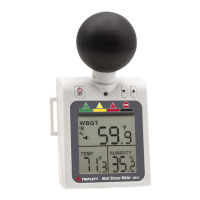

 To Next Page