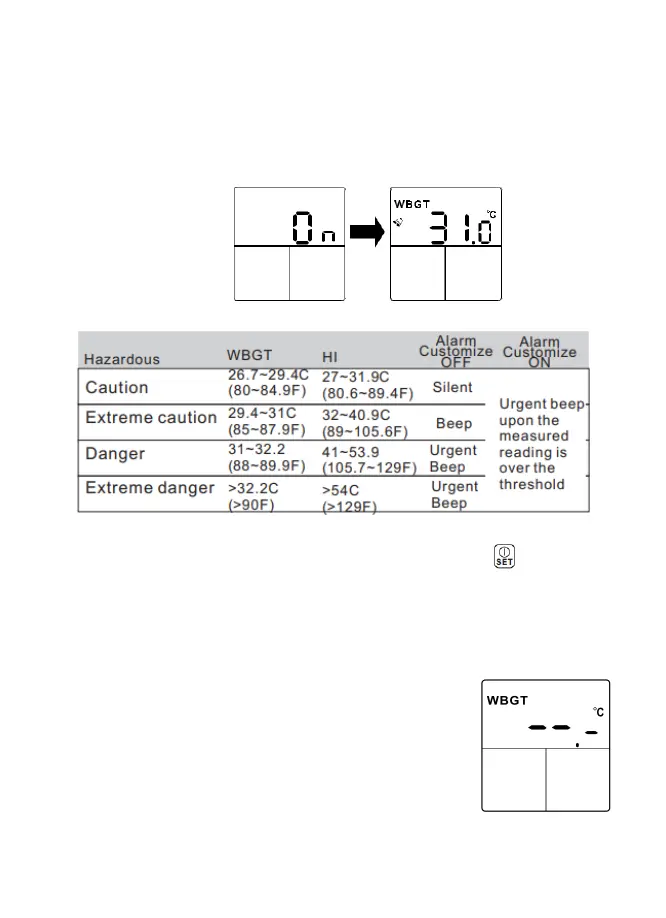
The default alarm-threshold is defined in below and each range has different
buzzer frequence to distinguish.
If user decides to customize their own alarm threshold, select [ON], [ON]
means the alarm threshold setting is turned ON by user.
The adjustment
range is listed
below.
Press the [▲] or [▼] button to adjust alarm value. Press the button to save
the value. The adjustment is 0.1 per step. The adjustment range is 68°F to
122°F (20 to 50°C) for WBGT and 50°F to 140°F(10~60°C) for HI
Note: If user prefers to monitor the heat stress in a complete silent mode
the following procedure can disable the alarm function
so LED, buzzer and alarm related icons are all OFF.
While adjusting alarm threshold value, pressing [▲]
and [▼] key simultaneously. The alarm threshold will
show [--.-] on the LCD Press [▲] and [▼] again to
revert the status.


 To Next Page