12
Troubleshooting
Try these remedies for common Inverter/Charger problems before calling for assistance. Call Tripp Lite Customer Service at 773.869.1234
before returning your unit for service.
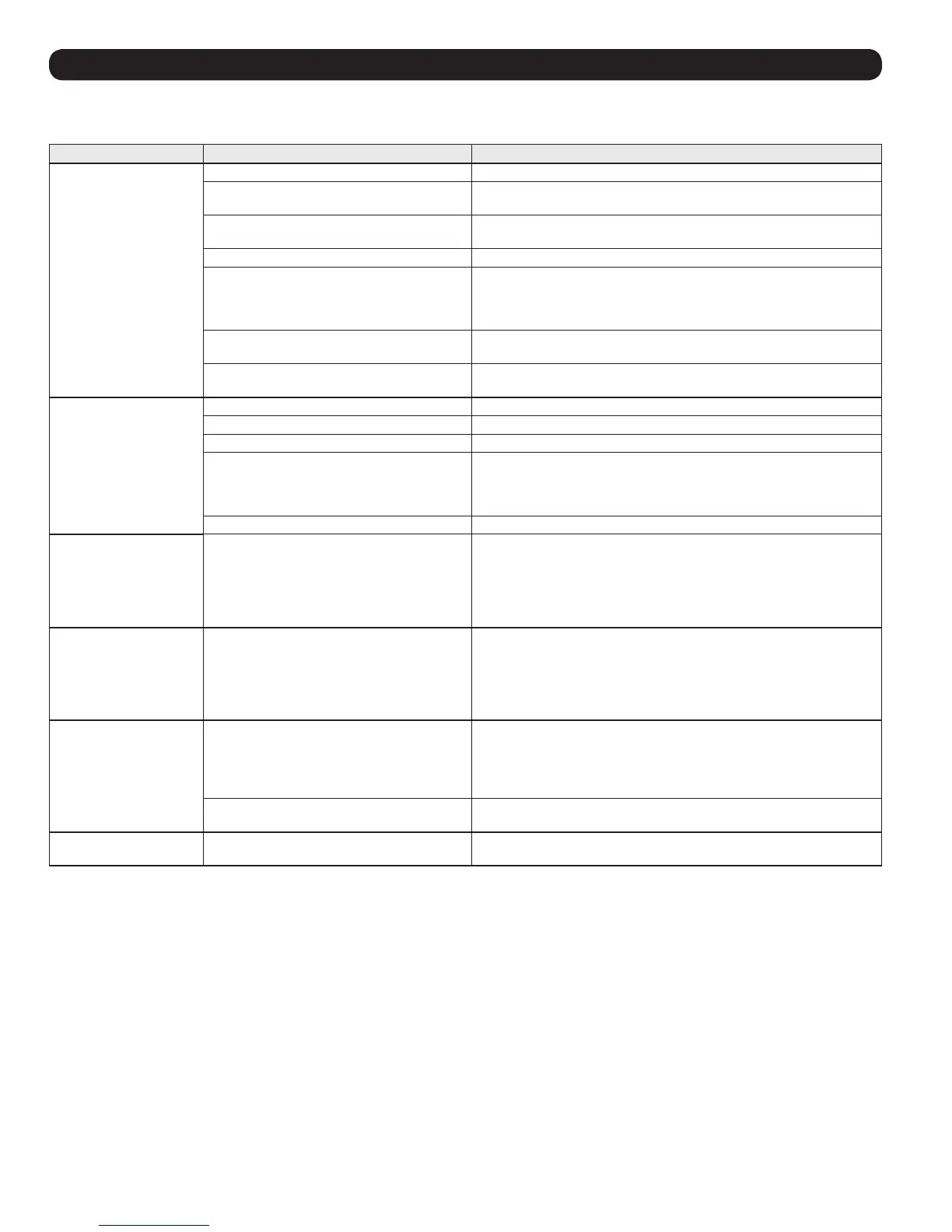
SYMPTOM PROBLEMS CORRECTIONS
No AC Output (All
Indicator Lights Are OFF)
Unit is not properly connected to utility power. Connect unit to utility power.
Operating Mode Switch is set to “OFF” and AC
input is present.
Set Operating Mode Switch to “AUTO/REMOTE” or “CHARGE ONLY.”
This is normal when the Operating Mode Switch
is set to “CHARGE ONLY” and AC input is absent.
No correction is required. AC output will return when AC input returns.
Set Operating Mode Switch to “AUTO/REMOTE” if you require AC output.
Output circuit breaker is tripped. Reset circuit breaker.
Unit has shut down due to battery overcharge
(preventing battery damage). The problem may
be with connected auxiliary chargers, if any, or
with the unit’s charger.
Disconnect any auxiliary chargers. Reset by moving Operating Mode Switch
to “DC OFF” Wait 1 minute and switch to “AUTO/REMOTE” or “CHARGE
ONLY.” If unit remains in shutdown mode after several attempts to reset,
contact Tripp Lite Customer Service for assistance.
Unit has shut down due to excessive battery
discharge.
Use an auxiliary charger* to raise battery voltage. Check external battery
connections and fuse. Unit automatically resets when condition is cleared.
Unit has shut down due to overload. Reduce load. Reset by moving Operating Mode Switch to “DC OFF.” Wait 1
minute. Switch to “AUTO/REMOTE” or “CHARGE ONLY.”
Battery Not Recharging
(AC Input Present)
Connected batteries are dead. Check and replace old batteries.
Battery fuse* is blown. Check and replace fuse.*
Battery cabling* is loose. Check and tighten or replace cabling.*
Unit has shut down due to battery overcharge
(preventing battery damage). The problem may
be with connected auxiliary chargers, if any, or
with the unit’s charger.
Disconnect any auxiliary chargers. Reset by moving Operating Mode Switch
to “DC OFF.” Wait 1 minute and switch to “AUTO/REMOTE” or “CHARGE
ONLY.” If unit remains in shutdown mode after several attempts to reset,
contact Tripp Lite Customer Service for assistance.
Output circuit breaker is tripped. Reset circuit breaker.
All Three “BATT VOLT/
CHRG CURR” LEDs are
slowly flashing (½ second
flashes) with Operating
Mode Switch in the “AUTO/
REMOTE” position.
Battery is excessively discharged. Unit will shut
down to prevent battery damage.
Use an auxiliary charger* to raise battery voltage. Check external battery
connections and fuse. Unit automatically resets when condition is cleared.
All Three “BATT VOLT/
CHRG CURR” LEDs are
rapidly flashing (¼ second
flashes) with Operating
Mode Switch in the “AUTO/
REMOTE” position.
Battery is overcharged. Unit will shut down to
prevent battery damage. The problem may be
with connected auxiliary chargers, if any, or with
the unit’s charger.
Disconnect any auxiliary chargers. Reset by moving Operating Mode Switch
to “DC OFF.” Wait 1 minute and switch to “AUTO/REMOTE.” If unit remains
in shutdown mode after several attempts to reset, contact Tripp Lite
Customer Service for assistance.
Red “LOW” Battery
Indicator Light is flashing
with Operating Mode
Switch in the ”AUTO/
REMOTE” position.
Battery voltage is low. Unit has shut down to
protect battery from damage.
If AC power (utility- or generator-supplied) is present, the unit will
automatically reset itself and start recharging connected batteries.
However, if an external charger is used to recharge the batteries, you will
need to manually reset the unit by moving the Operating Mode Switch to
“DC OFF” for two seconds then returning it to “AUTO/REMOTE”.
False reading due to undersized or insufficiently
connected DC cabling.
Use sufficient size DC cable sufficiently connected to the Inverter/Charger.
Red “LOAD” Operation
Indicator Light Flashing
Inverter is overloaded. Unit will automatically
shut down after 5 seconds.
Reduce load. Reset by moving Operating Mode Switch to “DC OFF.”
Wait 1 minute. Switch to “AUTO/REMOTE” or “CHARGE ONLY.”
*User-supplied.


 To Next Page
 Loading...