5
A2
Select High AC Input Voltage Point
for Switching to Battery—OPTIONAL*
Level 120V Models 230V Models Switch Position
A 145V 278V Up
B 135V 259V Down (factory setting)
* Most of your connected appliances and equipment will perform
adequately when your Inverter/Charger’s Low AC Voltage Input Point (DIP
Switches #3 and #4 of Group A are set to 95V. However, if the unit
frequently switches to battery power due to momentary low line voltage
swings that would have little effect on equipment operation, you may wish
to adjust these settings. By decreasing the Low AC Voltage Point, you will
reduce the number of times your unit switches to battery due to voltage
swings.
** For APS3636VR and APSINT3636VR models Level A setpoints are the
same as Level B.
Operation
Configuration
Resetting Your Inverter/Charger to Restore AC Power
Your Inverter/Charger may cease supplying AC power or DC charging power in order to protect itself from overload or to protect your
electrical system. To restore normal functioning:
Overload Reset: Switch operating mode switch to “DC OFF” and remove some of the connected electrical load (ie: turn off some of the
AC devices drawing power which may have caused the overload of the unit). Wait one minute, then switch operating mode switch back to
either “AUTO/REMOTE” or “CHARGE ONLY.”
Output Circuit Breaker Reset: Alternatively, check output circuit breaker on the unit’s front panel. If tripped, remove a portion of the
electrical load, wait one minute to allow components to cool, then reset the circuit breaker. See the Troubleshooting section for additional
possible reasons why AC output may be absent.
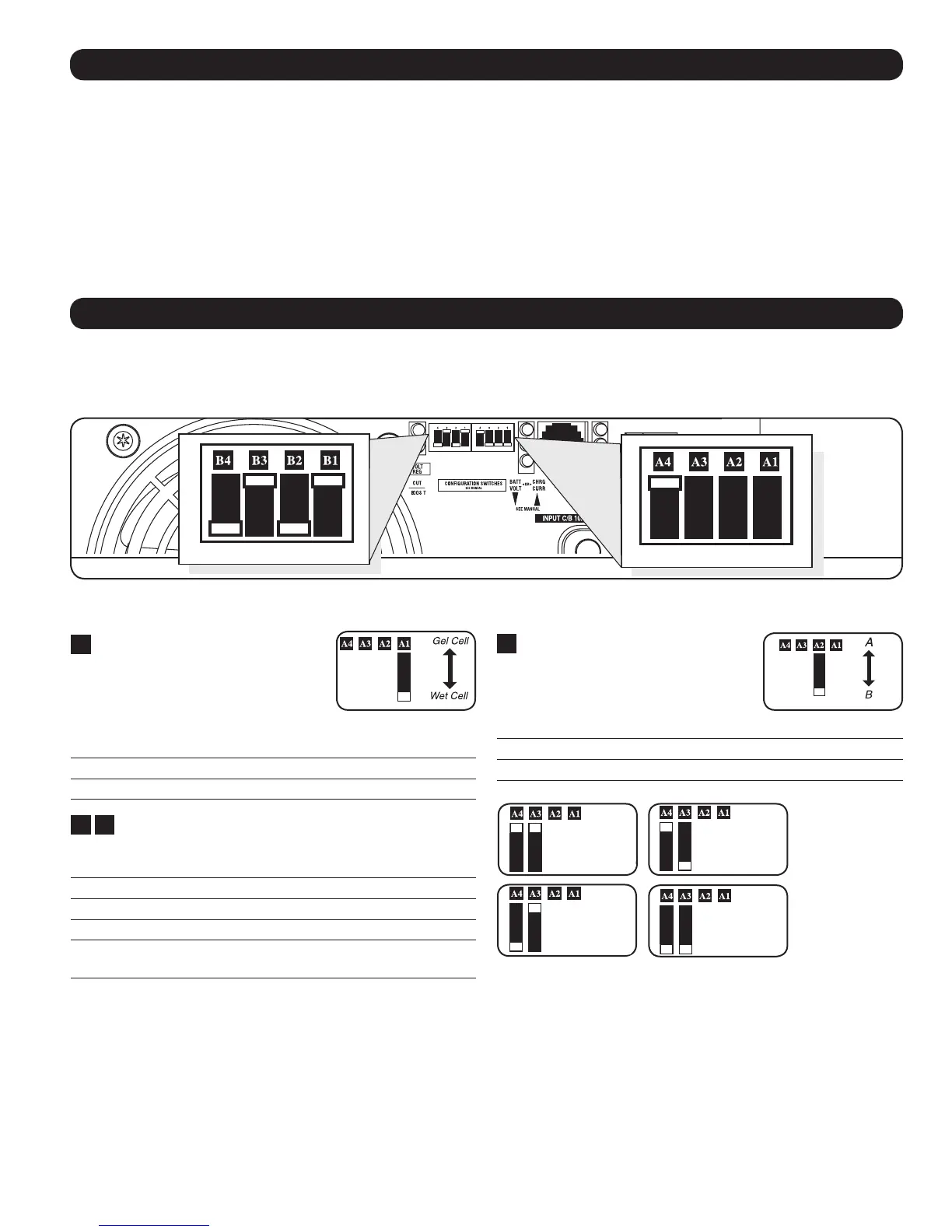
A1
Select Battery Type—REQUIRED
CAUTION: The Battery Type DIP Switch setting
must match the type of batteries you connect,
or your batteries may be degraded or damaged
over an extended period of time. See “Battery
Selection,” for more information.
Battery Type Switch Position
AGM/Gel Cell (Sealed) Battery Up
Wet Cell (Vented) Battery Down (factory setting)
A2
A3
Select Low AC Input Voltage Point for Switching to
Battery—OPTIONAL*
Level 120V models 230V models Switch Position
A 105V** 201V** A4 Up & A3 Up
B 95V 182V A4 Up & A3 Down
C 85V 163V A4 Down & A3 Up
D 75V 144V A4 Down & A3 Down
(factory setting)
Group A DIP Switches
Set Configuration DIP Switches
Using a small tool, set the Configuration DIP Switches (located on the front panel, see diagram) to optimize Inverter/Charger operation
depending on your application.
Group B Dip Switches
Group A Dip Switches
Level A
Level B
Level C Level D



 To Next Page