33
General Information
Pannier System
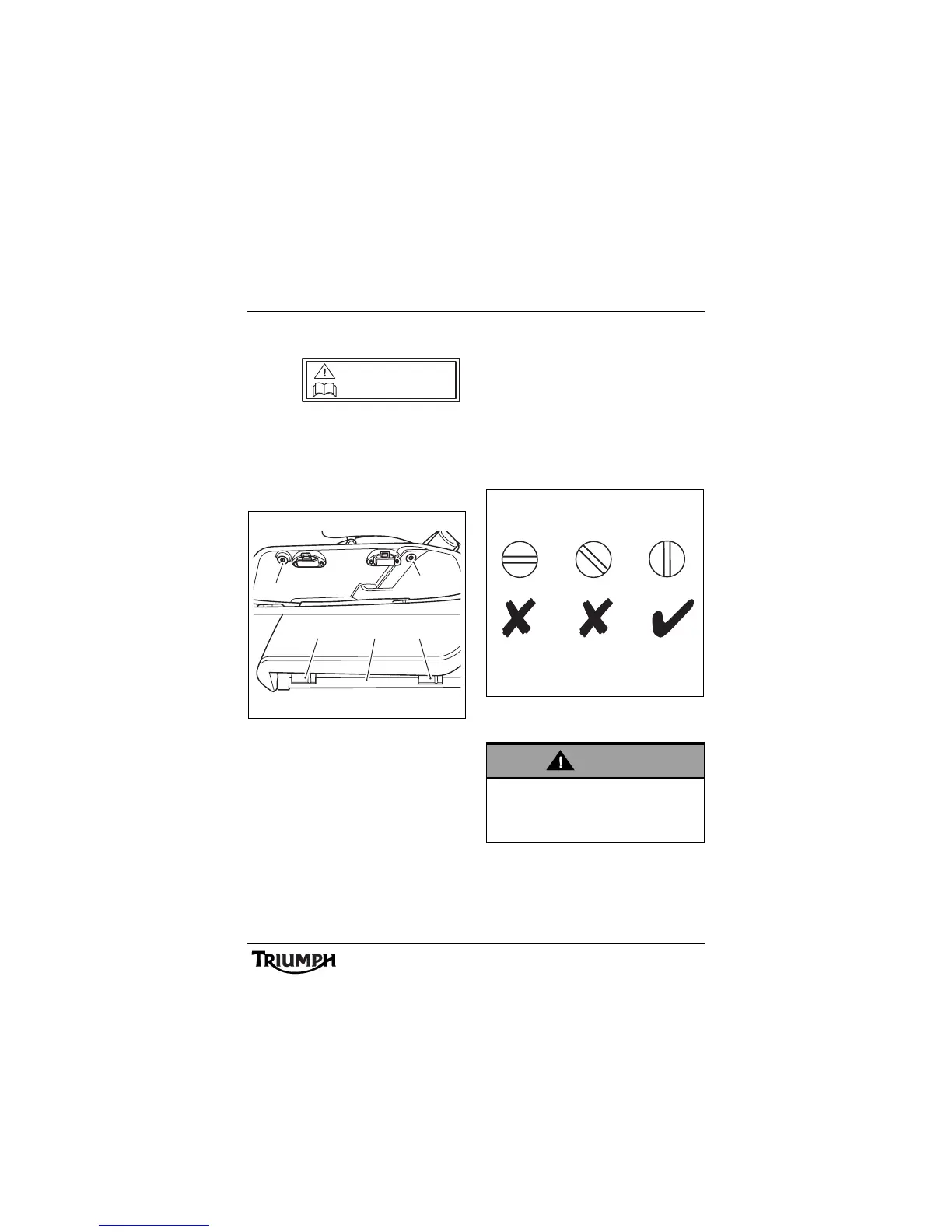
To remove the panniers
Note:
• The same procedure can be
followed to remove and mount the
left hand or the right hand pannier.
1. Quick release fixings
2. Pannier lower mountings
3. Pannier rail
To remove the pannier from the pannier rail,
open the lid of the pannier and turn the two
quick release fixings 90° anti-clockwise. Lift
the pannier free from the pannier rail.
To install the panniers
Position the pannier against the pannier rail.
Ensure that the pannier lower mountings are
correctly aligned with the pannier rail and the
quick release fixings are correctly located into
the pannier rail.
Lock the pannier to the rail by turning the
two quick release fixings 90° clockwise. The
slots in the fixings must be vertically aligned
to ensure that they are locked.
Pannier Quick Release Fixings
Correctly Locked
MAX LOAD
7 kg (15.4 lbs)
1
1
2
3 2
cens
Warning
Always ensure the panniers are secure and
the quick release fixings are locked. A
loose or detached pannier could cause loss
of motorcycle control and an accident.











 To Next Page