GENERAL INFORMATION
32
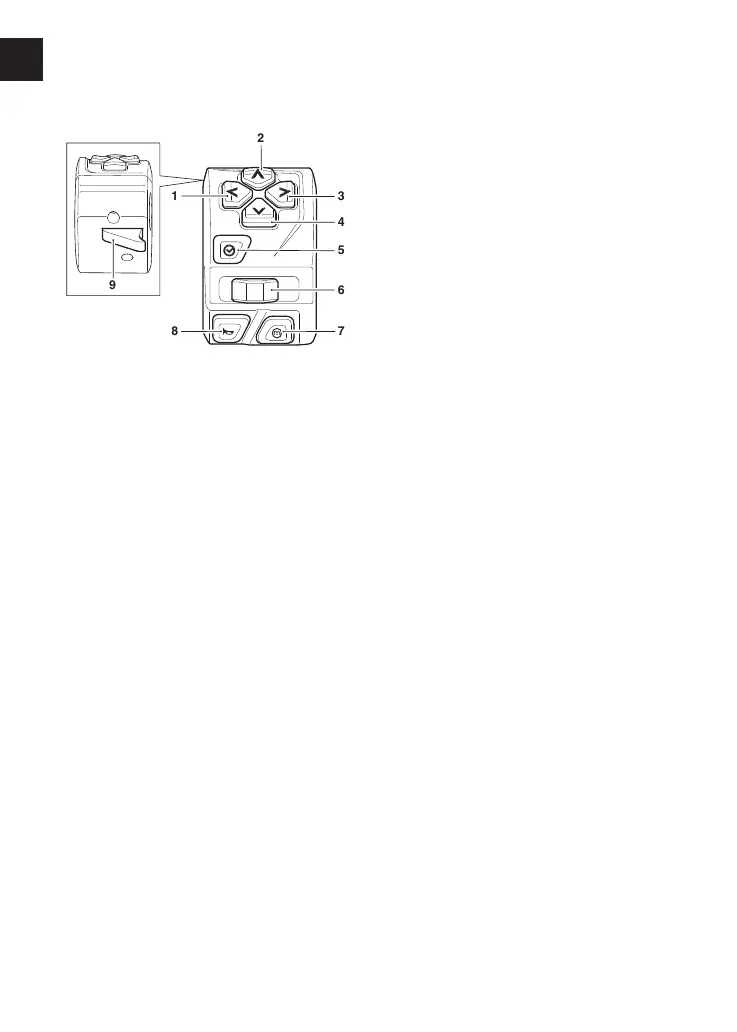
Left Handlebar Switches
1. Left button
2. Up button
3. Right button
4. Down button
5. Select button
6. Turn signal switch
7. Mode button
8. Horn button
9. High beam button
Navigation Buttons
The navigation buttons are used to
operate the following functions of the
instruments:
▼ Up - scroll the menu bottom to top
▼ Down - scroll the menu top to
bottom
▼ Left - scroll the menu to the left
▼ Right - scroll the menu to the right.
Turn Signal Switch
When the turn signal switch is pushed
to the left or right, the corresponding
turn signals will flash on and off.
The turn signals can be canceled
manually. To manually turn off the turn
signal, press and release the turn signal
switch in the central position.
Automatic self-canceling turn signals
can be activated in the Bike Set Up
function on the display, refer to
page52.
When in automatic self canceling mode
and the motorcycle stops for any
reason, then the turn signals will flash
for the remainder of the time and
distance unless manually canceled by
the rider.
Mode Button
When the Mode button is pressed and
released it will activate the riding mode
display. Further presses of the Mode
button will scroll through the available
riding modes (see page45).
Horn Button
When the horn button is pushed, with
the ignition switch turned on, the horn
will sound.












 To Next Page