P. 14 — User manual V3
Handlebar position
Make sure to fully understand how to use
and adjust a quick release lever before
setting the handlebar position. Failure
to properly use this mechanism can
result into the dismantling of the stem
assembly and lead to a loss of control
and serious injuries. Instructions on how
to use a quick release lever can be found
in the Maintenance and adjustment
section.
Never lift the stem above the minimum
insertion mark engraved on the lower
part of the stem. Lifting the stem above
this mark can result into the dismantling
of the stem assembly and lead to a loss
of control and serious injuries.
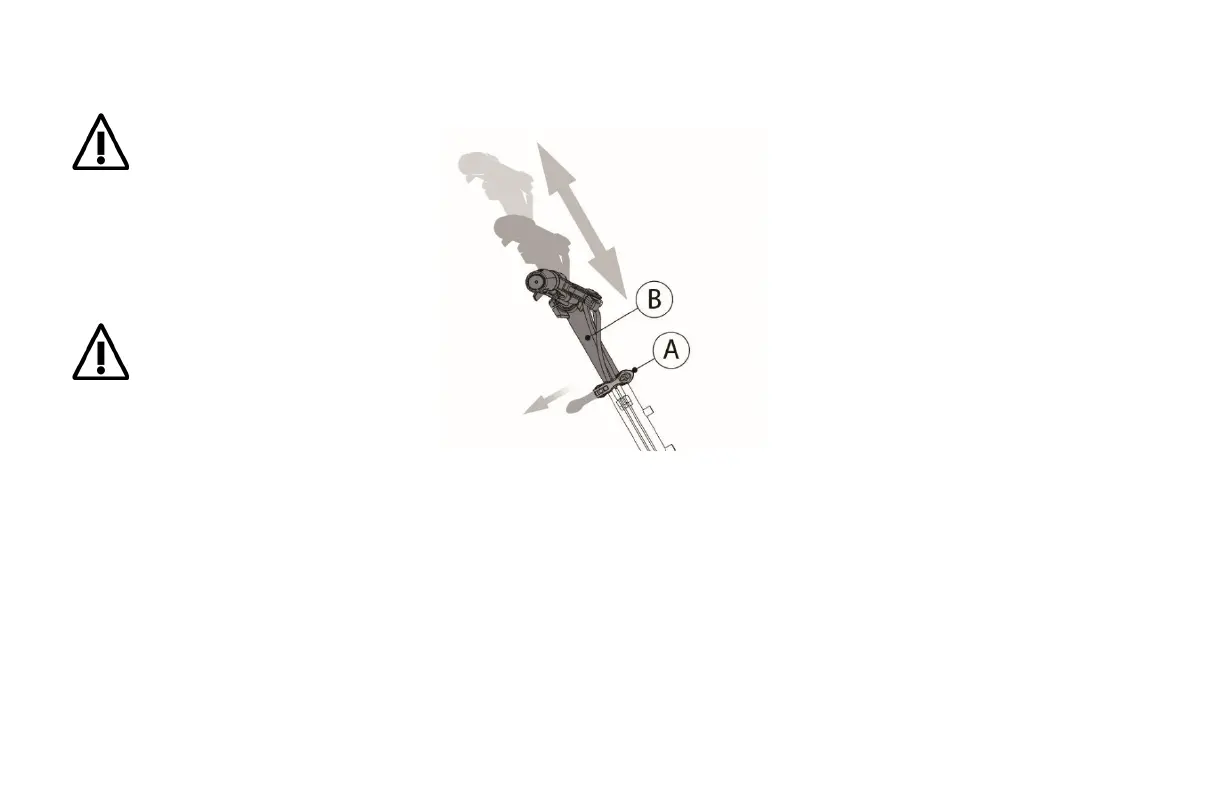
You can easily move the stem (B) up or down
using only the quick-release lever (A).
A) Quick release lever
B) Stem
The stem should be positioned so that the
user’s forearms are parallel to the ground
when holding the handlebars.
1.
Loosen the quick release lever (A) to
its open position to free the stem (B).
2. Adjust the stem to the height required
to meet the recommended arm
position.
3.
Check alignment of the handlebars
with the front wheel. Realign if not
perpendicular.
4.
Lock the quick release lever (A) back to
its closed position to lock the stem (B)
in its new position.



 To Next Page