P. 37
Turning the power assist system on
To activate the power assistance system,
press the power button on the control
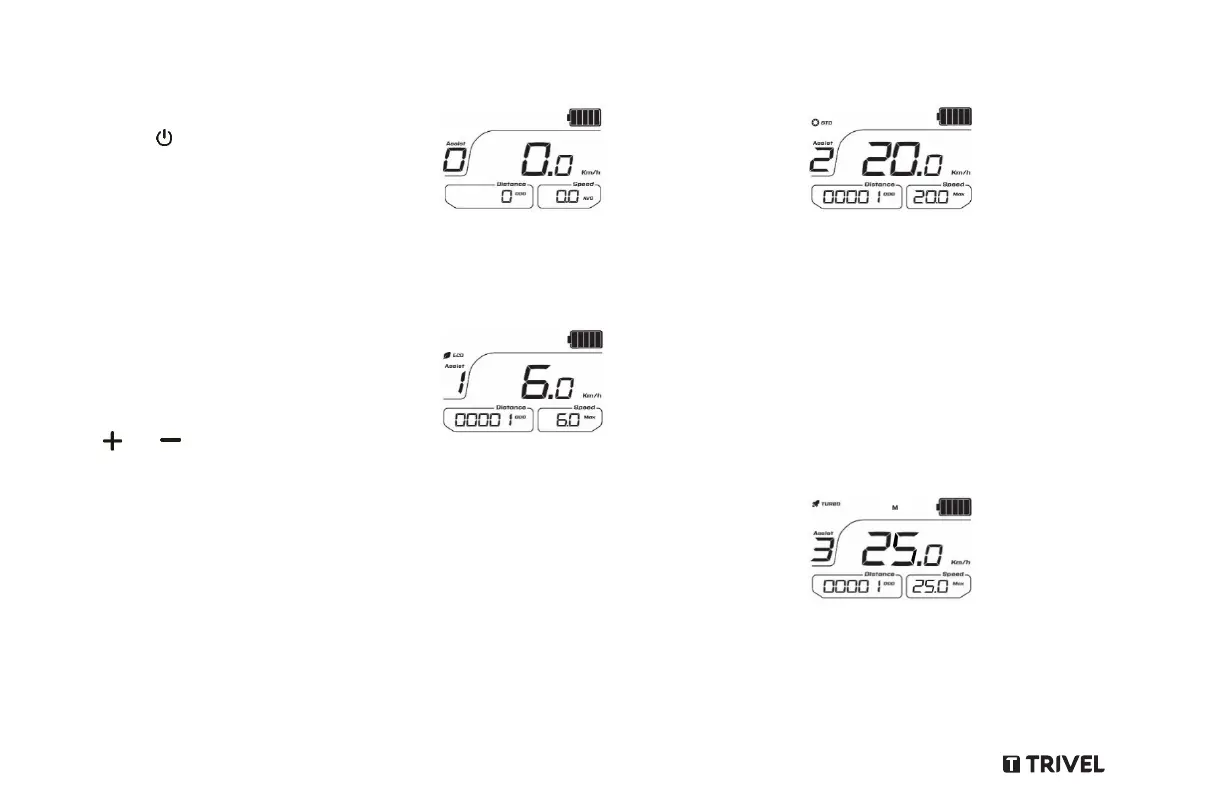
panel. The LCD Screen will light up and show
Assistance mode 0 by default.
Choosing a mode of assistance
The LCD Screen unit shows which mode
you’re in. Use a power assistance level
based on the riding conditions. Use a higher
assistance level when going uphill or against
a head wind, and to conserve battery charge
switch to a lower assistance level if you are
riding on a flat road or with a tail wind.
Switch through power assist levels using
the and buttons on the control panel.
Power assistance mode (5 levels)
Use this mode whenever you wish to benefit
from electrical power assistance, which
makes pedalling easier. Compared to the
No-pedalling mode, this mode gives you
longer range for the same charge.
Level 0
This is the mode when you pedal without
throttle or any power assistance.
Level 1
In ECO mode the motor gives you power
assistance up to 6 Km/h when pedalling.
Acceleration is set to smooth.
This mode is recommended for beginners
or people who like to cruise around at low
speed.
It is not recommended for riding up steep
inclines.
Level 2
This intermediate mode offers a smooth
power assistance up to 12 Km/h. This
means less effort for you if you are travelling
at a steady speed on a level road with a
headwind or slight incline.
This mode is recommended unless your ride
itinerary includes several steeper inclines
and requires more assistance from the
motor.
Level 3
This mode allows you to ride at a
maximum of 25km/h with minimal effort
with a very smooth acceleration curve.
Ideal for rides in all types of terrain.



 To Next Page