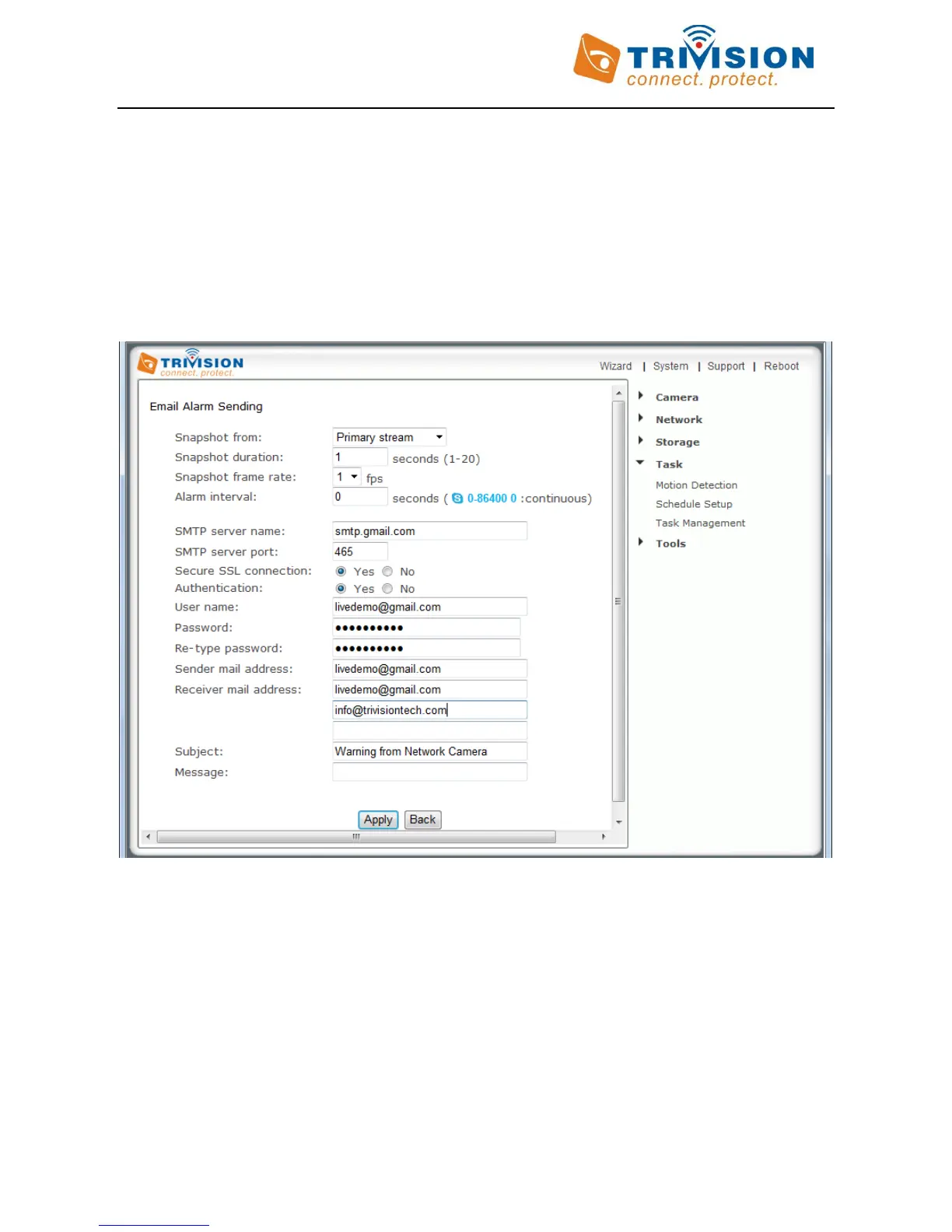
1. Email Alarm Sending/Email Periodic Sending
For automatic emailing you will need both an outgoing email server and one or more email receiving addresses. If
you don’t have this information handy you may want to refer to your internet service provider’s help pages or
your Microsoft Outlook or other email program account settings.
Following is an example of a proper configuration for using Gmail as the outbound server, which then can send
email to any receiving email address.
Note: Gmail requires that you go to your account settings on Gmail.com and enable the POP feature (Post Office
Protocol). If your Gmail account does not have POP enabled, the camera will not be able to send email.
1. “Snapshot from” can be “Primary stream” , “Secondary stream” and “ Mobile Stream” . For smaller pictures
you can select from “Secondary stream” or “Mobile Stream”.
2. “Snapshot Duration” and “Snapshot Frame Rate” (Frames per second) have the following meaning: When
motion detection is triggered, send pictures at the rate of “snapshot frame rate” frames per second for the
duration of “snapshot duration”. Here is an example:
If “Snapshot duration” had a value of 4 and “snapshot frame rate” had a value of 2, you would be getting 2
images each second for 4 seconds in a row, meaning 8 pictures total for each motion detection event.



 To Next Page