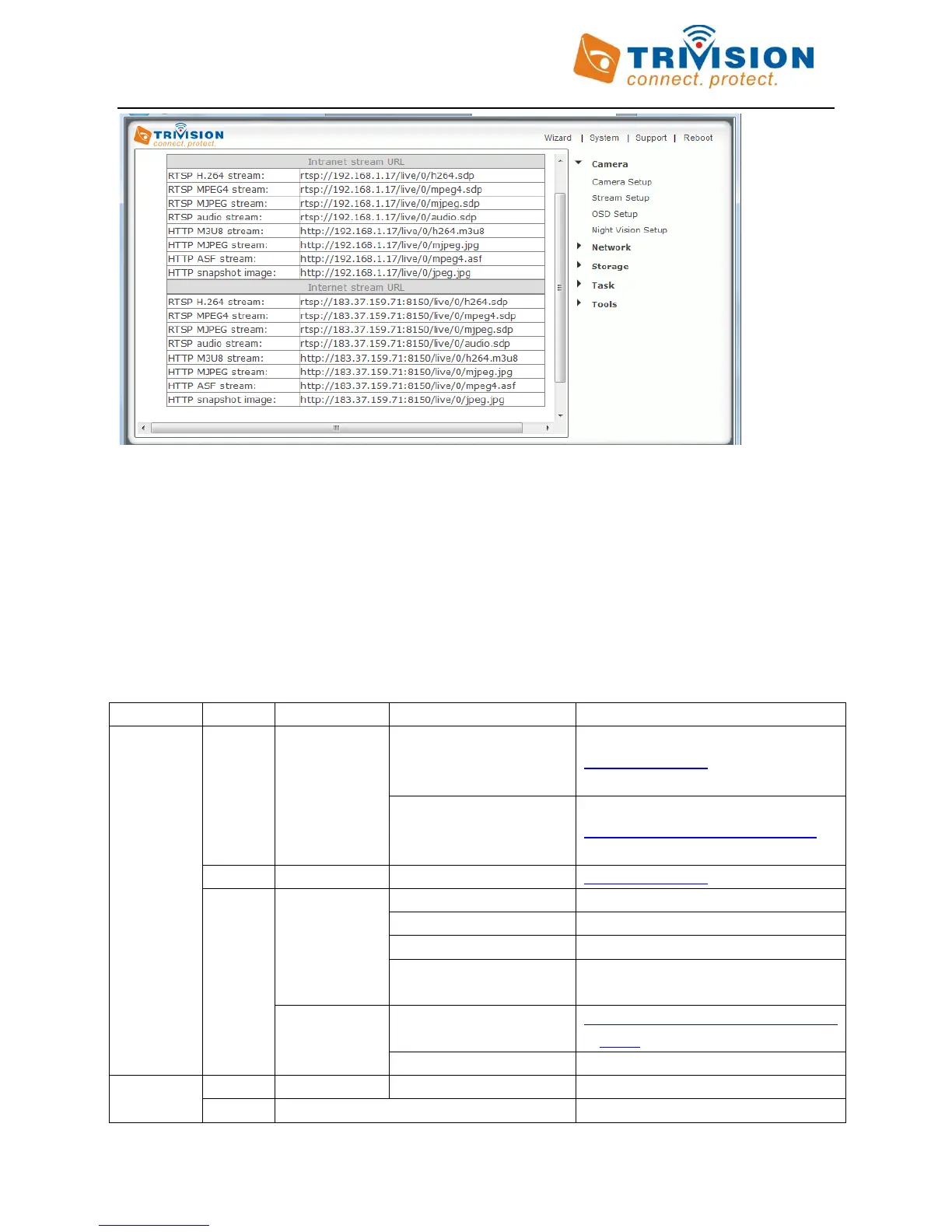
You will notice that some entries start with “RTSP”, instead of “HTTP”. This is not a typo.
RTSP steams can be opened by the “Open URL…” menu in Apple QuickTime 7.0 or later and “Open Network…”
menu in VLC 2.0 version on Macintosh or Windows desktop with audio and video.
A quick summary of the different video/audio stream supported on various OS, browsers and Media players
available formats:
RTSP H.264 stream
(Mac OS X 10.8, safari 6.0
later)
HTTP MJPEG stream
(Mac OS X 10.8, safari 6.0
before)
http://192.168.1.17/live/0/mjpeg.jpg
http://192.168.1.17 (video only)
rtsp://192.168.1.17/live/0/h264.sdp
rtsp://192.168.1.17/live/0/mpeg4.sdp
rtsp://192.168.1.17/live/0/mjpeg.sdp
rtsp://192.168.1.8/live/0/audio.sdp
(Audio only)
http://192.168.1.8/live/0/mjpeg.jpg
(Video only)
http://192.168.1.17/live/0/mpeg4.asf
http://192.168.1.17/live/0/h264.m3u8
Directly play with UID and password



 To Next Page