CHAPTER 4B: ESCALATE
15
OPERATION
Truefitness.com / 800.426.6570 / 636.272.7100 79
ADVANCED CONSOLE FUNCTIONS (continued):
Setup Menu:
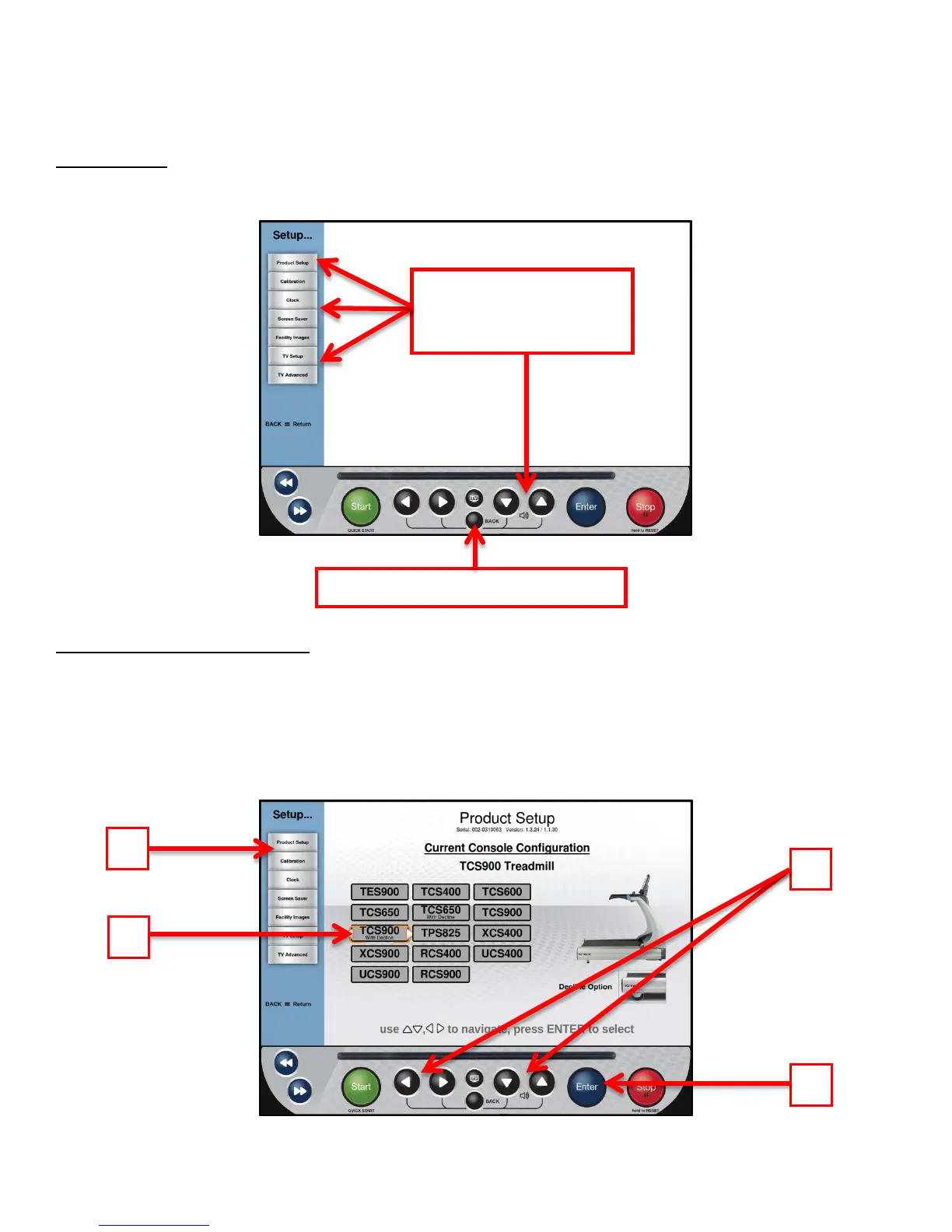
The setup menu is accessed by touching the Setup button on the main menu. The Setup Menu is separated into seven sub-
categories and allows to users configure the console and to set up various functions of the unit.
Setup Menu - Product Setup:
The Product Setup screen allows users to change the console configuration to match the unit on which it is installed. To
change the console configuration:
• From the Main Menu, select the Setup menu.
• From the Setup Menu, select Product Setup (A).
• Use the Selection Buttons (B) to select the correct model number (C).
• Press the Enter Button (D) to confirm the selection.
selected by using the
Up/Down Selection Buttons
Touch Back to return to the main menu



 To Next Page