CHAPTER 4B: ESCALATE
15
OPERATION
Truefitness.com / 800.426.6570 / 636.272.7100 86
ADVANCED CONSOLE FUNCTIONS (continued):
Setup Menu - TV Advanced:
The TV Advanced Menu allows users to fine tune their TV settings by adding channels, removing channels, and adding
channel logos.
Add a Channel:
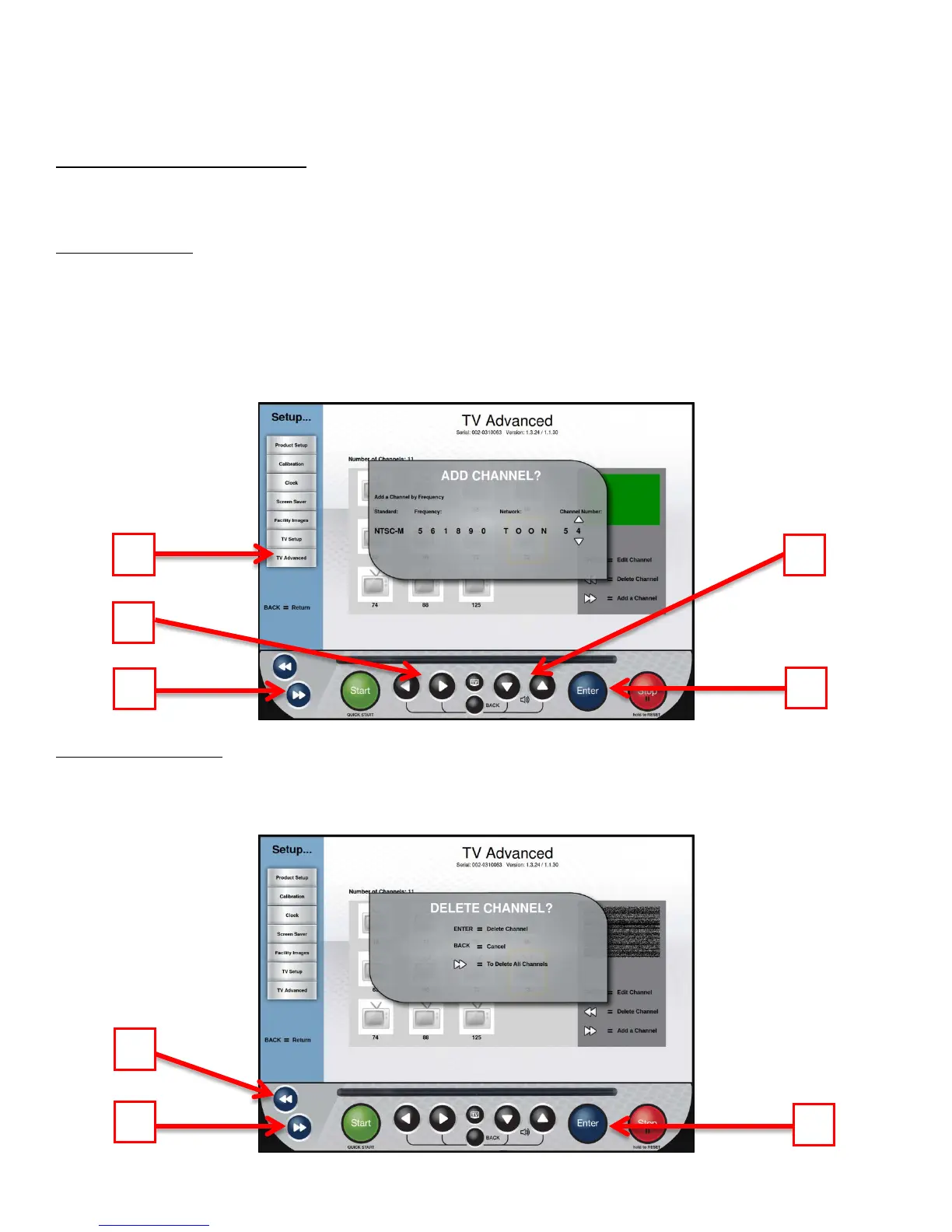
• Navigate to the TV Advanced Screen (A).
• Press the Forward Navigation Button (B) to access the Add Channel Screen.
• Use the Left Right Navigation Buttons(C) to select between the available values (Standard, Frequency, Network,
and Channel Number). *Channel frequencies must be obtained from your television service provider.
• Use the Up/Down Selection buttons (D) to adjust each value.
• Once all values are correct, press Enter (E) to save the channel
Deleting Channels:
• Highlight the channel to be deleted.
• Press the Back Navigation Button (A)
• Press Enter (B) to delete the selected channel or the forward navigation button (C) to delete all channels



 To Next Page