CHAPTER 4B: ESCALATE
15
OPERATION
Truefitness.com / 800.426.6570 / 636.272.7100 88
ADVANCED CONSOLE FUNCTIONS (continued):
Options Menu:
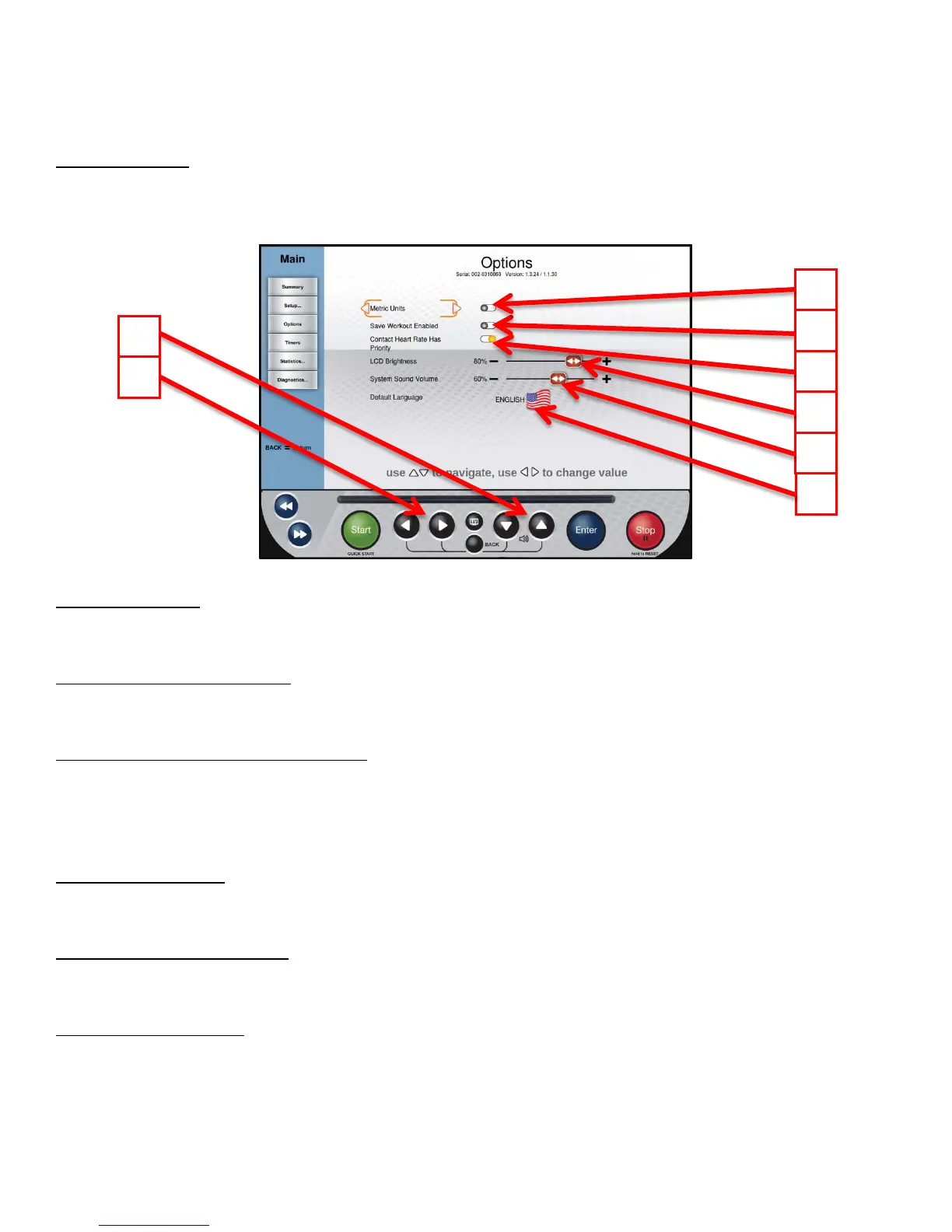
The Options menu allows users to customize settings on the console to meet their needs. Use the Up/Down Selection
Buttons (A) to select the desired option and the Left/Right Selection Buttons (B) to adjust the value.
*The settings in this menu save automatically.
C) Metric Units:
When enabled, the console will display all Metric units rather than American Standard.
D) Save Workout Enabled:
Turn on this feature to allow users to save custom workouts to the console.
E) Contact Heart Rate Has Priority:
When enabled, the console will attempt to read heart rate data from the contact heart rate grips before reading data from a
wireless chest strap.
*When this option is turned off, telemetry heart rate will take priority.
F) LCD Brightness:
Adjusts the brightness of the TFT display.
G) System Sound Volume:
Adjusts the volume of the notifications and beeps that come from the console.
H) Default Language:
Select a different language. Once a new default language has been selected, all menus, options and workout data will
appear in that language.



 To Next Page