Issue 1 – January 2020 Page 5
4. Always check that ALL rollers are fully engaged on to the tires of the RV before
removing the handbrake. This can be done visually by checking the yellow Roller
Position Indicator is in the correct position as shown below.
5. Always ensure that both sides have fully engaged before moving the RV.
DO NOT ATTEMPT TO MOVE THE RV UNTIL THE MOVER HAS FULLY PARKED I.E
ALL 4 GREEN LEDs HAVE STOPPED FLASHING.
Once the Rollers are engaged ONLY then disengage the handbrake when you are
ready to use the Powrtouch Freedom.
2.6 MOVING THE RV (HANDSET OPERATION)
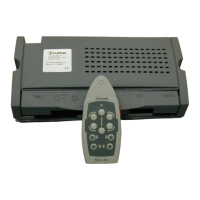
The RV can be moved as required by pressing buttons A, B, C, G, H or I. The RV will move in
the direction of the arrows printed on these buttons. Pressing opposite button A and I or C and
G will make single axle RVs (only) rotate on their axis. The Electronics Control System also
has a continuous movement capability in that if button B is being pressed then buttons A or C
can be used, alternatively if button H is pressed then buttons G or I can be used, using this
sequence will allow the Powrtouch to redirect the RV without stopping the forward or backward
motion.
Please note that the speed settings will always default to MAXIMUM – Speed
changes can only be made when the RV is stationary


 To Next Page
 Loading...