S1/S2 Assembly Instructions – Rev N Page 20
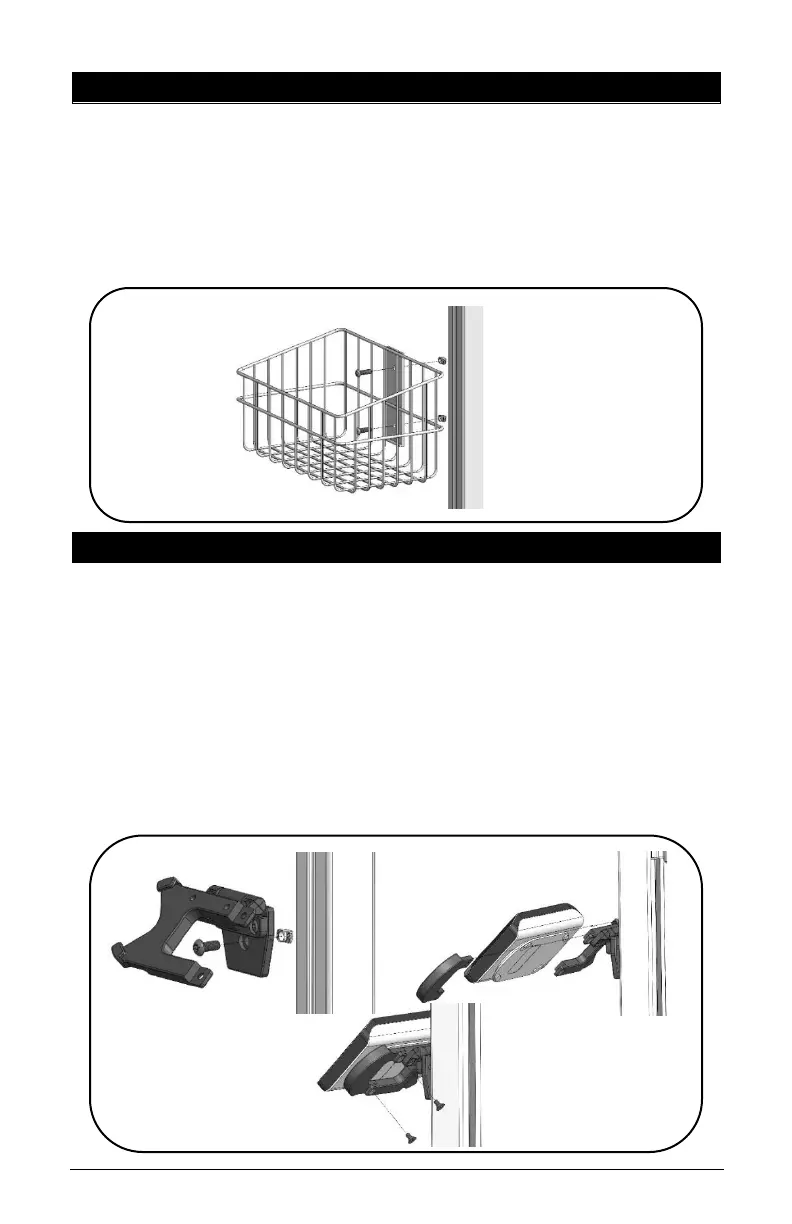
13. WIRE BASKET INSTALLATION
• Remove channel cover strip (ref. point 5).
• Loosen two (2) Z-Nuts but do not remove, place Z-Nuts
into the extrusion channel, move basket to desired height.
• Tighten wire basket to extrusion with two (2) screws and
two (2) Z-Nuts.
14. POLY SY20 SPEAKER INSTALLATION
• Remove channel cover strip (ref. point 5).
• Loosen T-Nut but do not remove, place T-Nut into the
extrusion channel, move bracket up or down to desired
height.
• Tighten bracket to extrusion with screw and T-Nut.
• Slide speaker back ridge into the fixed bracket, slide clamp
bracket onto speaker and align two (2) screw holes.
• Install and tighten two (2) screws.



 To Next Page