EasyManua.ls Logo

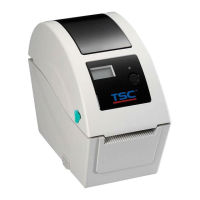
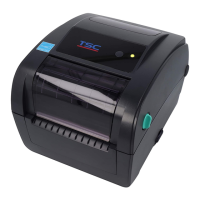
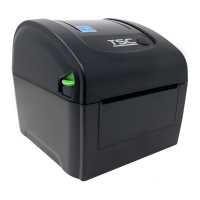
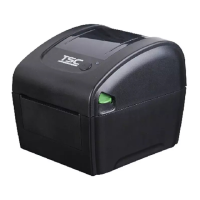
TSC XP-DT425B Series - User Manual

TSC XP-DT425B Series
40 pages
Print Icon
To Next Page IconTo Next Page
Loading...
DIRECT THERMAL
BARCODE PRINTER
USER’S MANUAL
XP-470B/ XP-450B/ XP-460B/
XP-DT425B Series
Direct Thermal Printer

Questions and Answers

  • S
    simsrobertAug 12, 2025
    Why is my TSC XP-DT425B Barcode Reader not printing?
    • T
      Trevor Curtis Jr.Aug 12, 2025
      There are several reasons why your TSC Barcode Reader might not be printing: * The interface cable might not be properly connected. Try reconnecting the cable to the interface. * The serial port cable pin configuration might not be pin to pin connected. Replace the cable with one that is pin to pin connected. * The serial port setting might not be consistent between the host and the printer. Reset the serial port setting. * The port specified in the Windows driver might be incorrect. Select the correct printer port in the driver. * The Ethernet IP, subnet mask, or gateway might not be configured properly. Configure the IP, subnet mask, and gateway.
  • M
    Marcus ChavezAug 16, 2025
    How to improve poor print quality on my TSC Barcode Reader?
    • J
      Janice BrownAug 16, 2025
      If you are experiencing poor print quality on your TSC Barcode Reader: * Ensure the top cover is completely closed and the levers on both sides are properly latched. * Check if the supply is loaded correctly; if not, reload it. * The media may be incompatible; try changing the label combination. * The print head may have accumulated dust or adhesives; clean the print head. * The print density may not be set properly; adjust the print density and print speed. * Run a printer self-test and check the print head test pattern for missing dots, which could indicate a damaged head element.
  • T
    Timothy RandallAug 19, 2025
    What to do if my TSC XP-DT425B Barcode Reader is continuously feeding labels?
    • G
      gregory62Aug 20, 2025
      If your TSC Barcode Reader is continuously feeding labels, the printer setting may be incorrect. Please initialize the printer and perform gap/black mark calibration.
  • T
    trevinomichaelAug 23, 2025
    Why is there no print on the label from my TSC XP-DT425B?
    • B
      bentonmelissaAug 23, 2025
      If there is no print on the label when using your TSC Barcode Reader, the label may not be loaded correctly. Please follow the instructions for loading the media.
  • T
    Timothy RossAug 27, 2025
    What to do if my TSC Barcode Reader shows an error?
    • H
      hermangregoryAug 27, 2025
      If your TSC Barcode Reader shows an error, it could be due to: * Being out of labels. Load a roll of labels and follow the instructions for loading the media, then press the FEED button to resume printing. * Incorrect printer settings. Initialize the printer by following the instructions in “Power on Utility” or “Diagnostic Tool”.
  • D
    Danielle WallaceAug 30, 2025
    What to do if my TSC Barcode Reader has a paper jam?
    • T
      Thomas LucasAug 30, 2025
      If your TSC Barcode Reader has a paper jam: * The gap/black mark sensor sensitivity may not be set properly. Calibrate the gap/black mark sensor. * The label size may not be set correctly. Set the label size exactly as the installed paper in the labeling software or program. * Labels may be stuck inside the printer mechanism near the sensor area. Remove the stuck label.
  • Z
    zachary91Sep 3, 2025
    Why is my TSC Barcode Reader not responding?
    • M
      Mary RobertsSep 3, 2025
      If your TSC Barcode Reader is not responding, it may be due to: * No power. Turn on the power switch. * A broken power supply. Check if the green LED is lit on the power supply. If it is not lit, the power supply is broken. * Loose power connections. Check both power connections from the power cord to the power supply and from the power supply to the printer power jack to ensure they are securely connected.
  • Q
    qjonesSep 7, 2025
    What does it mean when my TSC XP-DT425B is paused?
    • K
      kathrynlaneSep 7, 2025
      If your TSC Barcode Reader is paused, it means that the printer is paused. Press the FEED button to resume printing.

TSC XP-DT425B Series Specifications

General IconGeneral
Print MethodThermal Transfer & Direct Thermal
Max Print Width4.25 inches (108 mm)
Resolution203 dpi (8 dots/mm)
ConnectivityUSB 2.0
Operating System CompatibilityWindows
Label Length0.39 inches (10 mm) to 39.37 inches (1000 mm)
Processor32-bit RISC Processor
Supported Barcode Types1D Barcodes: Code 39, Code 128, UPC-A, UPC-E, EAN-8, EAN-13 | 2D Barcodes: QR Code, Data Matrix, PDF417, MaxiCode

Related product manuals