FIG. B
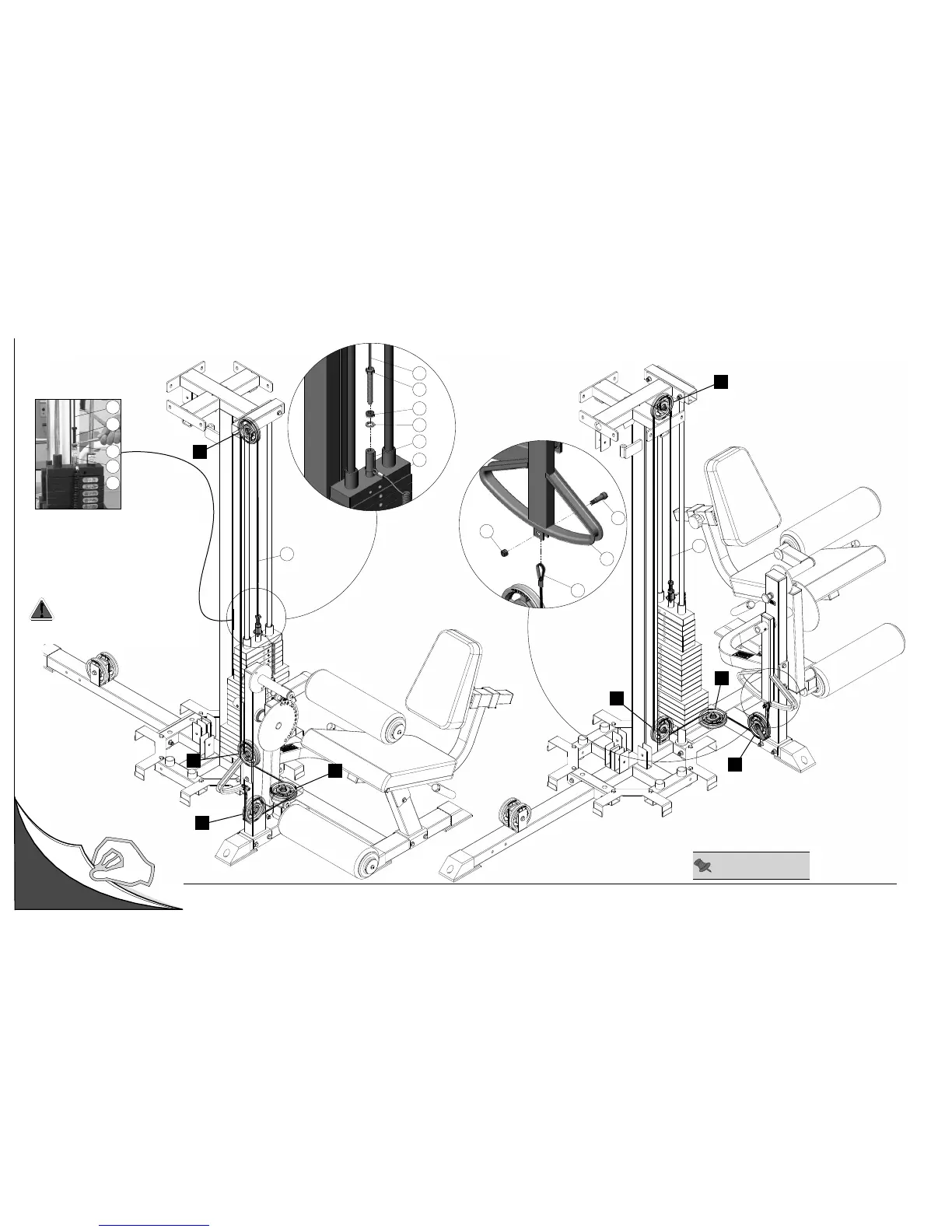
Cable Mapping Diagram Leg Developer Station
FIG. A
26
144
1
120
26
151
88
153
58
31
C1
C2
C3
C4
C4
C3
C2
C1
26
26
Left Side View Right Side View
26
31
58
151
88
Cable Adjustment
1. Loosen the Finished Hex Nut 1/2-13 (#88).
2. Thread the Cable Hex Tap Bolt (#151) in
or out of the threaded socket of the Selector
Bar (#58) to give the Cable proper tension.
3. Re-tighten the Finished Hex Nut 1/2-13 (#88)
to complete the adjustment.
Caution: Make sure the Cable Hex Tap
Bolt (#151) is threaded at least 1/2” into
the threaded socket of the Selector Bar
(#58) once the cable adjustment has
been completed.
Unfold
Page
Note: Some parts have
been cut away for clarity.












 To Next Page